

- Overview
- Transcript
3.1 Understanding GraphQL
Now that we have some data to work with, let's briefly go over what GraphQL is and how it differs from RESTful APIs.
1.Introduction
1.1Introduction01:31
2.First Steps
2.1Setting Up the Project05:29
2.2Designing and Migrating the Database10:06
2.3Setting Up the Models10:48
3.Building and Querying a GraphQL API
3.1Understanding GraphQL09:42
3.2Creating and Querying Our API08:17
4.Building the Client Application
4.1Assembling the UI07:17
4.2Querying the API With JavaScript11:26
4.3Adding Arguments to Your Queries11:28
4.4Organizing Our Client-Side Queries07:53
4.5Defining Other GraphQL Types08:53
4.6Displaying Our New Data09:44
5.Incorporating Authentication
5.1Building the Login View09:42
5.2The Login Mutation11:37
5.3Authenticating the API09:17
5.4Incorporating Authentication on the Client Side09:04
5.5Displaying Auth-Appropriate Menus07:59
5.6User Registration09:33
6.Working With Complex Data
6.1Building the Project Creation UI08:31
6.2Getting a List of Users03:54
6.3Defining Input Types12:33
6.4Saving the Project09:52
7.Conclusion
7.1Conclusion01:00
3.1 Understanding GraphQL
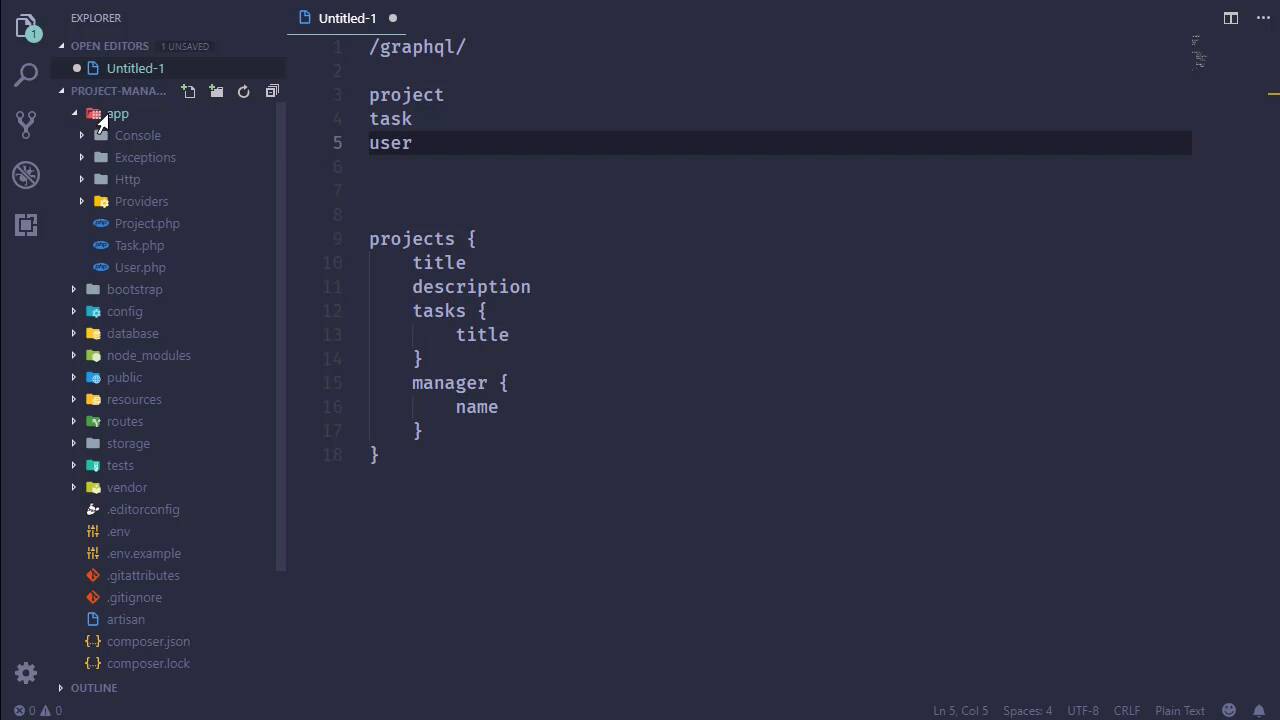
In this lesson, we are going to finally start talking about GraphQL, because we're going to start working on the frontend. And the frontend is going to interact with our web API, which is of course, powered by GraphQL. So it just kind of makes sense there. So to start, I'm going to call npm install to start installing all of our client stuff. And while that is working, we need to talk about a few things about GraphQL. So GraphQL is very different from a RESTful API, because we have just a single endpoint. So a RESTful API would have something like projects and then have the ID. And the same for tasks and ID and so on and so forth. And then we would make different types of requests. So if we wanted to retrieve a project or a task or something, we would use a GET request. So if we wanted to pull in projects and then the first project, and we would do that. And depending upon how we defined or designed our API, we might also have to get the other individual pieces of that project. But then if we wanted to make any modifications, like if we wanted to create a project, we would issue a POST request to projects. And if we wanted to update something, we would PUT and then DELETE. Well, that's the RESTful way of doing things. With GraphQL, we have just a single endpoint. And then we make queries for the information that we want. So our endpoints will be graphql, and then we would issue a query. So let's say that wanted to retrieve all of our projects, so we would say, hey, I want all of our projects. But that's not enough, we also need to specify any extra information that we want. So it's not going to give us everything right off the bat, and that's the beautiful thing about GraphQL, because it allows us to pick and choose the information that we need. For example, if we are going to be showing a dashboard that has just a listing of all of the projects, we would make a request for our projects. And we would need the title for each of those projects. We might want the description for those projects. And we wouldn't necessarily need to pull in all of the users in that case. But we might want to show some information about the tasks that we have. And we also might want to include the manager as well. So the query that we end up sending essentially looks like this. We have our projects query. And we are requesting the title, the description, the tasks and the manager. And that's going to pull back all of our projects with that information. Now, some of these are more complex than just a simple value like a string or an integer or something like that. For example, tasks, that would be an array of tasks, which have their own properties. So we could then turn around and say, okay, for our tasks, really we just need something that would allow us to get a count of all of the tasks. So we could say that, okay, give us the titles of all of the tasks. As far as the manager is concerned, we don't really need the email or anything like that, but we would need the name of the manager. So for displaying a dashboard, our query would look something like this. Give us our projects, and we want the title, the description. We want the tasks, but only give us the title of those tasks. And give us the manager, but only the name. And this allows us to request only the data that we need. As opposed to getting, well, basically everything involved with a project and all of its other pieces of information. So in order for this to work, we essentially have to create some types so that GraphQL knows how to work with all of this stuff. So we are going to create three types. We're going to create a project, which is pretty much going to mirror our project model. The same is true for our task and for our user, as well. But we don't necessarily have to mirror our model as well. If there's other types of computational things that we want to do, we can include those as well. I mean, it doesn't have to be a straight up clone of our model, but in this case, it pretty much is. So what we are going to do is create a type for our project. I'm going to put this inside of the app folder. I'm going to create a new folder called GraphQL. And then inside of here, I'm going to create a new folder called Types. Then we will also define our queries, because it's not enough to just create our types. We have to create a query on the backend so that our frontend can use that query. So we have our Types folder, let's create a new file. We're going to call it ProjectTypes.php. And we're going to start with the namespace, App\GraphQL\Types. And since this is going to be working with our project, let's go ahead and put in our project model. We need to use GraphQL. We also need to use GraphQL\Type\Definition\Type, that's rather redundant. And then we want to use Rebing, or Rebing, I wish I knew how to pronounce that, cuz I'm definitely doing it wrong. GraphQL\Support\Type as GraphQLType. So it's quite a bit of typing, but that's okay. Now we're going to create the class, we're gonna call it ProjectType, that is going to extend GraphQLType. And then we just define our schema. So the first thing we need is an array called attributes, or rather, $attributes. And this just contains some metadata about this particular type. Like, for example, the name will be Project. Then we'll have a description, which will be, A project. I mean, I don't know what else to put for the description there. But then we need to specify the model here. And our model is, of course, our Project::class. So we have our attributes, the next thing we need to define are the fields of this type. We do that with a public function called fields. And we are going to return an array that defines the fields. Now, it's a little bit more involved than just a name and value. We have the name of our field, followed by an array that contains different pieces of information about this particular field. Like for us, all that we need to do is specify the type here. So we're going to say that the id is a nonNull field. And then we specify the type of information. So in this case, it is simply an integer. And then we do this for all of the fields that our project type is going to need. So we'll have the id, we'll have the title, the description, the manager and the tasks. So let's change those names so that I don't get confused as to what is what. So we'll have our manager, then, and then tasks. Now, our title is not an int, that is a string, so let's change that. The same is true for the description. So we will change that as well. The manager is actually going to be a user. So you know what? Let's comment out our manager and our tasks, because we need to create other types to represent those. So for right now, we'll just have our id, title and description. Now, we can also provide a description for these fields if we wanted to. So we would add a description key. And then as far as the id is concerned, we could say, The project's ID. And we could do that for every field if we wanted to. And in a real application, if we are providing an API, then the argument could be made that, well, we need to provide a description. But in this particular case, we're not. That's just a choice on my part, [LAUGH] because I'm lazy. [LAUGH] And so now that we have this project type, we need to tell GraphQL that we have this type and it's readily available for our queries. So we need to go to the config folder. We need to open up the graphql.php, and we need to scroll on down to the types section. And you can see essentially what we need to do. We need to define the name, which in this case it's going to be project. And then what that type is, that was App\GraphQL\Types\ProjectType, and there we go. So every other type that we create, we're going to add here inside of our types. But a type by itself is really useless. What we want to do is create a query so that we can use that query from the frontend. And we will do that in the next lesson.


