

- Overview
- Transcript
5.3 Authenticating the API
In addition to traditional authentication, we need to authenticate our API requests. We'll do that in this lesson.
1.Introduction
1.1Introduction01:31
2.First Steps
2.1Setting Up the Project05:29
2.2Designing and Migrating the Database10:06
2.3Setting Up the Models10:48
3.Building and Querying a GraphQL API
3.1Understanding GraphQL09:42
3.2Creating and Querying Our API08:17
4.Building the Client Application
4.1Assembling the UI07:17
4.2Querying the API With JavaScript11:26
4.3Adding Arguments to Your Queries11:28
4.4Organizing Our Client-Side Queries07:53
4.5Defining Other GraphQL Types08:53
4.6Displaying Our New Data09:44
5.Incorporating Authentication
5.1Building the Login View09:42
5.2The Login Mutation11:37
5.3Authenticating the API09:17
5.4Incorporating Authentication on the Client Side09:04
5.5Displaying Auth-Appropriate Menus07:59
5.6User Registration09:33
6.Working With Complex Data
6.1Building the Project Creation UI08:31
6.2Getting a List of Users03:54
6.3Defining Input Types12:33
6.4Saving the Project09:52
7.Conclusion
7.1Conclusion01:00
5.3 Authenticating the API
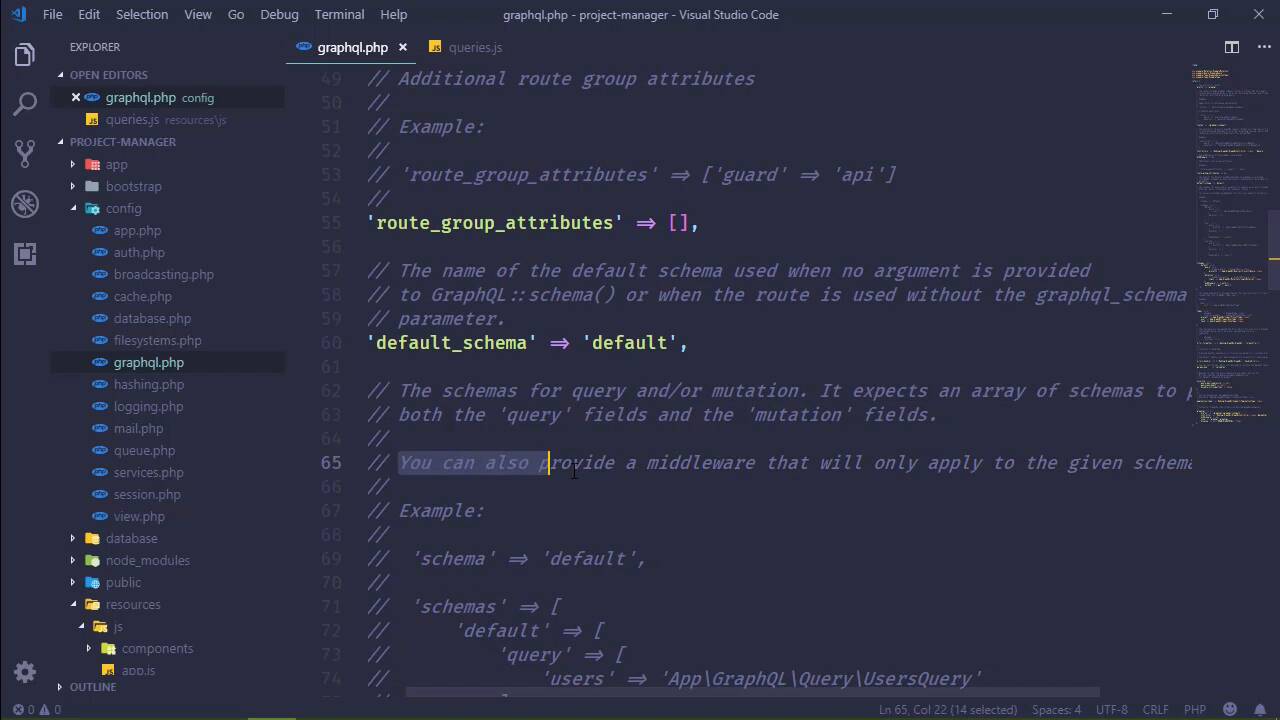
In the previous lesson, we implemented the login mutation so that we can login using traditional means, with an email address and a password. And we saw that it worked. After we logged in, it gave us the API token that we stored in our session storage, so we can authenticate in that way. But we also need to authenticate each of our API requests because not everyone needs access to the individual project pages, as well as the dashboard. In fact, these things should only be available to the people that has access to them. So we need to protect our API requests, and that's really easy to do. We need to go to our config And go to the graphql config, and we want our schemas. Now we're gonna talk about schemas here in a few moments. But let's look at this, we have defined all of our queries, all of our mutations, all two of them right here in this default schema and, hello, there's this middleware. So we can specify middleware that's going to be applied to all of the queries and all of the mutations in our default schema. So I'll write auth, there we go. So if we go back to the browser and we refresh the page, well, we still see the headings of our table but that's because that's part of the view component, that's not the data, and we are missing the data. So we have just protected our API. But we, of course, want to see this if we have an API token, which we do. So let's go to our queries .js file. And let's use our token with our request. So right here where we have had that comment let's try to get a token from sessionStorage. So we will call get item, and that was called api-token. Then, we will check to see if we have a token, because if we do, we want to include it with our request. So we will say options.headers, and we will add an Authorization header, and that is simply going to be Bearer, and then token. There we go, that should work. So lets' go back to the browser, let's refresh the page, and now that our token is being supplied with the request, we get nothing. Now I didn't expect that. We probably have an error somewhere, so let's look and see. Module build failed. Expected token. So where was that? Semicolon. I have a bad habit of putting a semicolon where I'm not supposed to. So let's fix that. Let's refresh. And then, we will see our data. So our API is being protected, and the API guard is doing its job. It's using the API token to authenticate our request. But let's do this. Let's delete our API token. Let's refresh the page. Of course, we're not going to see the data here, so let's log in. And we're going to run into an issue. Of course we see our Login form because that is part of the view component. But let's try to log in, admin@local, and then password. Let's go to the console first of all. Let's click Login. And we are unauthorized. That is because we set the auth middleware for our default schema, and it is being applied to every query and every mutation in this schema. That's obviously not what we want, because there are some things that everyone should have access to or at least guests should have access to, and Login is one of them. So this is where we can define another schema. But what exactly is the schema? Well, if you read the comments It's not really gonna tell you, it says the schemas for query and or mutation. It expects an array of schemas to provide both the query fields and the mutation fields. You can also provide a middleware that will only apply to the given schema. Now that last sentence is very Important. You can also provide a middleware that will only apply to the given schema. So if we create another schema, one for guests, then the middleware that we applied to the default schema is not going to apply to that guest schema unless if we explicitly say so. But, again, what is a schema? Well a schema is a way that you can segment your API. So let's say that you have an admin section. Well, it would makes sense to segment that admin section so that you can apply admin like middleware to those queries and those mutations. So you could come in here and you can add an admin segment or an admin schema to find the queries and mutations that would be used for that admin section and then apply the middleware to it. The same would be true for a user profile or, in our case, a guest segment. So what we are going to do then is create another schema, all we have to do this at another entry in the schemas array. Let's copy our mutation here. And then let's delete the login mutation from the default schema. And because we haven't specified anything for middleware, then no middleware, or at least no auth middleware is going to be applied to our guests schema. But then the question is, okay, how do we access this guest schema? Well, it simply adds another segment to our API URL. So that is currently graphql. Well, by specifying the guest schema, we simply add /guest, it's just adding another segment to that URL. Now this poses a slight, little problem, because our JavaScript is only making requests to graphql. So we need to change it so that it will take into account this guest segment. So let's do this, let's create a variable, called guestQueries. I don't really want use queries but I can't really think of anything else to use right now, because it could be queries or mutations. So we will add login here. And if there were any other queries, or mutations that needed just guest access, we could include that here. And then we will have a function. And we can call it getAPIUrl where we accept a query name and then we check to see if this query name is inside of this array. And we could do that very easily using the sum method. So if the queryName is equal to whatever we are checking inside of the guestQueries array, then we of course have a guest url. So we could do this, let segment = ' '. If we have a guest request then we will set segment = '/guest'. And then at the end we will return and we will say /graphql, and then we would incorporate the segment there. So then inside of our query method instead of hard coding our url, we will call getApiUrl, we will pass in the queryName, and that should work. Should. Let's give it a whirl. Let's refresh the page and let's attempt to login. So admin@local, password, and hopefully it logs us in. It does, otherwise we would have gotten another 401. And because we now have an API token we can access everything that is on the default schema. And, of course, if we delete this API key, and we refresh the page, then we of course, don't see the data. But that is a user experience problem. Normally, if we don't have access to something, it should redirect us to the log in page. Otherwise, we would of course should see a normal project page. So that is something that we can implement in the next lesson.


