

- Overview
- Transcript
4.5 Defining Other GraphQL Types
We need a functional app, so it makes sense to define our other GraphQL types so that we can properly query them.
1.Introduction
1.1Introduction01:31
2.First Steps
2.1Setting Up the Project05:29
2.2Designing and Migrating the Database10:06
2.3Setting Up the Models10:48
3.Building and Querying a GraphQL API
3.1Understanding GraphQL09:42
3.2Creating and Querying Our API08:17
4.Building the Client Application
4.1Assembling the UI07:17
4.2Querying the API With JavaScript11:26
4.3Adding Arguments to Your Queries11:28
4.4Organizing Our Client-Side Queries07:53
4.5Defining Other GraphQL Types08:53
4.6Displaying Our New Data09:44
5.Incorporating Authentication
5.1Building the Login View09:42
5.2The Login Mutation11:37
5.3Authenticating the API09:17
5.4Incorporating Authentication on the Client Side09:04
5.5Displaying Auth-Appropriate Menus07:59
5.6User Registration09:33
6.Working With Complex Data
6.1Building the Project Creation UI08:31
6.2Getting a List of Users03:54
6.3Defining Input Types12:33
6.4Saving the Project09:52
7.Conclusion
7.1Conclusion01:00
4.5 Defining Other GraphQL Types
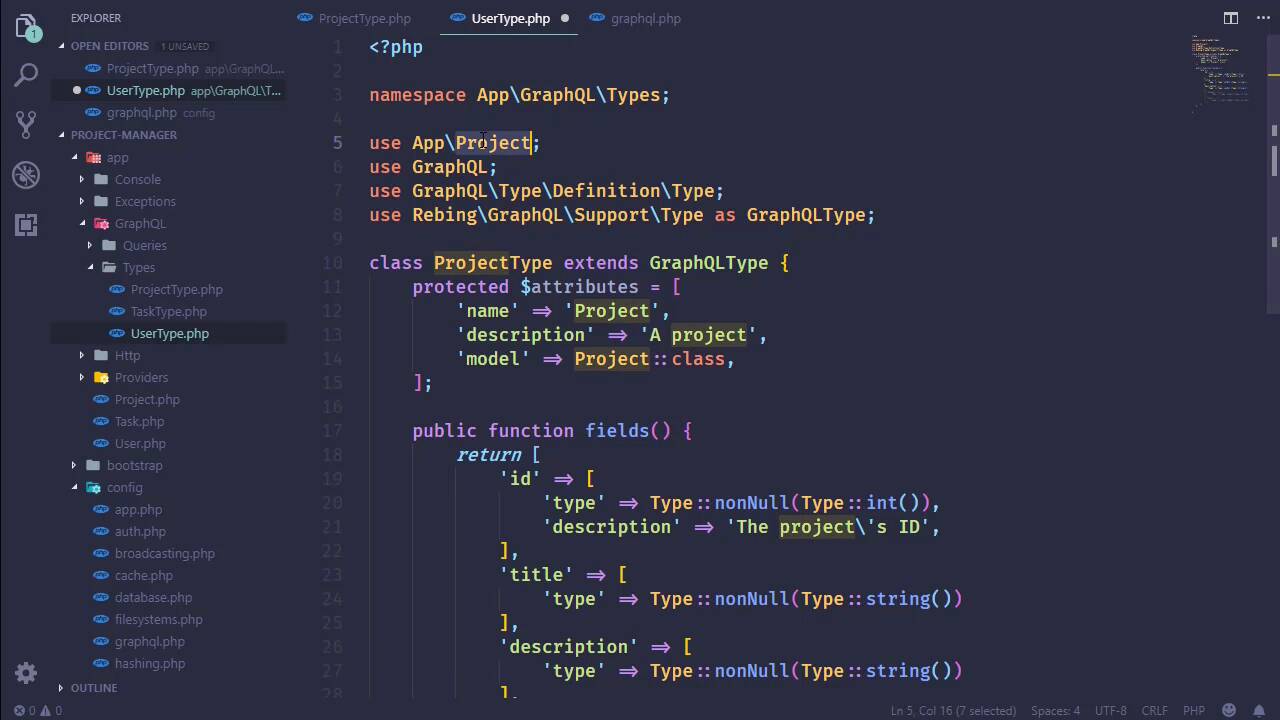
In this lesson, we're going to finish defining the project type as well as create the task and user types. Because it's about time that we do that so that we can write a working application. So let's go to the GraphQL folder and Types. Let's open up ProjectType because we want to use this as a basis for our others because we don't want to to keep typing the same things over and over and over again. So let's create a new file and let's start with the task type. So let's paste in that code. We, of course, need to change the model that we are using. So that is going to be Task. And then we need to change the class to TaskType. The model to task, let's change the name to Task and then description is going to be a task. Now as far as the fields are concerned, we have ID, title and description. So all of those are ready to go. However, we do want to be able to refer to the project that this task belongs to, as well as the user that was assigned to it and the status code. So let's start with the status code. And let's just copy what we have for description here. And we will change that to statusCode. Now notice the casing here. I'm using camel case because in the database It is status_code. Now the reason why I'm choosing to go with camel casing here is because this is going to be consumed, well in our case, by a JavaScript client. And as we make requests for different queries, I want the result set coming back to, well look like JavaScript. So I'm using camel casing here. Now this is going to cause a problem because Eloquent and GraphQL is not going to understand that statusCode, which is camel cased, is the same thing as status_code. So we're going to have to write a resolver in order to make that work, but that's not that big a deal. Now as far as the type, it is a non-null string so we don't need to do anything there. So now let's have the project that this is going to be part of. So the field will be project. The type is going to be a little bit different. It will still be a nonNull, but instead of using the type class here, we are going to say GraphQL, and this has a method called type. And then were going to pass in the name of the type that we want to use here which is project. Now this matches what we have used inside the config. So if we look at the GraphQL config and we define the types, it is this project type here. So It's important that those things match. Now, the other field is the user, which we don't have that type, but we can go ahead and implement it. Because it's a lot like the project except that the name is user, the type is going to be user here. And as far as our fields are concerned, that's it. So now we just need to write the resolver for the status code. And this is very simple. We want to write a protected method, and it needs to be named like this, resolve, and then the name of the field, StatusCode, and then the word, Field. So it's going to automatically resolve the status code by calling this method and there are two things past to it. The root and the args. Now those are the same names as the arguments that are passed to the resolve method for our queries. And it's kind of the same thing. So the root, in this case is actually our model object. So in order to resolve the status code which is camel cased, we just want to get the status code from our model. And that's it. Pretty easy. And that's all that we have to do for our task. So let's close that, and let's create a new file. And this will be our UserType. And once again, we will copy what we have for project type and use that for our user. We need to change the model, so there's that. The class name is going to be UserType. The name is User, the description, A user, the model is Use::class. And as far as the fields are concerned, It's going to be very easy. We have id, of course, we have email and then we have name. And of course those two fields are strings. Now here's one decision that we need to make. We have our API key, do we want to include that as something that we can query from our API? And I'm going to make the argument that no, that is not because that's highly sensitive information. Really the only time that we should be returning the API token is whenever we log in. So whenever we log in, the API should provide our client with the API tokens so that we can use that to make her requests. And yeah, I think that that's what we should do. So if we need to make that change later to where we want to return the API token here within our user type, then we can do that. But for right now, we're going to err on the side of caution and not. So now that we have those two types, all we have to do is finish our project type. So we will begin with our manager and our manager is a user. So we're going to say type nonNull, but just like what we did inside of task where we said GraphQL, and then we used the type method. We're doing the same thing here. So anytime that we are referring to our own custom GraphQL type we need to use the GraphQL class. And that gives us our manager, our tasks, it's going to be a little bit different. Now if we look at this we can see that's type is nonNull, which that could be true. But that is more representative of a single piece of information like a string or an integer or something like that. What we want to do is specify that our tasks is actually a collection of things. And so we're going to use that list of, just like what we used inside of the query by the return type. We said that this was a list of our projects. Well our tasks is going to be a list of our tasks. So we will change that to refer to our task type. And then we can also do the same thing for our users as well. So let's go ahead and do the same thing. That is going to be a list of, but in this case it's going to be our user type. And with that we should be able to query just about anything that we need about our projects. So we do need to go to our GraphQL config and we do need to set up those types, so we will have our user type. Then we will have our task type. And of course we need to change these classes. And then I just want to make sure that everything is working. So we're gonna go to the browser and see that this refreshes. Because if we've made any syntax error, as far as the PHP is concerned then, well something would go wrong and it looks like something did. So let's look at the console and we get a 500. So let's look at the network, I didn't see anything there. So let's do a refresh. And then we will see what we have. So the task type is not found. Well, we just set that up, didn't we? Yeah, we have. Lowercase t. That's kind of important. So let's refresh once again, hopefully, we will see our project manager development stuff. And we do. And that's great, because in the next lesson, we will be able to query all the stuff that we need, not just the title and the description. But we can also get all of the tasks. We can see the status of those tasks. And then we will be on our way to having a fully functional application.


