
 Lessons: 67Length: 8.9 hours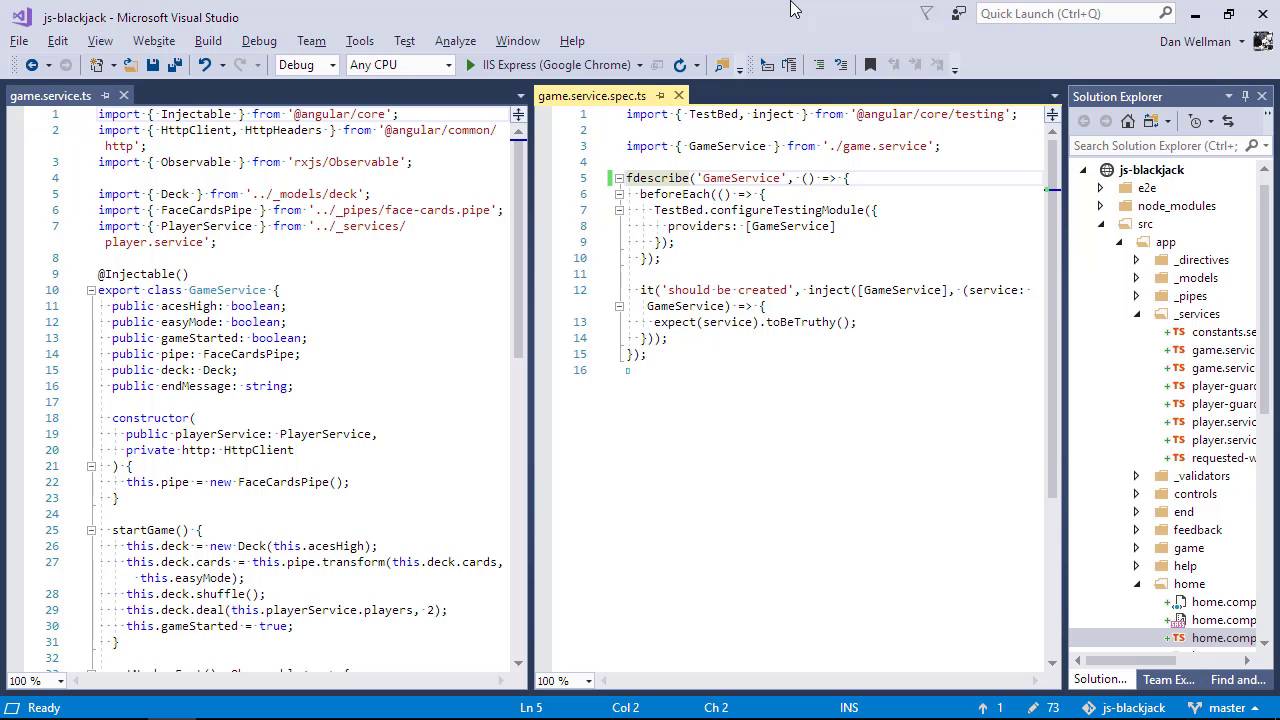
- Overview
- Transcript
8.1 Service Unit Test Preparation
In this lesson we'll get ready to test our app. I'll explain some of the preliminary steps that we need to complete in order to get the existing spec files working correctly so that we can write our own unit tests.
1.Introduction
1.1Introduction00:48
1.2Get Started With Angular-CLI11:09
1.3Developing With Angular-CLI13:17
1.4TypeScript vs. JavaScript06:54
1.5Angular Modules From the CLI04:31
1.6CLI Options05:21
2.Get Started With Angular
2.1Bootstrapping the Application04:30
2.2The Application Module04:15
2.3The Application Component08:06
2.4Component Styling03:06
2.5Global Styling05:11
2.6Creating a Component With the CLI09:34
2.7Creating a Service With the CLI07:56
3.Core Concepts
3.1Component Trees06:20
3.2Dependency Injection06:52
3.3Content Projection05:38
3.4Component and Directive Lifecycle Methods06:31
3.5Component-Only Lifecycle Methods05:28
3.6Decorators07:36
3.7Models16:55
4.Template Deep Dive
4.1Basic Data Binding With Interpolation05:35
4.2Property Bindings07:07
4.3Attribute Bindings03:29
4.4Event Bindings08:16
4.5Class and Style Bindings05:44
4.6The `NgClass` and `NgStyle` Directives05:04
4.7The `*ngIf` Directive04:41
4.8The `*ngFor` Directive09:29
4.9Inputs05:33
4.10Using Pipes in a Template07:31
4.11Using Pipes in a Class08:27
5.Forms
5.1Handling User Input With Template Reference Variables07:06
5.2Template-Driven Forms11:10
5.3Template-Driven Forms: Validation and Submission14:00
5.4Reactive Forms11:26
5.5Using a `FormBuilder`08:01
5.6Reactive Validation With Built-in Validators14:53
5.7Creating Custom Validators for Template-Driven Forms12:18
5.8Creating Custom Validators for Reactive Forms08:26
5.9Observing Form State Changes12:40
5.10Working With the `@HostListener` Decorator05:41
6.Routing
6.1Defining and Configuring Routes07:53
6.2Rendering Components With Router Outlets10:14
6.3Using Router Links for Navigation05:25
6.4Navigating Routes Using the Router06:24
6.5Determining the Active Route Using an Activated Route07:16
6.6Working With Route Parameters10:42
6.7Using Route Guards07:36
6.8Observing Router Events10:55
6.9Adding Child Routes08:45
7.Using the HTTP Client
7.1Sending an HTTP Request10:52
7.2Handling an HTTP Response11:22
7.3Setting Request Headers12:33
7.4Intercepting Requests09:04
7.5Finishing the Example Application12:33
8.Testing
8.1Service Unit Test Preparation10:45
8.2Unit Testing Services13:24
8.3Component Unit Test Preparation12:35
8.4Unit Testing Components07:27
8.5Unit Testing Component Templates06:58
8.6Unit Testing Pipes04:41
8.7Unit Testing Directives04:56
8.8Unit Testing Validators04:48
8.9Unit Testing Observables11:37
8.10Unit Testing HTTP Interceptors06:16
9.Building for Production
9.1Building for Production03:40
10.Conclusion
10.1Conclusion01:32
8.1 Service Unit Test Preparation
Hi folks, in this lesson we're going to take a look at a unitest that the Angular CLI creaed for us when we first created the service that the test is for. And we'll see what changes we need to make just to get the test to actually run. As we've been working through the example part of the course, we've been creating components, services, and all of the other pieces of our application. And as we've been doing that, the CLI has also been creating spec files for most of these things for us, but the problem is that none of the tests will currently run because our components all have dependencies. And the test will need to be updated to include these dependencies. So there are some preliminary steps that we'll need to take just to get the tests to run, and that's what we're going to look at in this lesson. So we're gonna start out by testing the services. So before we get started, let's just try to run the tests and see what happens. So the test command will build a test version of our application and it will open a browser to try to run the tests, but as you can see, we'll just be left looking at a blank white screen. We don't even have any console errors. So we'll start out by testing the services first. The first service in the folder is the constant service, but that's pretty much just a bunch of strings and there's no functionality, and hence nothing to test. So let's delete the spec file for the constant service. We aren't gonna be using that at all. Next up is the game service. That does have some functionality, so we'd better write some tests for it. And let's just open the service being tested and the spec file. Let's just arrange the editor so that they're both onscreen at the same time. Great, so in the spec file we can see that there is some tests boiler plate ready that the CLI added for us when we created this service originally. So let's just stop the test command running because it will keep trying to run the tests and popping this browser window open. So the example test that is in the service at the moment is pretty rubbish in general because Angular is responsible for creating the service. So this test is just testing that Angular itself is working correctly. I'm pretty sure that Angular has its own set of unit tests to test whether or not it's able to create services. We can delete this example test shortly but it's not entirely pointless. We can use it to get the text file setup correctly because at the moment, even this test won't run. So, let's just focus on this test, we can do that by changing the L to describe to be an F describe. And let's try running the tests once again. And let's see if there's any console messages this time. And it's not even getting far enough to add some console messages. So even though there weren't any errors in the console, we can see that there was an error in the command line here, and the error is that the module app.component can't be found in the home.component.spec file. Now we have added a focus to the game service spec file. So it's just gonna run that one test, but in order to run that one test karma still has to build our application and it currently can't do that, because this module app.component no longer exists. So the first thing that we need to do is to fix that. So let's open up the spec file for the home component. And we don't want to import the app component we want to import the home component And we considered there's a few other places. And actually it's not in the folder called home because we're already in that folder. And we can see there's a few other instances of app components through out this file so let's just correct those. So we fixed all the issues there let's see if we can run the test again. So we can see that the test runner did manage to actually do something this time. But we can see that there are still some errors. We're seeing a static injector error, and the message is that there is no provider for the player service. And what this means is that, let's just go back to the editor. So the game service imports a number of things and one of the things that it imports is the player service. So we're going to need to inject that player service into our test. So we know that an Angular application is made up of one or more modules. And that our components and services all hang off of that module. A test is slightly different. Angular constructs a special module just for testing. And the thing that we are testing and any of its dependencies are injected into this special test module. So this error means that there's no provider for the dependant service. No problem at all, we just need to register the player service with a provider so that it can be injected into the test module. So at the top of the test you can see there is this configure testing module method of the test bed class which is used to coordinate unit tests in Angular. We can see that this has a provider's array and that's where the game service, which is the service that we actually want to test, we can see that that is being injected currently. So, we should just import the player service and we can inject that along with the game service. So now let's go back to the browser. And we can see that the error has updated, and it's telling us a very similar thing, that this time, it can't find a provider for the http client, okay. So, let's go back to the code again. And now we're going to need to import the http client. So http is a bit more complex than our single service. For testing purposes there is actually a whole http client testing module that we can import. And that just takes care of a bunch of things so that we don't have to import and stub all of the http things that we want to do. So we can't add this to the providers array because that's only for services and this is a module. But we can add an imports array just like an ng module has. And we can import the httpClientTestingModule in that way. So again, as soon as we save the file, the tests should be run again. So let's go back to the browser and see if anything is happening. Success. We can see that the test is now running. There's only a single test and that is the generic should be created test but at least we know that everything is working as it should do now. So we can now delete the almost pointless test and write some tests of our own. There's just one bit of the example test that we want to keep though. So, can you see how the game service is injected down in the it method? The inject method takes a number of injection tokens within an array as the first argument, and then we can pass those injection tokens into a callback passed as the second argument. This is the test equivalent of dependency injection. So we do need to inject the game service because we want to test it, but we don't have to repeat this injection in every single test in the file. There could be many, many it methods throughout the file and we don't want to keep having to inject the game service. So let's just add another before each after the first one and capture the injected service in a variable that we can then reuse throughout the test file. And we don't want to actually make. And we don't want to actually make an assertion here, so let's just store the service in the game service variable that we added to the top. So the game service is being injected here and you can see from the parameter passed to the arrow function, that the local reference to the service is just service. So all we do is save that reference in our own variable game service. And then we should be able to use that throughout the rest of the file. So let's just get rid of that it method now. And now we're all set to start writing our own tests for this service. And we'll start doing that in the next lesson. So in this lesson, we looked at some of the things that we need to fix just to get our tests running. Each of the automatically generated spec files will need this kind of treatment. Bringing independencies and building up the test module. So it's essential to know how to get through this process as quickly as possible. Thanks for watching.


