
 Lessons: 14Length: 1.3 hours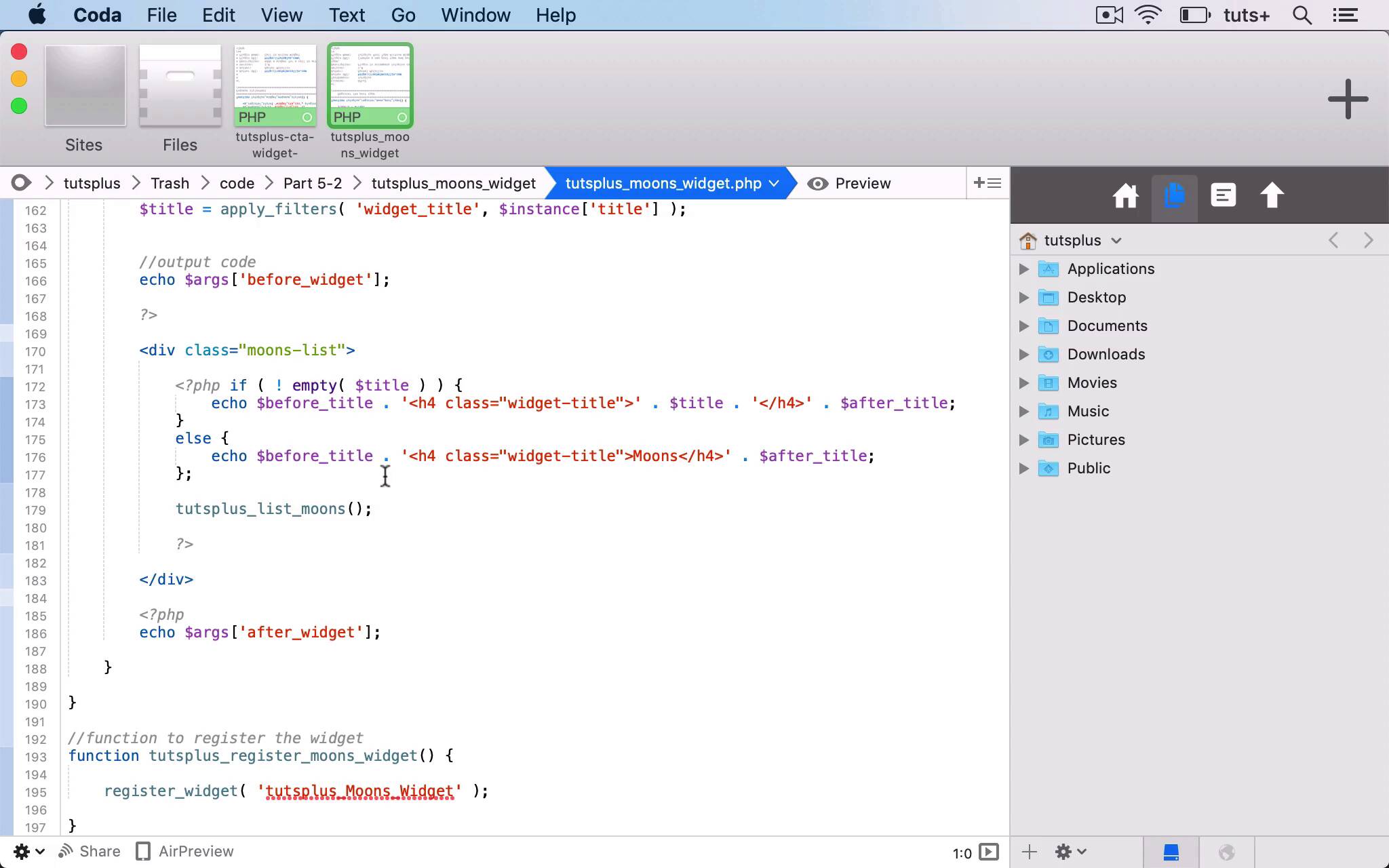
- Overview
- Transcript
5.3 Coding a Query Widget
In this lesson, I'll show you how to create a query widget.
Related Links
1.Introduction
1.1Introduction00:53
2.Understanding WordPress Widgets
2.1What Is a Widget?06:54
2.2Examples of Widgets13:05
3.Adding Widgets to Your WordPress Site
3.1Adding Widgets via the Widgets Screen03:38
3.2Adding Widgets via the Customizer05:59
3.3Adding Extra Widgets via Plugins07:43
3.4Adding Widgets to Posts and Pages05:11
4.Widget Areas
4.1Understanding Widget Areas05:50
4.2Add a Widget Area to Your Theme: Registering the Widget Area07:03
4.3Add a Widget Area to Your Theme: The Theme Template Files07:13
5.Coding Your Own Widget
5.1The Widgets API03:36
5.2Coding a Call-to-Action (CTA) Widget06:52
5.3Coding a Query Widget03:54
6.Conclusion
6.1Conclusion02:34
5.3 Coding a Query Widget
Hello, and welcome back to this tutsplus course on WordPress Widgets. In this part of the course, I'm gonna run through the code for a widget plugin for you. And this is a widget that outputs the latest posts using a custom post type. So first, my plugin registers the custom post type. So I've got this Moon's post type that's been registered. There's also a taxonomy being registered for it, which is a planet taxonomy. And then I'm gonna be outputting a query in my widget. So, here I've got a function called tutsplus_list_moons, which uses the WP query class to output the most recent five moons that have been added to the site. So this uses a query with an unordered list of all the moons. So, that's quite a simple query. And then we have our widget. So, we have tutsplus_Moons_Widget as the class. We have a widget constructor function, which is very similar to the previous example I showed you, a form which is much simpler this time because all we need is a title. There aren't any other variables or text. We've got a label for the title. We've then got updating, which is just with the title. And then we've got a function to output the widget, which is a little bit different. So firstly, we've got the title, where we're using the instance of title in our widget and hooking that to the widget title filter, which is used when outputting a widget. We're echoing out the before widget arguments. If the title variable isn't empty, so the title has been set, in other words, echoing out before the title and then an h4 class=widget-title, and then the title itself and then closing our h4 and echoing out what comes after the title. If that's not the case, we've got a default title here, so I'm just calling it moons if the user hasn't added another title. And then, instead of outputting a lot more HTML or PHP, I'm just running this tutsplus list moons function. So that goes back to up here this tutsplus_list_moons function, which runs a query using WP_query, querying our moons post type. So that particular widget will register a post type and add a widget to my site where I can display the most recent five posts from that post type. And obviously, finally, I have the tutsplus_register_moons_widget function. I'm registering that widget using my class name here, tutsplus_Moons_Widget, and I'm hooking that to the widgets_init action hook. So that's a second example of a widget. And this one does a different job, instead of outputting some texts that the user imports. In the widget screen on the customizer, it outputs a list of a custom post type and it registers that custom post type as well, because obviously, you can't output it unless you register the post type. So that's a second example of a widget plugin. In the next part of the course, we're gonna wrap up, and I'll walk you through everything we've covered during the course and what you've learned. And if you want to learn more about the details of creating these two widgets, you can check out the courses for each of them. So we've got introduction to WordPress plugin development, and three practical projects to learn to code WordPress plugins. And those two courses, we'll work through that code in detail. Because as you've seen, it's quite complex code, and it will show you exactly how to create your widget plugins as well as other types of plugins too. In the next part of the course, we're going to wrap up and I'll work through what you've learned as you've been going through this course and conclude the course. See you next time and thanks for watching.


