
 Lessons: 18Length: 1.7 hours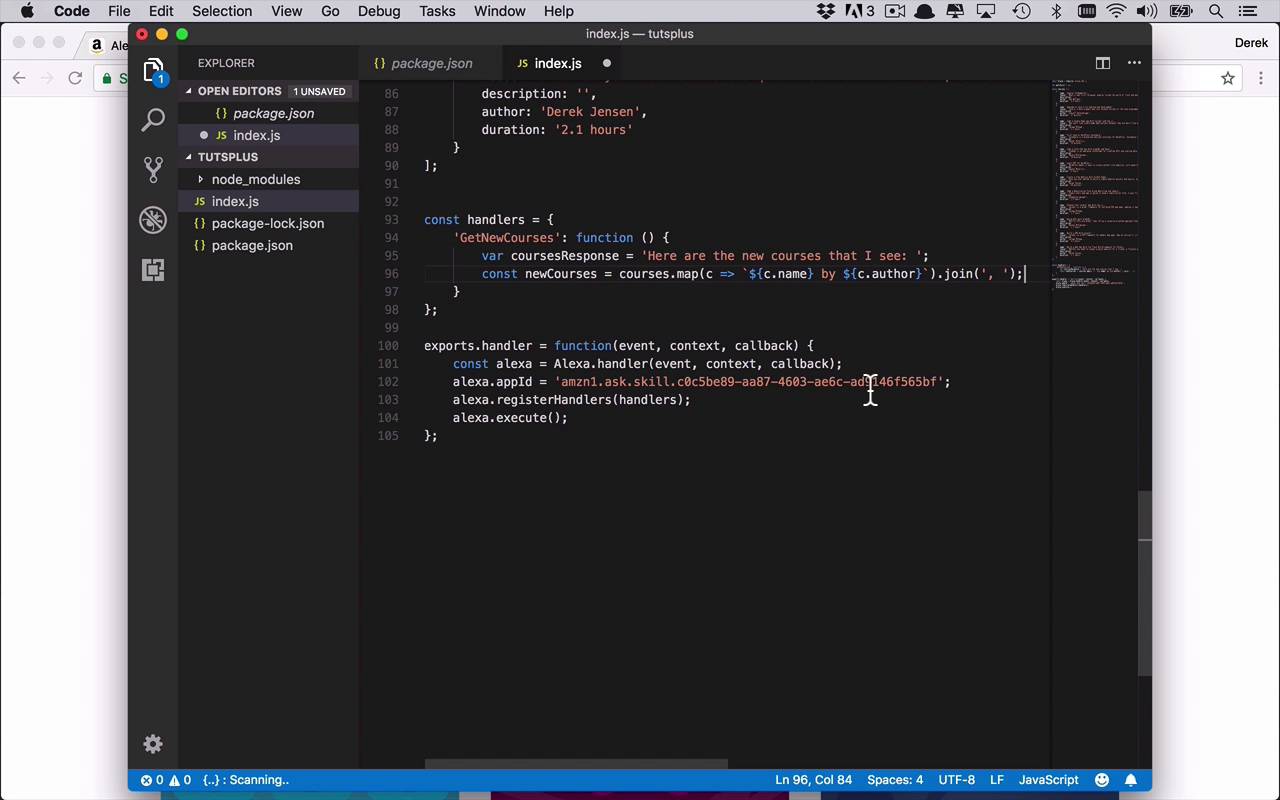
- Overview
- Transcript
3.6 Finishing the Get New Courses Handler
Now that we have some data to work with, we can finish our initial GetNewCourses intent handler. I'll cover some simple JavaScript mechanisms to retrieve the necessary courses and format them so that Alexa can communicate them back to the user.
1.Introduction
1.1Introduction01:03
1.2Prerequisites06:17
2.Alexa Skill Basics
2.1Alexa Skill Kit Walkthrough08:25
2.2AWS Lambda Walkthrough10:14
2.3Creating the Hello World Skill08:00
2.4Creating the Hello World Lambda Function10:14
2.5Handling Multiple Intents and Slots07:03
3.Building a Real-World Skill
3.1Creating the Skill06:37
3.2Creating the Lambda Function03:48
3.3Creating a Node.js App for Your Lambda Function07:11
3.4Creating Your First Handler04:38
3.5Creating the Setup Data for Your Skill03:00
3.6Finishing the Get New Courses Handler03:49
3.7Create the `GetCourseTeaser` Handler07:08
3.8Create the `AddToWatchList` Handler06:30
3.9Create the `GetWatchList` Handler03:43
3.10End-to-End Testing03:37
4.Conclusion
4.1Conclusion02:33
3.6 Finishing the Get New Courses Handler
Now that we have our mock data ready to go, let's go ahead and fill out our first handler, the GetNewCourses handler. So we want to modify this a little bit. So the first thing that we wanna do is we want to start by creating kind of the placeholder response that we're gonna end up returning. And then we'll go ahead and get all of the necessary data from our courses list and fill it into that response as we need it. So let's go ahead and create a new variable, and this is going to be the coursesResponse. And we're gonna set that equal to, Here our the new courses that I see. Something like that. And now what we wanna do is we want to dig in to all of those courses and pull out the pieces of information that we want to tell the end user, namely the name of the course, as well as the author. And you could add in additional data if you would like. So we're going to say const newCourses will be equal to courses, and we'll use our map function. And in here, we're gonna say for each course I want to return a little bit of information here, so we'll do some formatting. I want to first return the course name, so I'll say c.name by, and I will also then here return the author, c.author, just like that. And then once I've returned all of those, or once I've gotten all those, I wanna join them all with a comma. Because when Alexa is actually speaking, you will notice that you really do have to pay attention to where you put commas and where you put different punctuation. Because she will use those as pauses, as you and I do in normal speech. So in order to do that, we're simply going to use the join function, and we'll go ahead and join this with a comma space, just like that. So now we have the newCourses put together that I wanna be able to use, and now I wanna add that to my coursesResponse. So I'll simply say coursesResponse, and I'll go ahead and append the new courses onto the end of that. So now I have my response, I've built the response out that I want to return, or that I want Alexa to say, and how do I have her say that? Well, I use the this.emit function that we saw before. So I'll say this.emit, and then we're just going to simply tell, so we're just giving information, and I wanna use the coursesResponse. So we'll go ahead and save that. So that's the basic function of what we wanna do. We're getting the courses, we're putting it together in a nice response with some decent punctuation, and then we're going to have Alexa say it. We're gonna have her tell the end user. So lets go ahead and make sure everything is saved. Now we need to upload everything. So, once again, we'll do, and I'll save you the time and energy, and I'll just go ahead and do this. And I'll come back when we are ready. All right, so now you see I've come back over here to my Lambda function. I have uploaded and saved my code. Now, I will come back over to my test here and I'll once again say, ask tuts to get new courses. And if everything has been done correctly, we should get a fairly lengthy list of all the courses that we've gotten. And as you can see here, we see our response, here are the new courses that I see. Angular Fundamentals by Dan Wellman, and all of the other courses, including their authors listed out here. And once again, Alexa will say this to the end user, and this will kind of be the beginning of the interaction with the end user. So this is pretty nice. Now I can get an entire list, but it is rather lengthy. And what do I do if I wanna know a little bit more about a specific course? Maybe I wanna know a little bit more about Angular Fundamentals. Well, that's where the next handler will come in, where we're going to get the teaser description to get a little bit more information.


