
 Lessons: 18Length: 1.7 hours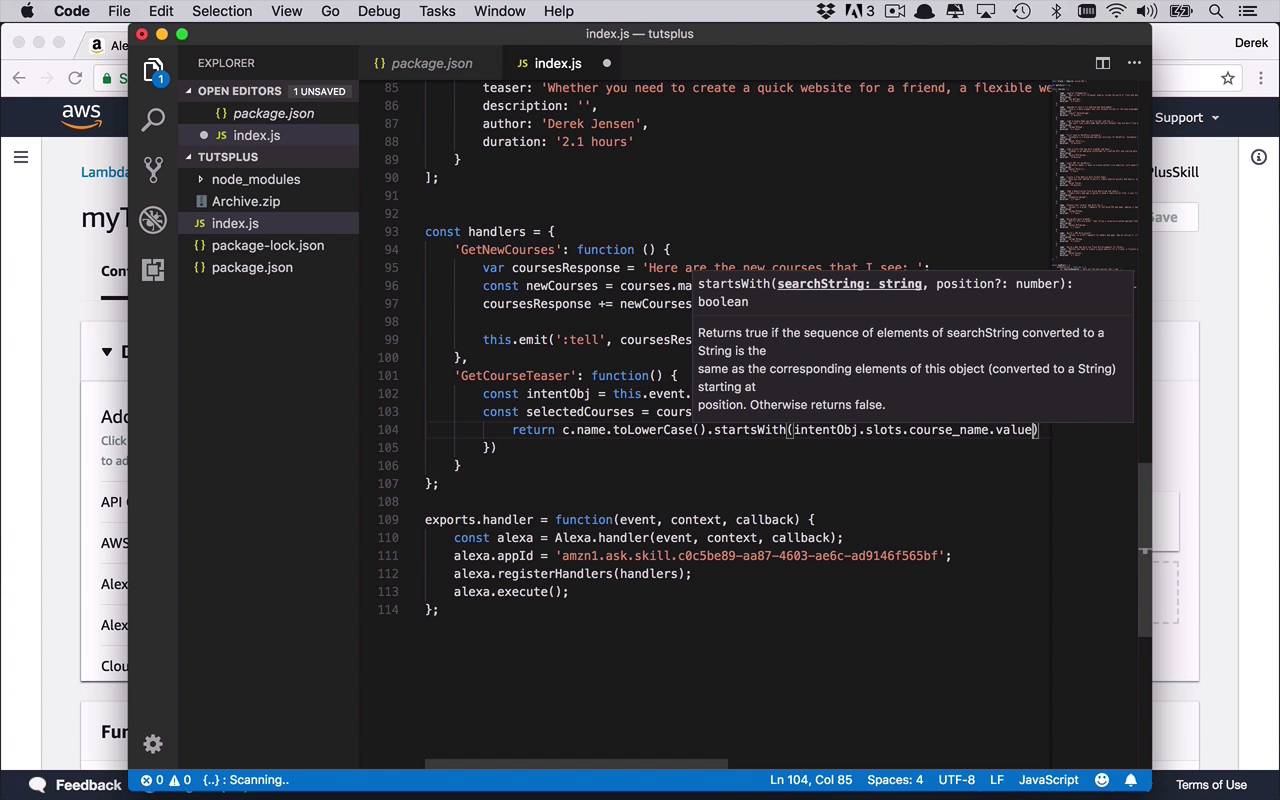
- Overview
- Transcript
3.7 Create the `GetCourseTeaser` Handler
Since your users can now get a complete list of the new code courses that are available from Envato Tuts+, it would be nice if the user could also get some additional information about them. In this lesson, you will add a new intent handler to provide the teaser information for any course the user wants.
1.Introduction
1.1Introduction01:03
1.2Prerequisites06:17
2.Alexa Skill Basics
2.1Alexa Skill Kit Walkthrough08:25
2.2AWS Lambda Walkthrough10:14
2.3Creating the Hello World Skill08:00
2.4Creating the Hello World Lambda Function10:14
2.5Handling Multiple Intents and Slots07:03
3.Building a Real-World Skill
3.1Creating the Skill06:37
3.2Creating the Lambda Function03:48
3.3Creating a Node.js App for Your Lambda Function07:11
3.4Creating Your First Handler04:38
3.5Creating the Setup Data for Your Skill03:00
3.6Finishing the Get New Courses Handler03:49
3.7Create the `GetCourseTeaser` Handler07:08
3.8Create the `AddToWatchList` Handler06:30
3.9Create the `GetWatchList` Handler03:43
3.10End-to-End Testing03:37
4.Conclusion
4.1Conclusion02:33
3.7 Create the `GetCourseTeaser` Handler
Now that we're able to get the full list of new courses, at least with the name and the author, we might want to be able to get a little bit more information. And so like I said before, we wanna create an intent that's going to get us the teaser of a specific course that we are going to select. Now, the way that we're going to determine this, is we're going to say we want to get the teaser for, and then whatever the course name is. But it could be somewhat complicated to be able to remember the full name of the course. So instead of doing that, we're going to specify some piece of the course name. And then we'll just do the checking based on if that course name begins with the utterance or the slot name that the user uses as the input. And that's kinda how we're gonna dictate this. You can obviously improve that logic a little bit if you want, but that's where we're gonna start and you can take it to the next level if you so choose. If you remember from a couple of lessons ago, we are going to now create a handler for the intent known as GetCourseTeaser. And then once again we're going to specify a function, and then that function is where we're going to give our logic. Now you can do all sorts of different variations of this. I'm gonna give you one implementation and you can feel free to change it and improve it or adopt it to your particular needs. So in this case, I'm gonna start by getting our intent object, so that I can start to pick it apart, and get different pieces of it. So I'm gonna say const intentObj is gonna be equal to and then once again you're going to say this.event.request.intent. So now I have the intent, I can get the name if I wanted, although I'm not really gonna need it, but I am gonna use it to be able to get the slot values like I've done before. So now what I wanna do is I want to kind of search through my list of courses and be able to filter on them based on checking to see if the beginning of the name, or if the name starts with the value that I'm passing in to my course name slot. So the way the way we're gonna do that is we're going to say const and we're gonna actually do this as a list. We're gonna say selectedCourses because of the way that filter works. So we're going to say course selectedCourses = courses. And then we're going to do a filter function. And then within here, we're going to say function(c). And then, we can return whatever courses actually follow or fall into our check here. So I'm going to say return course or c.name. Now remember, we're gonna be only be dealing with the beginning of this, so we're gonna see that the name starts with. But before we can do that, one of the things that we want to be sure of is when the values are being passed from our skill over to our lambda function. Most of them, and actually most in my experiences playing around with this and testing them, these are coming across in lower case. So there's not always uppercase and lowercase, most things are converted to lowercase. So in order to really do this check properly, we're gonna say .toLowerCase. And then we can say, startsWith, and then we can pass in these slot values. So we can say intent, so let's grab our intent object. We can say slots, and then remember what we named our slot and our skill was actually course_name. And then we need to be able to get that value, and once again just to be consistent we're gonna .toLowerCase that one as well. So that way we know that we're comparing against lower cases on both sides. Both what is coming in from our slot and also what is already existing within our courses. So just to kind of cover those bases. So, that's the value that we wanna return. So once again, this filter is going to return a list, so this selected courses can be multiple values, even though in our particular case, I don't believe any of the names actually are similar at the very beginning. So we shouldn't get multiple results here. But what we can do is once we've gotten our selected courses, we can do a little bit of checking and then send back some response to the end users. So in this case, we can say if(selectedCourses.length == 0). So this would mean we've asked for a course or the name of a course that doesn't actually exist. So this filter function didn't match anything, so nothing came back, so maybe we'll just send back a nice little message to the end user. We'll use once again tell and we'll do a little formatting as well. We'll say something like, sorry, I couldn't find the course. And then we'll go ahead and pass in whatever is passed in in that slot name. So we'll say slots.course_name.value, so right there we're going to return back, sorry I couldn't find the course, whatever the user asked for. But now if we did get something then that means we did get at least one result. Now, if we got multiple results we could handle it a little bit differently, but in this case, I'm simply going to use the first one that came back. And then go ahead and get that particular teaser. So we're gonna say const course = selectedCourses, and we'll just grab the first one. And now we have a specific course and now we can go ahead and create our response. So we're gonna do in an emit. Again, we're simply gonna use the tell, and then I'll say, with a little bit of formatting the teaser for, and in this case we'll put in the name. So we'll say course.name by, and we'll add in the author here again, course.author is as follows. And then we'll just go ahead and dump the teaser in here. Say course.teaser just like that. Okay, so now we can review this just a little bit, so we can make sure we're all on the same page. We're going to use the GetCourseTeaser intent. And then once we've done that, we are going to get the intent object. And then we're gonna use a filter to look at the beginning of all of the names in our courses list and see which ones begin with the course name that we're passing in from our skill. And then if the selected courses, because filter returns a list, if that length of the result is 0, then we'll just respond with something like, sorry, I couldn't find whatever you asked for. But if we do find something, at least one, then we're just gonna grab the first one that matches. And then we'll go ahead and respond with the teaser for that specific course by that author, is as follows, and then we'll give back the teaser. So that's gonna be the basic handler for the GetCourseTeaser. Now instead of you watching me go back and forth and uploading all that sort of stuff, I'm just gonna go through and finish the remainder of the functions or handlers that we need for the remaining intents. And then, we'll go back and do some full end end testing, by getting all the new courses, getting a course teaser, and then interacting with the watch list. So let's go ahead and continue with our watch list functions.


