
 Lessons: 18Length: 1.7 hours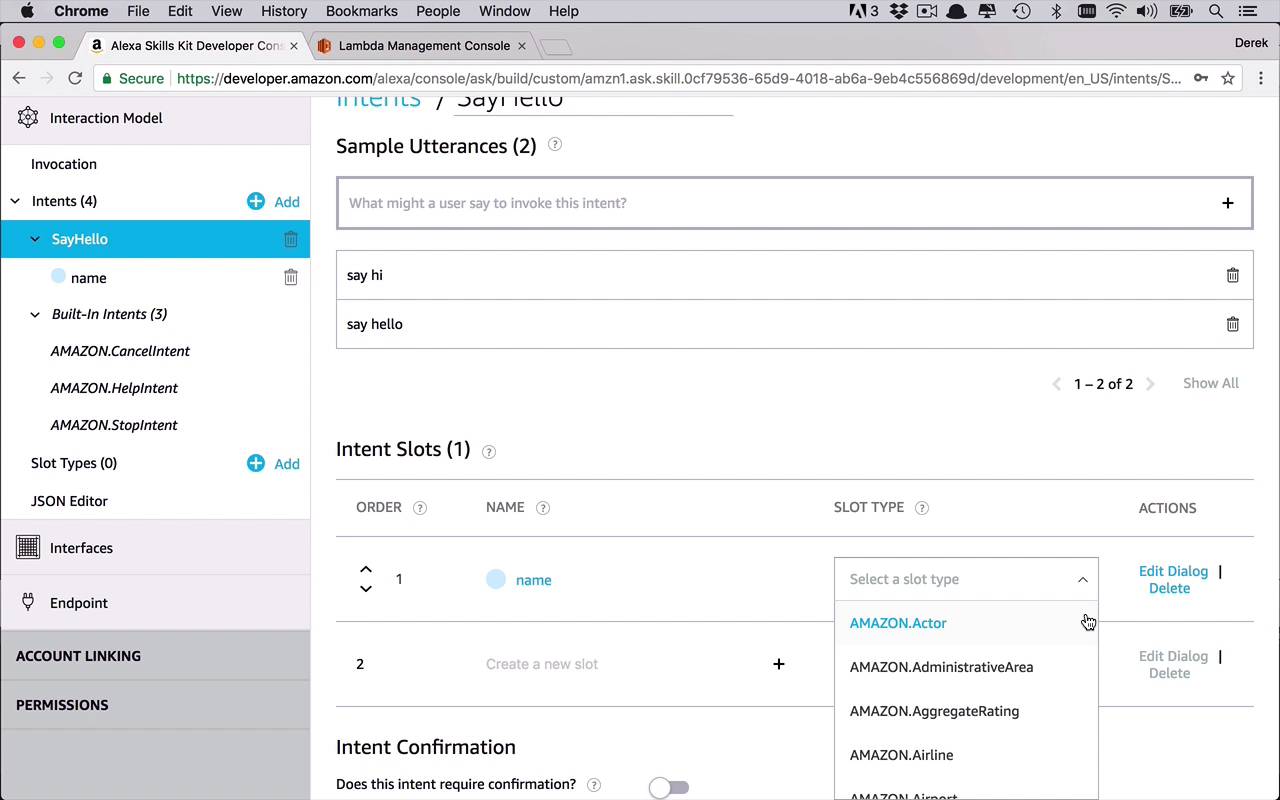
- Overview
- Transcript
2.3 Creating the Hello World Skill
Now that you know the basics of creating an Amazon Alexa skill, let's actually go through the process of creating a new skill. In this lesson, you will learn how to actually create a functional skill that will be able to greet your end users.
1.Introduction
1.1Introduction01:03
1.2Prerequisites06:17
2.Alexa Skill Basics
2.1Alexa Skill Kit Walkthrough08:25
2.2AWS Lambda Walkthrough10:14
2.3Creating the Hello World Skill08:00
2.4Creating the Hello World Lambda Function10:14
2.5Handling Multiple Intents and Slots07:03
3.Building a Real-World Skill
3.1Creating the Skill06:37
3.2Creating the Lambda Function03:48
3.3Creating a Node.js App for Your Lambda Function07:11
3.4Creating Your First Handler04:38
3.5Creating the Setup Data for Your Skill03:00
3.6Finishing the Get New Courses Handler03:49
3.7Create the `GetCourseTeaser` Handler07:08
3.8Create the `AddToWatchList` Handler06:30
3.9Create the `GetWatchList` Handler03:43
3.10End-to-End Testing03:37
4.Conclusion
4.1Conclusion02:33
2.3 Creating the Hello World Skill
In the next couple of lessons, we are going to work on finishing up and putting together the basic fundamentals of this Hello World Alexa skill and lambda function. So the first thing that we are going to do in this lesson is we are going to work on putting together some of the basics of a skill that you might find useful in your development process. So what we're gonna do is we're gonna make sure that we first define an invocation name. So what do we want to call this skill when we're communicating with Alexa? So this is that whole thing about Open Tuts, or ask Tuts+ how to do x, y, z., that type of thing. So we're just gonna say that the invocation name is going to be hello tuts. So that's what we're going to use in order to test this out in the upcoming lessons. So now that we have this invocation name, what we wanna do is we wanna work on the intents. So right now, it comes with three by default, as mentioned before, and those are fine, but let's go ahead and give this a little bit of pizzazz. So we're going to create our own intent and this is where we're going to have an option of either creating your own custom intent or we can use existing intents from the built-in library. So this is kind of interesting to look through to see what type of pre-built intents we have access to. Things about books, calendars, music, videos, weather, all sorts of interesting things that you can take advantage of. But I often times find that it is very interesting to kind of go through our own custom intent. So what do we want this intent to be? Well, this is kind of like what we're asking Alexa to do for us. So once we've specified the invocation name, hello tuts, what do we want it to do? So we're just going to have a very simple intent, and we're just going to call this SayHello. Let's go ahead and create that custom intent. So now we have the SayHello intent and now we are presented with a dialog to create sample utterances, and what's an utterance? Well, think of it this way, the intent is the command that we want to be processed on the server side. The utterance are the different variations of the language that you want to associate with that intent. So lets say every time a user says say hello, I want to associate that with the SayHello intent. And you can create a vast number of these utterances to be able to allow Alexa to understand more language. So maybe say hello is an utterance that is going to be part of SayHello. So let's do that. We'll say, say hello, but that might not be the only one. Maybe you say hi is another variation, something like that. So we can continue to create a number of different utterances that, when Alexa detects those different word combinations, it's going to associate that with this SayHello intent. And then that is the actual event or command that it's gonna send to our lambda function to process. So I think these are two good ones to start. So every time we ask our app, which is the hello tuts, to say hello we are going to be executing the SayHello intent. So now that I have my SayHello intent created, what I can do now is I can start to define my slots. Now remember, a slot is kind of a way to introduce a variable value into my intent so I can further customize this. So let's say that I wanted to add in a new intent slot, and we're gonna call this Name. And this slot type is a number of different ways that we can kind of specify what this is. Is it a name, is it a date, is it an airline, is it all these different types of things that are kind of pre-built? And you can also create your own, if you would so choose. For something like this, when we're talking about the name of a person, I like to use AMAZON.Person, but that's just my preference. I can create this as anything I really want, cuz it's just really a sample. So what I wanna do is I wanna be able to use this slot in one of my utterances, if I so choose. The way that I'm gonna do that is I'm gonna say, another utterance here is gonna be say hello to, and in here I can do an open and close curly brackets, and I can specify what that slot is. So now I can add in say hello to {name}. So these are all gonna be utterances that are gonna be associated with my SayHello intent, so I can do very generic things like say hello, say hi. Or I can be very specific and I can say say hello to {name}, or I can do say hi to {name}, just like that. So now we have a couple different variations of this and what I wanna be able to do is then ultimately send this to my lambda function to ultimately be processed. So now I've got this all set up in here. Another good practice as you're building out this interaction model is periodically save early, save often. So once you start to create these invocations and intents it's a good idea to every once in a while come up here to hit Save Model and then go ahead and close out the little pop up that shows you that it was successful. All right, so now we have an intent, we have a slot inside that intent, we have our built-ins here, we're specifying what slot types we're using here, so you can add these in as you so choose. And then, after that, you can also take a look at the JSON Editor and you can see what our invocation model looks like. Our invocation name is hello tuts, here are our intents, here's our SayHello. We do have one slot that we can use, and then some samples that are going to train Alexa to interact with our skill. Now you can come into the interfaces, once again, if you wanted to try to add in some audio, some video, things like that, you can start to play around with these. I'm not so worried about that at this point. And now we come down to the endpoint, so the very end of the process of building out these very basic skills. We need to tell the skill where to send their request. And in this case we're going to use a lambda function, but I need to know the skill for my function. So this is the unique identifier of my skill, but now I need to specify the unique identifier of my functions. So I can come back to my function and I can come up to the top, and as you can see right here, there's a big, long string. You need the entire thing all the way through the function name, so I'll copy that. I'll come back over here, and I'll paste it into my default region. So, paste that in, and then once everything is filled out successfully, I can Save Endpoints. And so now I have a fully created and valid interaction model for my skill. So the final thing you're going to want to do before you can actually use this skill is you have to build the model. So, we've been creating the different pieces of the model, we've been saving it, but now we have to build it so that it's actually usable as a skill. So I'm going to go ahead and click this build model button. It's going to start, it may take a few moments to actually build out completely. But when it's done, this little animation will go away and we'll be able to now successfully use our skill. So as you can see here now, our build was successful. That we have now built the model out to actually be able to execute the skill. But before we start doing that I want to shift gears and go over to the next lesson where we're gonna talk a little bit more about the lambda function that we have. And then start to test that out, and then do some end to end testing from our skill all the way to our lambda function.


