
 Lessons: 18Length: 1.7 hours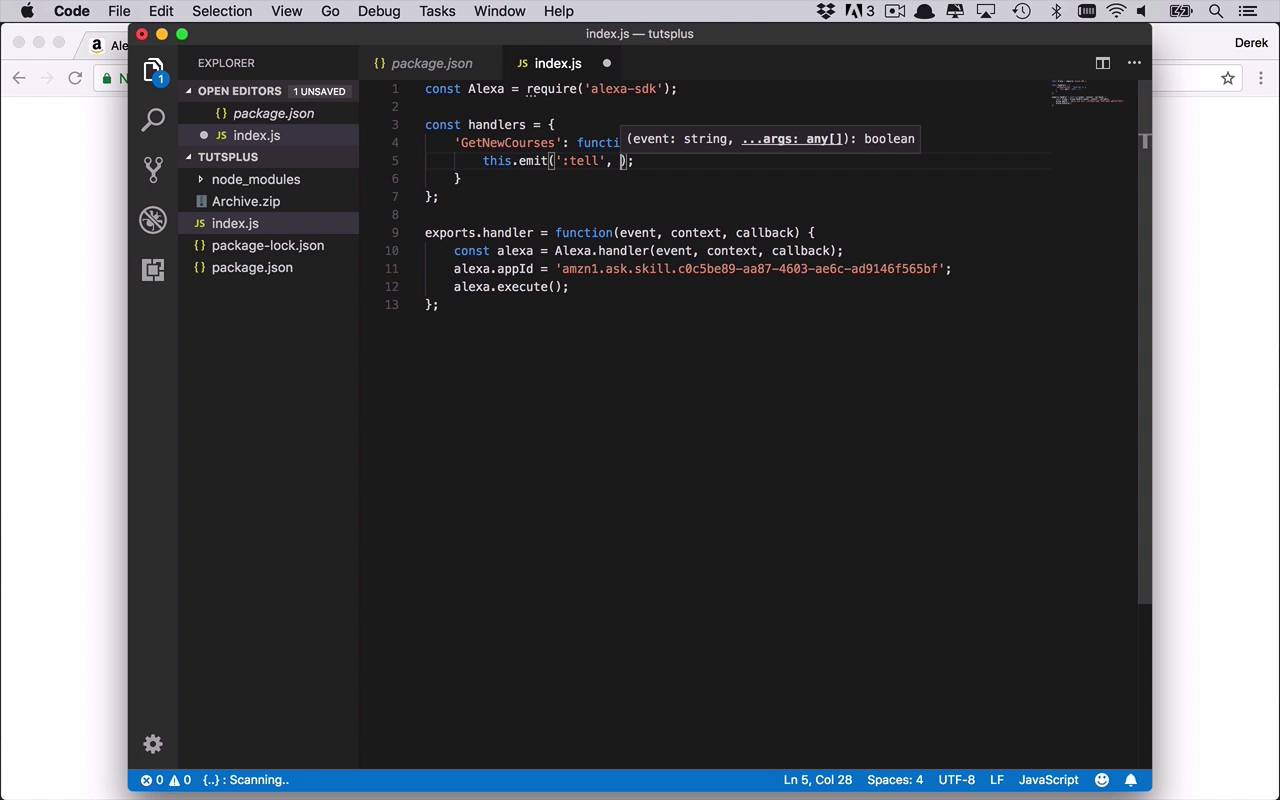
- Overview
- Transcript
3.4 Creating Your First Handler
With a new structure for your AWS Lambda Function, there comes a slightly different mechanism for creating intent handlers. You'll see that this approach makes your function much cleaner and easier to maintain.
1.Introduction
1.1Introduction01:03
1.2Prerequisites06:17
2.Alexa Skill Basics
2.1Alexa Skill Kit Walkthrough08:25
2.2AWS Lambda Walkthrough10:14
2.3Creating the Hello World Skill08:00
2.4Creating the Hello World Lambda Function10:14
2.5Handling Multiple Intents and Slots07:03
3.Building a Real-World Skill
3.1Creating the Skill06:37
3.2Creating the Lambda Function03:48
3.3Creating a Node.js App for Your Lambda Function07:11
3.4Creating Your First Handler04:38
3.5Creating the Setup Data for Your Skill03:00
3.6Finishing the Get New Courses Handler03:49
3.7Create the `GetCourseTeaser` Handler07:08
3.8Create the `AddToWatchList` Handler06:30
3.9Create the `GetWatchList` Handler03:43
3.10End-to-End Testing03:37
4.Conclusion
4.1Conclusion02:33
3.4 Creating Your First Handler
Now that we have our basic functions set up it's time to start introducing the concept of handlers or handler functions. And the way that this works, if you scroll down a little bit just past where we were in the documentation for the Alexa SDK. You're gonna see implementing handler functions, and the basic process is this. We're going to implement a handler or a collection of handlers. And then once we've created them, we're going to initialize the Alexa SDK with them. So actually if you scroll down a little bit further, you see a very good example here where we are creating a constant of handlers. And within here we're going to create a mapping of whatever the intent is that's coming through to a function. And within this function we'll be able to do just about anything we want. We can return a request to have Alexa say something, to ask a question, to ask for additional information, and what have you. And that's what these emit statements are doing. And the first property here, or the first argument, the colon tell identifies different things that we can have Alexa do. So tell is basically just saying, I want you to say what it is that I'm passing as the second parameter, and then that kind of ends that interaction. But then there's other types of interactions you can do. And they're documented a little bit further down, and we'll get to that a little bit later. So this is the basics that we wanna be able to set up. So once we've created our handlers we can then register those handlers in that handler code that we started with previously. So let's just go ahead and copy this right here. And then we'll take this over to Visual Studio Code. And then what we wanna do above this, is we wanna go ahead and dump that in here. Now, obviously we don't have a launch request, or a hello world intent, or anything like that. But we do have a request or an intent called GetNewCourses. Now let's just go ahead and start with that. So we'll say GetNewCourses, because we can test that. And we only need the one, we don't need this extra handler just yet. And then as our function, what do we wanna do? Well we just want to just at least get a response. So we're going to say tell, once again, that will let Alexa know that she needs to inform or to speak to say something which will tell here to say here. And then after that is kind of like the interaction with the user is done. So what we're gonna do here is we're going to say, these are great new courses. And we're actually gonna start to return courses in another lesson, but for now let's just go ahead and get this started. So we'll save that. Now, as you can see, once we've done that now we need to use the registerhandlers method to pass those handlers into Alexa now that we have it ready to go. So we're gonna come down here after our appId line. We'll say alexa.registerHandlers, and we're just gonna pass in handlers like that. So we'll go ahead and add a semicolon and we'll hit save. Now is the part where things get a little tedious because now we need to re-upload this handler right here, or this code right here. So we'll simply go back into our directory here, we'll go ahead and delete our old archive. And we'll go ahead and create a new archive, so we'll compress these two items. Then we can come back over to our Lambda right here. And we'll just go head re-upload a zip file again just like this. And we'll make sure we grab the correct archive right there. We'll go ahead and open that and we'll click save. So that will go ahead and upload our new lambda function. And if you were to change any of the node modules or dependencies, those would go up there as well. So once this is saved and ready to go, at this point we should be able to send a request across to our function. So let's go ahead and try that out. So from this skills developer kit, let's go over to test like we've done before. And if yours is not enabled, you can go ahead and enable it. And at this point we'll simply say, asks tuts to get new courses, like that. So let's go ahead and hit that request. And as you see, we're getting a response, these are great new courses. So that's pretty good. We were able to see that we are sending across our GetNewCourses, and we just sent back a basic response from our code. So that's pretty good but this is, once again, a little limiting. So yes, we can add in additional handlers and things like that. But now we want to inject a little bit of interest and a little bit of something more interesting into our skill. So in the next lesson I'm gonna show you some of the setup code, where the data's coming from. And some of the code that you'll be able to just insert into your application to help you get started a little quicker.


