
 Lessons: 18Length: 1.7 hours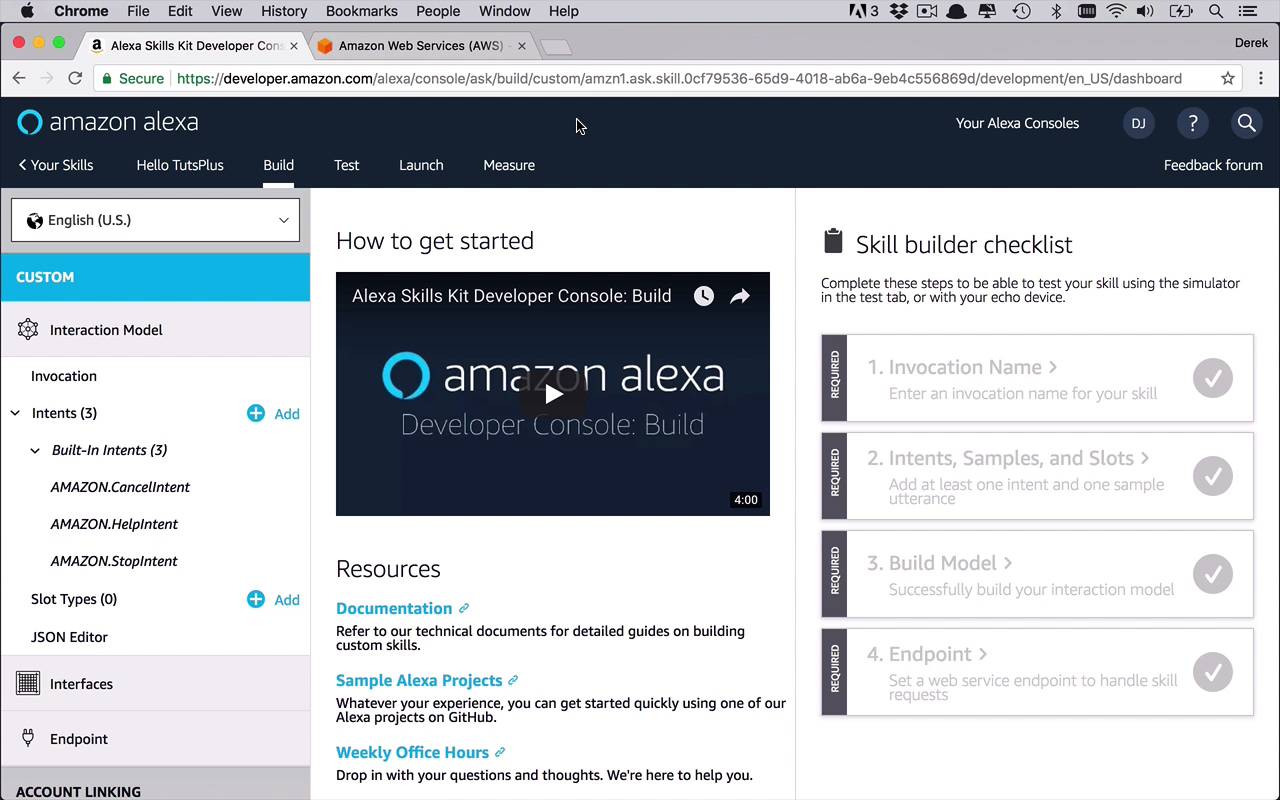
- Overview
- Transcript
2.1 Alexa Skill Kit Walkthrough
Before you can really start writing code to interact with Amazon Alexa, you need to understand where and how to create your actual Amazon Alexa skill. This lesson will provide a basic walkthrough of Amazon Developer Services and show you how to start to create your custom skill.
Related Links
1.Introduction
1.1Introduction01:03
1.2Prerequisites06:17
2.Alexa Skill Basics
2.1Alexa Skill Kit Walkthrough08:25
2.2AWS Lambda Walkthrough10:14
2.3Creating the Hello World Skill08:00
2.4Creating the Hello World Lambda Function10:14
2.5Handling Multiple Intents and Slots07:03
3.Building a Real-World Skill
3.1Creating the Skill06:37
3.2Creating the Lambda Function03:48
3.3Creating a Node.js App for Your Lambda Function07:11
3.4Creating Your First Handler04:38
3.5Creating the Setup Data for Your Skill03:00
3.6Finishing the Get New Courses Handler03:49
3.7Create the `GetCourseTeaser` Handler07:08
3.8Create the `AddToWatchList` Handler06:30
3.9Create the `GetWatchList` Handler03:43
3.10End-to-End Testing03:37
4.Conclusion
4.1Conclusion02:33
2.1 Alexa Skill Kit Walkthrough
Before we start digging into writing actual code, I wanna take a couple of minutes to give you a brief walkthrough of each of the locations that we're gonna be spending time on in Amazon, both the Amazon developer portal as well as AWS. So the first thing that you're gonna wanna do is you're going to want to create your Amazon developer account. So as you can see here, I am at developer.amazon.com and I am logged in, and I'm at this main page. So where do I go when I wanna get started building Alexa skills? Well, quite obviously, you can go here to the Alexa link. So let's go ahead and click on that, and this is going to take us to basically everything you need to know about creating apps for Alexa. There's a lot of really good documentation, some videos, some samples on what you can build. You can subscribe to the newsletter. You can take a look at a lot of things. Now, where do you go from here when you really wanna get started and follow along with this course? Well, what we're gonna do is we're going to head pp to the top left to the Alexa Skills Kit. Now, as with anything else, you can really build just about anything in the world from scratch, but it really helps to kind of have a starting point. So what we're gonna do here is we're going to come down here to the Get Started section. And what I wanna do is I want to use the Alexa skills kit to create a skill. So we'll go ahead and click on that. And then this is going to take you to additional information once again about the Alexa Skills Kit. What is it? How do you use it? What can you use it for? Why should we build skills, all that sort of good stuff. Once you actually want to create one, you're gonna come over here to the right-hand side and you're gonna click start a skill. Now this is going to take you through a little bit of a wizard. As you can see here ,I've got some other sample ones that I have built recently too. What I wanna do now is I wanna create a brand new skill from scratch. Now if you don't have anything here, that's fine. You can go ahead and start and create a skill from scratch. So let's click the create a skill button. And now what this is going to do is it's gonna sort of walk you through the process of creating a skill. So the first thing that we need to do is give our skill a name. Now this is going to be kind of a little bit of a boilerplate walkthrough demonstration of how to create basic skills and what to do with them in kind of a hello world kind of a context. So my skill name in this case, I'm gonna call this Hello TutsPlus. And we can create this with a default language, I'll be using English, then we'll go ahead and hit Next. And now we've come to the point where we need to make our first decision. Now we need to be able to choose a model to which we wanna add our skill. So we can use some different kind of pre-built models to be able to create this scale. The best place I think to start is to go with custom. Now you can investigate these other options on your own. But custom is gonna be what we're going to choose. So I'm going to select that, and then I'm going to hit Create Skill. So what it's going to do now is it's going to create a very basic skill skeleton for you, and then take you into this kind of developer environment here. Now as you can see here, along the top, we are looking at the Hello Tuts Skill and there are four different sections that we can look at. We can build, we can test, we can launch, and we can measure. So build is where you're going to be doing most of your design work and creating the actual skill. We'll be talking about intents and utterances and invocations and all that kind of stuff which we're going to be getting into more detail as we go. Once you've actually built it you can go to test and I'll show you this in a later lesson where we can actually test our skill via the web browser. So this is a good time for you to be able to test out your functionality and the conversation that you're gonna have with Alexa before you actually put it on a device, which is actually very, very beneficial. Launch, we're really not gonna get into very much in this course,. But that's ultimately where you are going to be putting your skill into the Amazon Store, so other people can download it and install it on their devices and use your skill. So definitely something you wanna keep in mind if you want to be creating these skills for mass publication. And then measuring so you can see what sort of statistics about your skill, how often it's being used and how often it's being installed and downloaded and all that sort of good stuff. Now also in here you can watch this video and I highly recommend you doing it. It's gonna take you through a bit of a, kind of introductory lesson on what it is to build skills and how to do it and the different things that you're gonna need to do in order to accomplish it. Now once you've done that, you're gonna be kind of in this world here which is a little bit jumbled, I will agree, and I'm not a huge fan of, but the basics will always be the same once you get to this point. What you're going to do when creating a custom skill is you're gonna have to define a couple of things and that's mostly gonna be done on this section here on the left under custom, we have our interaction model. We have our interfaces and then we have our endpoint. Now the Interaction Model section up here at the top is where you're gonna be doing most of the work when it comes to defining the skill and the interaction you're going to be having with Alexa. And we're gonna be filling all of this out in a little bit, but just to kinda give you a brief walkthrough, the skill invocation name is what you're going to assign to kind of wake up this app when you're talking to Alexa. So in my case, it might be something like Tuts Plus, and then I can say to it, Alexa, open Tuts Plus, or ask Tuts Plus to give me this information or something like that. So whatever you put in here as the invocation name is what you're going to kind of be talking to Alexa about when you want to communicate with this particular skill. Then we have the idea of intents. Now intents are, think of them as events or kind of requests that you are making to the specific app. Now all Alexa's skills by default come with these three ready to go in the StopIntent, HelpIntent and CancelIntent. As you can see, they are required and basically these things are fired off when you say to Alexa, Alexa, stop or Alexa, help or things like that. So these are pre-built that you get out of the box, and you can go ahead and start with that right away. Now, from here, we're going to add in our own intents, think of them as, like I said, kind of events or commands that you're going to be giving to your skills. So you can add anything you want in here. Alexa, ask Tuts Plus to give me the top ten courses by Derrick Jensen, something like that. And so then maybe that intend to something like, get top ten or something like that. And we're gonna work on this quite a bit in the upcoming lessons. Then we have the concept of slot types. Slot types are interesting and this allows you you to kind of build in variables into the things that you're saying to Alexa. So I could say something like, or I could genericize something to say, hey Alexa, ask TutsPlus to give me the top ten courses by so and so. And that so and so is a name that I can inject in there that maybe at this time it's Derrick Jensen. Maybe it's somebody else later on. And then it's kind of a variable placeholder that I can then use to find information based on that particular input or variable given by the end user, which is pretty cool. The JSON Editor is going to allow you to see what your actual interaction model looks like in JSON form because that's how it's going to live. The interfaces section here allows you to use some prebuilt interfaces to take advantage of pre built funtionality if you wanted to play audio, if you wanted to display video and things like that. We're not really gonna use this very much in this course, but just to know that it's there and you can use these things out of the box instead of having to create your own. And then endpoint here as I said before, this is where we're going to point to our server application where everything is going to be sent to in the future. So when I ask Alexa to do something with my app, that request, that intent is going to be bundled up and sent to a server application where it can be processed and something can be returned to the skill to either say something or display something or play audio or video, or what have you. So those are the basic building blocks and pieces that you're gonna need to be familiar with as we start to build the skill in the coming lessons.


