
 Lessons: 18Length: 1.7 hours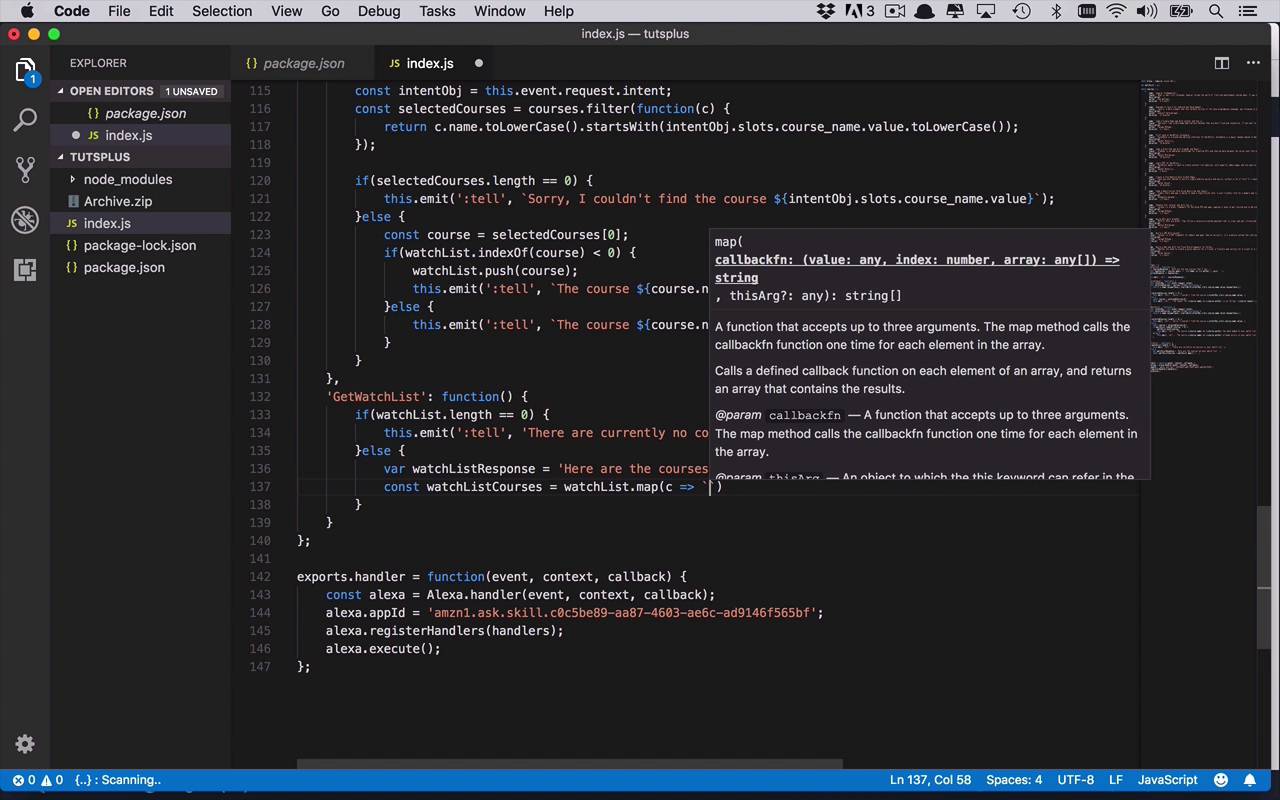
- Overview
- Transcript
3.9 Create the `GetWatchList` Handler
It's time to create the final intent handler for your skill. Your users have added a number of courses to their watch list and want to retrieve those courses to remember what they wanted to watch. Let's create a new handler that will retrieve all of the courses that have been added to the watch list.
1.Introduction
1.1Introduction01:03
1.2Prerequisites06:17
2.Alexa Skill Basics
2.1Alexa Skill Kit Walkthrough08:25
2.2AWS Lambda Walkthrough10:14
2.3Creating the Hello World Skill08:00
2.4Creating the Hello World Lambda Function10:14
2.5Handling Multiple Intents and Slots07:03
3.Building a Real-World Skill
3.1Creating the Skill06:37
3.2Creating the Lambda Function03:48
3.3Creating a Node.js App for Your Lambda Function07:11
3.4Creating Your First Handler04:38
3.5Creating the Setup Data for Your Skill03:00
3.6Finishing the Get New Courses Handler03:49
3.7Create the `GetCourseTeaser` Handler07:08
3.8Create the `AddToWatchList` Handler06:30
3.9Create the `GetWatchList` Handler03:43
3.10End-to-End Testing03:37
4.Conclusion
4.1Conclusion02:33
3.9 Create the `GetWatchList` Handler
Now it's time to finish up our handlers by adding in the final handler for out intent which is going to allow us to get the watch list. So we can view or listen to all of the courses that have been added to the watch list in this particular session. So in order to do that, we're gonna follow the same process. We're going to add a new handler for the GetWatchList intent. We'll create a function for that. And then this one is gonna be relatively simplistic. So we're gonna go ahead and say if(watchList.length == 0), so in this case, if there's nothing on the watch list, we're going to simply emit a message here. And we're going to tell the end user that There are currently no courses in your watch list. Just like that, so pretty simple. So there's nothing there then we wanna let the end user know, well, that it's empty, and you need to add something to it. Finally, if there are, well, if there is at least one course there and then multiple, we wanna get them on kind of concatonate them together in a similar fashion to how we did the get new courses intent handler. We wanna do something, somewhat similar anyway. And we're gonna start by creating a response, at least a very basic response here. So we'll call this the watchListResponse is going to initially be Here are the courses on your watch list. So that's gonna be the beginning of it. Now we need to go ahead and get all of the courses that are there. So we'll say watchListCourses, this is gonna be equal to, we're going to our watch list, and this time we're gonna use a map function. So we don't really want everything, we just wanna get only a few bits and pieces of information. And typically that's gonna be the name of the course and the author, similar to what we did before. So we're simply going to say, c.name, so the name of that course, by, and then we'll put the author in here again, c.author. And then once we've done that, we are again going to use a join. Because we do wanna use punctuation so that it sounds natural when Alexa is returning it back to us. So we're going to join that with a comma. So now we have this list of all the courses that are on our list. And then we want to add that to our watch list response. So we'll say, watchListResponse += watchListCourses. So we'll concatonate those things together. And we'll simply do an emit, so we can send back a response, tell. And in this case, we're just going to send back the entire watch list response. So pretty simple. We're gonna check to make sure that the watch list length isn't zero. And if it is, we're simply gonna say that there currently are no courses on your watch list. But if there is something there, then we're going to kind of format or build out this response, Here are the courses on your watch list. We will use a map function to be able to get only the pieces of information that we want to use. Now once again, you can add new things in here, add different things in here, maybe add the duration in here. So I did add the duration in here for you. You could use that if you would like. And then once we've got that list of watch list courses, we will append that onto the end of our watchListResponse, and simply send it back to the end user. So at this point you've got four pretty basic intent handlers, GetNewCourses, GetCourseTeaser, AddToWatchList, and GetWatchList. And in the next lesson, we are going to go through the process of doing a little bit of end to end testing. So you can see what it looks like to have full interaction with your skill, with Alexa going back all the way to your lambda function.


