
 Lessons: 18Length: 1.7 hours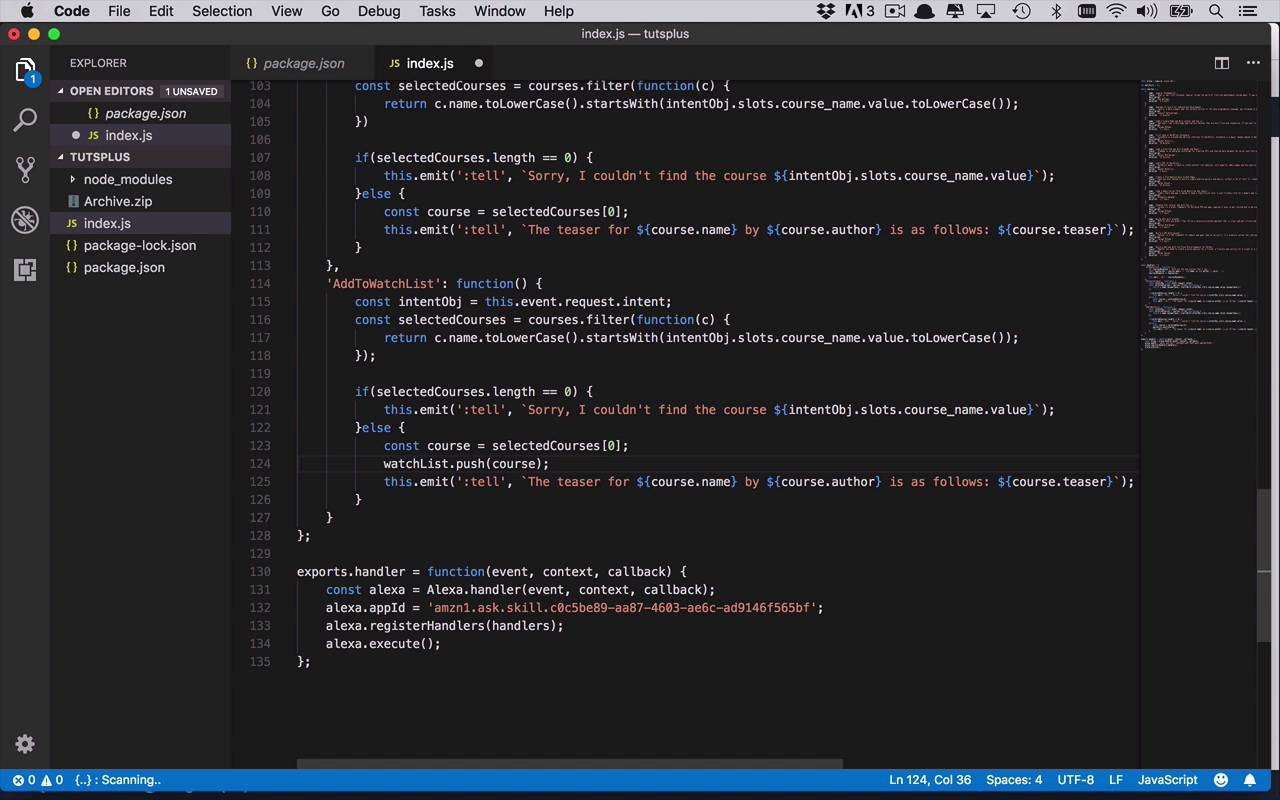
- Overview
- Transcript
3.8 Create the `AddToWatchList` Handler
With all this information at your users' fingertips, what happens if they want to save one of these courses for later? How about adding the ability to save any or all of these courses to a watch list? Let's take care of that in this lesson.
1.Introduction
1.1Introduction01:03
1.2Prerequisites06:17
2.Alexa Skill Basics
2.1Alexa Skill Kit Walkthrough08:25
2.2AWS Lambda Walkthrough10:14
2.3Creating the Hello World Skill08:00
2.4Creating the Hello World Lambda Function10:14
2.5Handling Multiple Intents and Slots07:03
3.Building a Real-World Skill
3.1Creating the Skill06:37
3.2Creating the Lambda Function03:48
3.3Creating a Node.js App for Your Lambda Function07:11
3.4Creating Your First Handler04:38
3.5Creating the Setup Data for Your Skill03:00
3.6Finishing the Get New Courses Handler03:49
3.7Create the `GetCourseTeaser` Handler07:08
3.8Create the `AddToWatchList` Handler06:30
3.9Create the `GetWatchList` Handler03:43
3.10End-to-End Testing03:37
4.Conclusion
4.1Conclusion02:33
3.8 Create the `AddToWatchList` Handler
Now that we're able to get a list of our new courses, as well as get a little additional information by getting the teaser for a specific course, now we wanna be able to take a course and add it to a watch list. So that we can be reminded that we were interested in watching this course later on by adding them to a watch list. Now remember, previously we added in this variable empty array of watchList. Now, one thing to note for this is that because this is very simplistic and it's meant to be a very simple example, we're just storing this in this particular instance of our lambda function. Now, if you were to and it's important to remember that this is not being persisted anywhere, we're not writing this to disc, it's not being saved anywhere, except for in this session. So if you were to change this index.js file and reupload, you're gonna lose everything that's being stored in that particular function. So just remember that in a production level environment you're gonna want to store this in a database somewhere. You're gonna want to maybe make a call out to a web service to persist this information somewhere. This is just merely an example, but one so that you can see how you can store information and retrieve it later on in a rather simple fashion. So let's go ahead and create another handler here, and remember, this one is going to be for an operation known as AddToWatchList. So we're gonna create another function, and now we can do all of our operations in here. So we're gonna kind of do something at least relatively similar to what we did before. We're going to go ahead and get our intent object. Then we're gonna set that to this.event.request.intent. So once again I can access that relatively easily, and then from there I want to, once again, find the particular course that I want to be using. So once again I'm going going to use some similar functionality. Now you can obviously take some of this and refactor this out into another function somewhere so that you're not copying and pasting like I'm doing here. But I'll leave that as an exercise for you to be able to enhance this a little bit, and make the code a little bit cleaner. So now we're gonna go ahead and get those selected courses, and once again we're gonna say, if, we're actually gonna copy this, as well. We're gonna have a similar piece of functionality here, and once again, we'll say something relatively similar here. We'll say, sorry, I couldn't find the course, if that wasn't there. But in this case, if it was there, then we're gonna go ahead and get the first one similarly to what we did before for getting the teaser, but we wanna do a couple of operations here. So now I wanna take that course and I wanna save it to our watchList. And then I also want to inform the end user that we were able to save it. So that we were able to put it in the watchList so that you can get the list of courses that are in that watchList later on so you can remember which ones you wanted to pay attention to. So now that we have this course, we're simply gonna go to our watchList and we're going to use the push function, and we're gonna push that course into the watchList. But you might say to yourself, what happens if I continually ask to add the same course to the watchList? Then we're gonna wind up sticking it in there multiple times and doing a bunch of duplications, so maybe we don't wanna do that. So let's be a little bit smarter about this. So now that we have that particular course, I can now say if, and I can go into my watchList, and I say, watchList.indexOf and I can look for the index of that course, so I can try to find it somewhere in there. If it does not exist, then we're going to get an index of typically -1, so it'll be less than 0. So I can say if < 0, then we'll go ahead and add it to our watchList. So that's being a little bit smarter about it, but maybe we wanna do something if it's found somewhere. So if it is found in there, then the indexOf function here is going to return to the indexOf, which is zero based, of where it exists within the watchList. So if that's the case, then I simply will tell the user, using the emit function, I'll say (':tell'). And we'll say, the course ${course.name} by ${course.author) already exists in your watch list. So that way we're just being a little bit more explicit to say why we didn't add it so that the user knows that they've already added this one to the watch list so we're not going to readd it, it's already there. So now we've done this little bit here and that's good, but what happens if we do wind up putting it on there? Then we want to let the end user know that we did add it to the watch list. So let's go ahead and grab this final one here that we copy and pasted before, and we'll just go ahead and add this after, we have added this to the watch list, and we'll just say, The course ${course.name} by ${course.author) has been added to your watch list. Just like that. All right, so it's fairly simplistic, so once again for this particular handler, we're going to get the intent object. We're gonna go through and we're gonna try to find the course that begins with whatever the course name is that the user specified. Once again, remember that's gonna be a list or an array. We're gonna check to see if the length of the selected courses is zero. In that case we did not find any course that matches what was requested so we'll say, sorry, I couldn't find that course. But if we do find something we're gonna use the first one, the first one in the result list, and then we wanna make sure that that course doesn't already exist on the watch list. So we're going to check for the index of that particular course in watchList. And if the index is < 0, like I said, typically negative one, that means it does not yet exist there. So we're going to push it on to the watch list, and then we're going to let the end user know that the course ${course.name} by ${course.author) has been added to your watch list. But if, for some reason, it already exists in there, we wanna let the end user know, so we're going to say, the course ${course.name} by ${course.author} already exists on your watch list. So fairly simplistic, and once again you can make this as fancy as you want. But I think this should simply prove the point that we're able to take the information that we got about a particular course that we wanted to know more about. And we were able to take it and add it into a watch list so we could remind ourselves later on that this was something that we were very interested in.


