
 Lessons: 18Length: 1.7 hours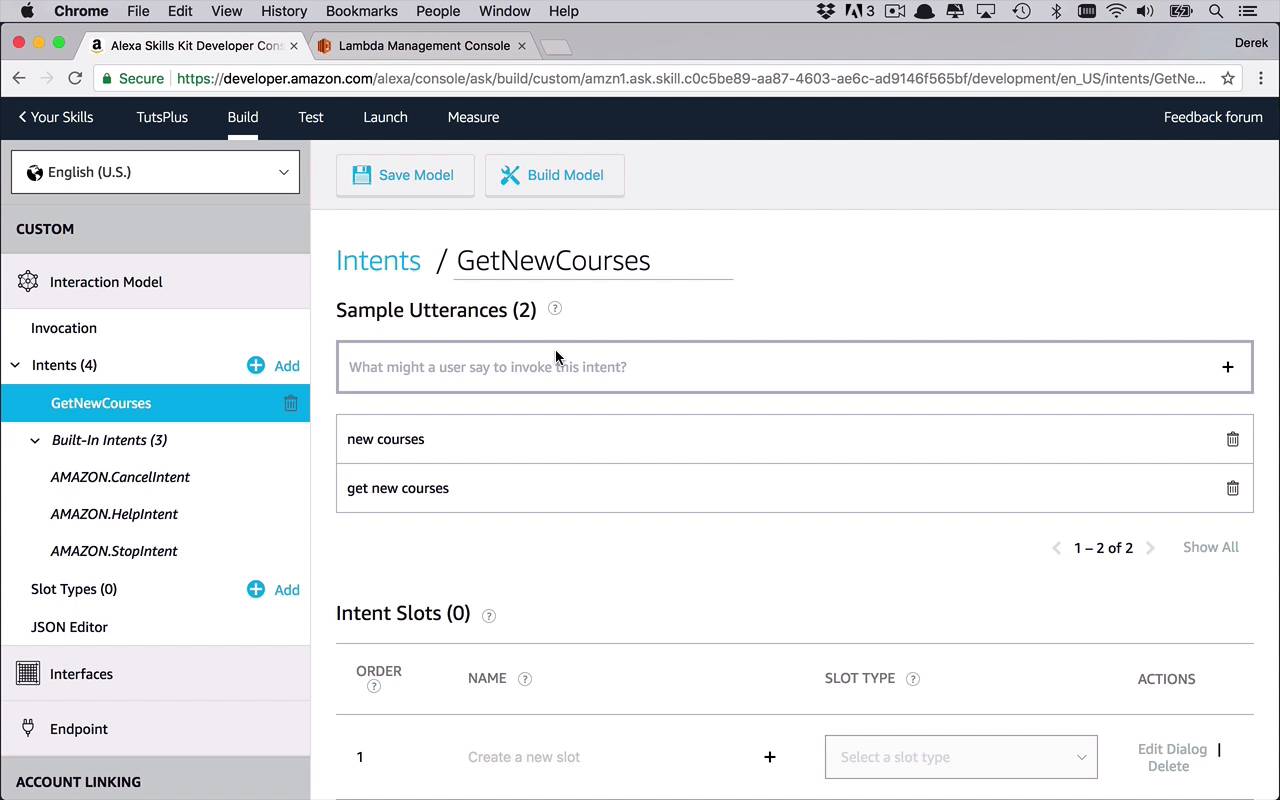
- Overview
- Transcript
3.1 Creating the Skill
Now that you know the basics of creating a skill, I'm going to teach you a new, and arguably better, way to design your Amazon Alexa skill and AWS Lambda Function combo. But first, we need to create the skill with all the necessary intents and slots.
1.Introduction
1.1Introduction01:03
1.2Prerequisites06:17
2.Alexa Skill Basics
2.1Alexa Skill Kit Walkthrough08:25
2.2AWS Lambda Walkthrough10:14
2.3Creating the Hello World Skill08:00
2.4Creating the Hello World Lambda Function10:14
2.5Handling Multiple Intents and Slots07:03
3.Building a Real-World Skill
3.1Creating the Skill06:37
3.2Creating the Lambda Function03:48
3.3Creating a Node.js App for Your Lambda Function07:11
3.4Creating Your First Handler04:38
3.5Creating the Setup Data for Your Skill03:00
3.6Finishing the Get New Courses Handler03:49
3.7Create the `GetCourseTeaser` Handler07:08
3.8Create the `AddToWatchList` Handler06:30
3.9Create the `GetWatchList` Handler03:43
3.10End-to-End Testing03:37
4.Conclusion
4.1Conclusion02:33
3.1 Creating the Skill
All right well, hopefully in the last several lessons you've kind of become a little bit more familiar with at least the process of creating an Alexa Skill and how to create a lambda function. And then be able to tie those things together. Because now what we're gonna do over the next several lessons is we're going to build out a fairly interesting and moderately more complex Alexa skill and lambda function that is going to tie into the concept of Tuts+ courses. And basically, the idea here is I wanna be able to interact with Alexa to do a couple of things. The first thing that I wanna do is I wanna be able to get some of the newer courses that are found on TutsPlus. Now, I'm gonna fudge that a little bit, but you could obviously make this as complicated as you want. But we're gonna do some basic stuff here and just kinda pre-plant some of these courses. But you'll see what that looks like a little bit later on. So I wanna be able to get a list of the new courses. I wanna be able to get the teaser descriptions or the first little bit of information that you find on the Tuts courses page. I wanna be able to add a course to a watch list, so I can kind of track some courses that I wanna be able to watch. And I want to be able to retrieve and check on what are all of the courses that are currently on my watch list. So that's the basic concept of what this skill is going to embody. Now, you can obviously add to this and tailor it as much as you want, but we're gonna to start there. And I feel like that's a very good starting point to be able to introduce you to the concepts that we want to be able to use throughout the rest of this course. And then for you to be able to reuse for any other skill that you want to create. So let's go ahead and start from the beginning. We're going to start with the Alexa Skills Kit Developer Console, and what we wanna do is we wanna go into our list of skills. And we're once again going to create a new skill, and this one I'm simply going to call TutsPlus. So this is gonna be a very basic skill that I wanna be able to say to Alexa I want to say ask TutsPlus to get new courses, or something like that. So let's go ahead and click Next. And I'm going to, once again, stick with Custom and we'll create our skill. And then we'll come in to our builder here and once again we can create an invocation. And I'm simply going to say tuts, or you can call it anything you want, tuts plus or whatever. Anything you wanna do, so I'm gonna keep this very simple for illustrative purposes. And we're just going to use the invocation name of tuts. Now the next thing that we're gonna wanna do is we're gonna wanna create some intents. And as I mentioned before, there's really four we wanna start with, but you can add on to them as much as you want. So we're gonna begin by adding an intent, and this will be a custom intent and this will be, GetNewCourses. And we'll create this custom intent. Now the utterances. Now, obviously, you can definitely train Alexa and train the skill to handle all sorts of different utterances, but we can keep things pretty simple right now. So we could say, get new courses. Maybe we'll just say, new courses would be another one. Maybe you could even get as generic to say new, but I think these two should be fine to get started. So we can say ask tuts to GetNewCourses or ask tuts new courses, something like that, I think that should be fine. In this case, the intent slots, I don't think we need any at this point. We're not really asking for anything specific, but we'll get into that in a little bit. So let's go ahead and save that model and I think we're good there. So let's move on to another intent. And we'll say, how about GetCourseTeaser, that little short description on the beginning of the tut page and we'll take a look at that in a little bit as well. And in this case, we can say something like get teaser for and then we're going to use a slot. So we'll do open close parentheses and we'll just do course_name, something like that. And we'll just click Add. And you can do something simple here, maybe just do, teaser for. And then we could also mention course_name here as well. And maybe we'll do, maybe teaser. And then once again we'll use course_name like that. So I think that should be good for this particular intent. As you can see now it added in here this course name down here, so we need to specify a type. Now, typically when you are dealing with a kinda generic string or something very simplistic like this, where you want to specify a slot, usually the best thing to use is a search query because that is kind of more free form. You don't have to specify possible values, whereas something like a literal or something like that you'd have to basically give a list of acceptable inputs. And in this case it could be just about anything. So we wanna leave it as free form as possible. So we'll use SearchQuery. So let's go ahead and save that model. So now we can take a look at the new courses, we can listen to the course teaser. Now let's also add in a little bit where we can interact with a watch list. We want to add a course to a watch list and we wanna be able to get our watch list. So we'll add a new one, and we'll say AddToWatchList, like that. Let's create that intent and we'll say add, once again we'll use course_name. Say add course_name to watch list. And you can obliviously add to this as much as possible but I think that's pretty simple, I think we with stick with that. And then once again for the slot type we'll just use SearchQuery again. So that's gonna be add to watch list. And then finally we wanna be able to get the entire watch list and just basically list everything out. So let's go ahead and add one more intent. We'll just call this GetWatchList and this one, we're not gonna need any slots. In this case, it's gonna be pretty simple, we'll just say get watch list. Or we could even say something like, get my watch list. So as you can see you can continue to create an add to these utterances as you need. But I think once again these two should be just fine, and we don't need an intent slot in this one. I think we should be good, we're not asking for anything specific, we just want an entire list. So let's go ahead and save that model. Now as you know we're almost done here. We could try to build the model but it's not gonna work at this point because we don't have an endpoint. We need to be able to publish these requests to an endpoint, which we don't have yet, which we are going to start to talk about how we're going to create that in the next lesson.


