
 Lessons: 19Length: 2.4 hours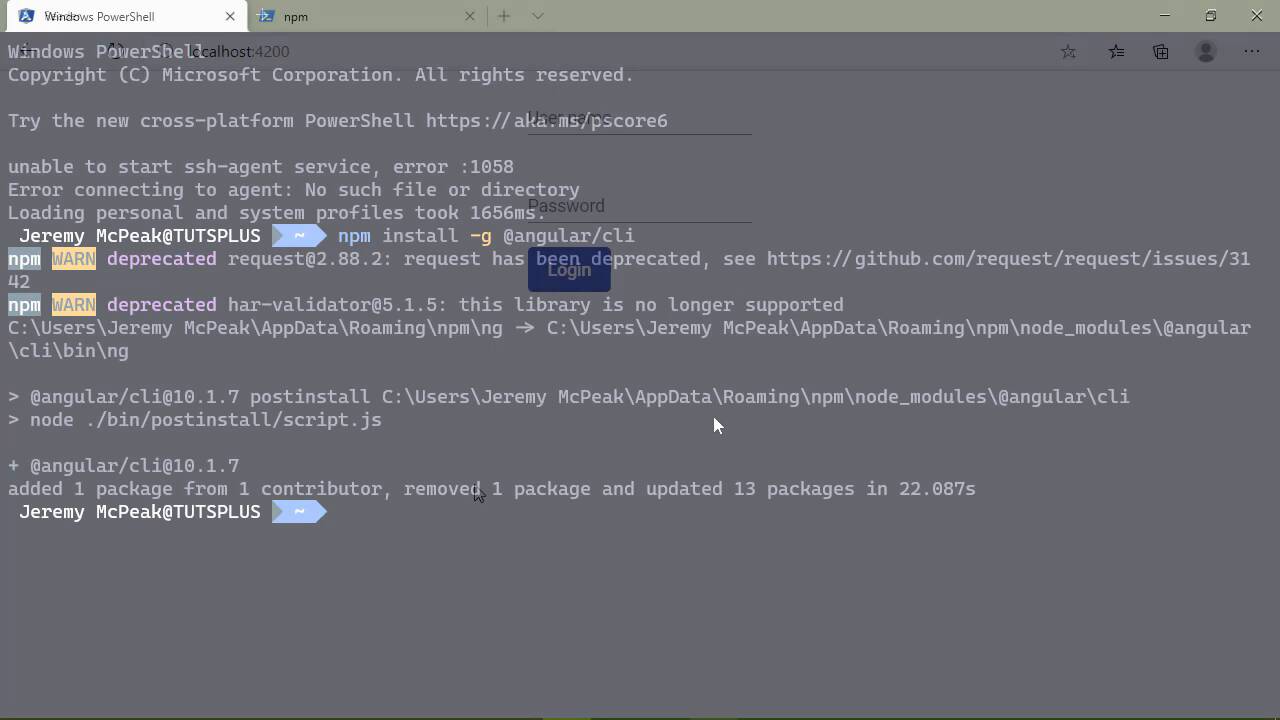
- Overview
- Transcript
1.2 What You Need
Your environment for developing Angular applications is very simple. We'll go over everything you need, and we'll quickly walk through the application we'll be building.
Related Links
1.Introduction
1.1Introduction01:23
1.2What You Need06:14
2.Getting Started
2.1Creating the Project08:21
2.2Designing the Basic Layout08:50
3.Writing the Basic Functionality
3.1Fetching the Feed List08:48
3.2Displaying the Feed List07:06
3.3Toggling the Feed List Drawer05:53
3.4Using Named Router Outlets09:22
3.5Displaying Feed Items09:11
3.6Displaying the Content12:16
4.Adding Settings
4.1Designing the Settings Panel10:03
4.2Using Services to Manage State07:13
4.3Finishing the Settings11:02
5.Managing Screen Sizes
5.1Using the `BreakpointObserver`08:03
6.Authentication and Authorization
6.1Refactoring08:24
6.2Authenticating With the Server07:58
6.3Sending the Token04:19
6.4Authorizing Routes07:05
7.Conclusion
7.1Conclusion01:06
1.2 What You Need
Before we get started developing our application, we need to first of all go over what you need to follow along in this course, and it is a very short list. So we will briefly go over those things and then we will go over the application that we are going to be writing. Now, the very first thing that you need is Node.js, and chances are you already have it installed but if not, go to node.js.org. Download the LTS version. Now, the version number itself really doesn't matter as far as our purposes are concerned. But download the LTS, that stands for long term support, and the installation is very simple. Just take the defaults and you will be good to go. So once you have Node installed, then you will want a code editor and any code editor will do. I mean, there is no right or wrong answer when it comes to what you like to use to write code because it's up to you. Now, we're saying that I personally think that Visual Studio Code is the best environment for JavaScript development. And I say that because, well, it is. So be it Node applications, Angular, React, Vue, it really doesn't matter. If JavaScript is the primary language that you're going to be using, this is the tool that you will use. In fact, I've gotten to where in my daily workflow, which I am a .NET developer by day, I have the full blown version of Visual Studio up and running so that I can do all the C# stuff. And then for all of the client work, I'm running Visual Studio Code for that. So it is a very, very good code editor for JavaScript. But we're saying that use what you like. But if you want to give this a try, just download it, it is cross-platform and give it a go. The next thing that we need is to install the Angular CLI because that is how we are going to create our project. And the installation is very straightforward because all you really need is Node running on your system. So you will want to go to the command line and basically just run this command npm install -g @angular/cli. And that will install the Angular CLI globally on your machine which is typically what you want to do with really any CLI tool. But the reason why we want to install the CLI is because it gives us a lot of tools that we need in order to get our application up and running. As well as add new features, like if we wanted to add components or services or things like that, we would do that through the CLI. And it has the tooling built in so that it will automatically update some important files like our app module. But once this is done installing, then you're good to go. You are ready to start developing your application. The application that we will write is just a simple feed reader. Now, let me iterate here that this is just the client portion of the application. We are only concerned with Angular in this course. So as far as the server is concerned, that is pre-built and it doesn't really do anything, which we will look at here in a moment. But as far as our Angular application, we will be able to log in using the username of user, the password is password. And then, of course, we will be able to log in. And we have a list of feeds. Now this UI here allows us to show and hide the feeds so that if we wanted to have a more space to view the content, which really isn't there, then we can do that. There's also the ability to manipulate our feed list so that if we wanted to add a feed, we can do that. And it really doesn't even have to be a valid URL because there is no checking being done on the server. So as long as we have a value of the feed URL, and we add that feed, it's going to automatically add that feed. And the feeds that we add are being stored in memory on the server. So as long as we don't restart the server, we're going to have the same list of feeds. Of course we can remove feeds if we want to, and all of that, of course, works. So as far as the server is concerned, it is just set up to respond to requests. So as far as our feeds are concerned, it's really just a JavaScript array that is serialized into a JSON structure that is then sent to the client which then displays the information. And it always starts off with the same two feeds. Anytime that we add a feed, it's going to automatically generate a feed but it's going to have the same kind of items and content there. If you look at the index file, you'll see that all of the routes just are there to respond with some data. So if it's to add feeds, it adds feeds, if it's there to just fetch the feeds, then that has been done as well. And you can see that as far as the authentication is concerned, that is hard coded. So the username is always user. And the password is always password and it responds with the same token. Now there are two scripts for the server because as we are developing the application we don't want to have to fiddle with authentication to begin with. So at the beginning we are going to be running our server using the no-auth script, that's going to bypass authentication so that we can develop our application not having to worry about authentication. But when it comes time to worry about authentication, then we will use the serve script and that will, of course, expect us to log in before we can do anything with our feeds. So that's just a brief overview of the application that we are going to building in this course. So in the next lesson, we will create and configure our project.


