
 Lessons: 19Length: 2.4 hours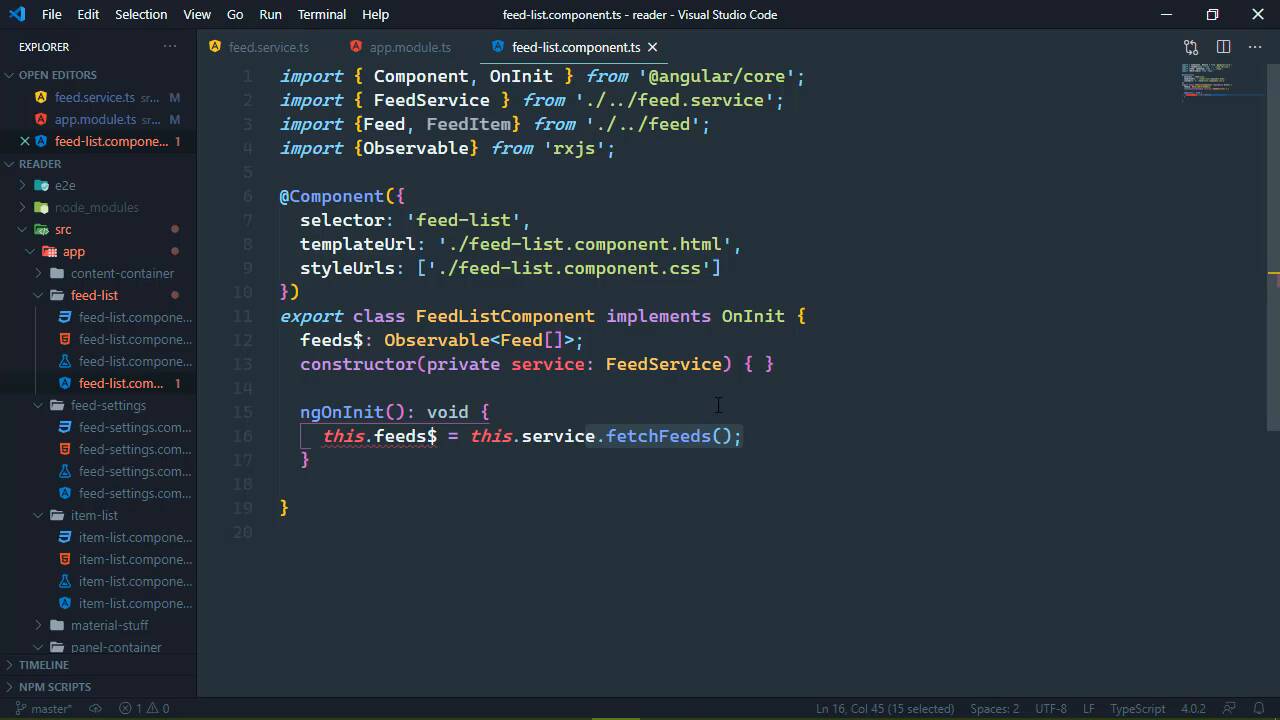
- Overview
- Transcript
4.2 Using Services to Manage State
Angular is a full-featured framework, and it has built-in state management. Yes, we could use a separate library, but we don't need to. In this lesson, we'll refactor our FeedService to manage the state of our feed list.
1.Introduction
1.1Introduction01:23
1.2What You Need06:14
2.Getting Started
2.1Creating the Project08:21
2.2Designing the Basic Layout08:50
3.Writing the Basic Functionality
3.1Fetching the Feed List08:48
3.2Displaying the Feed List07:06
3.3Toggling the Feed List Drawer05:53
3.4Using Named Router Outlets09:22
3.5Displaying Feed Items09:11
3.6Displaying the Content12:16
4.Adding Settings
4.1Designing the Settings Panel10:03
4.2Using Services to Manage State07:13
4.3Finishing the Settings11:02
5.Managing Screen Sizes
5.1Using the `BreakpointObserver`08:03
6.Authentication and Authorization
6.1Refactoring08:24
6.2Authenticating With the Server07:58
6.3Sending the Token04:19
6.4Authorizing Routes07:05
7.Conclusion
7.1Conclusion01:06
4.2 Using Services to Manage State
One of the things that sets Angular apart from other UI libraries is that it has a built-in mechanism for working with and managing state. For view in React, you need a second to library, and you have to tie that library into your application. And then you have some wonky interface that just, well, yeah. With Angular, it's not that difficult, in fact, it gives you everything you need out of the box, and you could still use a separate library if you wanted to. But for our needs, all we need is a service. This is what Angular gives us for managing our state, and our current service doesn't do that, but we do need to register our service so that it will. The first thing we need to do is go to our app module, and we are going to import the feed service here, so that we can then add it as a provider. And what this does is it'll create an instance of our feed service, and that will inject that same instance every time that we inject that inside of our components. Like for example, if we look at our feed list component, let's view that, we are injecting the service right here. Well, now that we have set feed service as a provider, our application is going to create a single instance. So it's kind of like a singleton, and it's going to pass that single instance every time we inject the feed service. So this gives us the ability to manage a state, we just have to do that inside of the service itself. Now one thing that we are doing is returning a bunch of observables. And when it comes to fetching an individual feed or fetching an individual item, I think that's okay. But for our feeds itself, this is primarily what we want to manage, because we have two places where we are going to see our feed. It's going to be inserted to the sitting, so that we can add and remove feeds, but it's also going to be in our feed list. And what we have in our feed list also needs to be represented inside of the settings. And whatever changes we make to the settings, needs to automatically be reflected in our feed list. So this is where we need to maintain state, it's with our feed list. And we can do that very easily by just having a property called feeds. And that is, of course, going to be an array of feed items. So this means that our fetch feeds is no longer going to return an observable. Instead, we are going to go ahead and subscribe to that observable so that we can get the data from the server and then just store that in our feed's property. So it's a lot like what we did at the beginning of this course, except that now this is being done inside of a service, and we can reference our feeds anyway that we need to. It's going to be the same feeds across our entire application. Now this change is going to force us to rethink how we have been fetching our feeds, because if we look at our feed list, inside of the init, we called fetchfeeds. And we don't need to call fetchfeeds multiple times in different components because now we are maintaining the state of our feeds. So really, we just need to call this method once, and it needs to be done somewhere that makes sense. And inside of our feed list component, it doesn't make sense. Now this also means that we're going to need to get rid of these feeds observable property. But we also need to change the service so that we can make this accessible inside of our template. So we'll just have a service property, which is, of course, going to be a FeedService. And then inside of the constructor, we will just set our service property equal to service there. So let's think about where it would be a good place to call that fetch feeds method, we could do that in the application. So if we look at our application component, and that was the wrong thing to click, that was the wrong thing to click. There we go. We could do that here, we could import the feed service and then call that inside of AppComponent, but I think a better option would be the panel-container. So let's open up the panel-container, and we do need to inject the feed service here. So let's make this private, we aren't really going to need the service inside of our template. So we'll just make this private. This is of course going to be FeedService, and then inside of our init method, we are simply going to call the fetch feeds service. So that way, anytime that the browser is reloaded, it's going to go out, fetch the feeds, set our feeds property inside of our service so that we always have those. Which means that this fetch item method is probably not going to be needed any longer. But we will get to that here in a moment. All right, so with that simple change, let's go to our feed list, and let's open up the template. And we need to change our ngFor, because we are no longer iterating over an observable, instead we are iterating over the feeds inside of our service. So with that done, we should be able to see this in browser, if we close our settings. Well, let's start reloading. Let's close the settings. There's our feeds. So everything is working there. Let's go to our settings template, so that we can display our feeds there as well because we need that functionality. So let's find our settings template. And we have that code already, but let's uncomment that. We're essentially going to do the same thing, so that we are going to iterate over the service feeds. And I don't know, did we inject the service? No, we did not, so let's kind of do the same thing. We're going to have our service, which is going to be FeedService. And of course, we want to inject that into the constructor so that we can set our properties. So we'll just call that FeedService once again, and then set our property, the service = service. We don't have to do anything inside of nginit, because, well, we are already getting our feed list. And so with that done, we don't need the router links or anything like that. But with that done, we should be able to see our feed list inside of the settings, and we certainly do. We can select them, and deselect them, of course, and we aren't doing anything with the Remove Selected Feeds button yet, but we will do that. So that in the next lesson, we will start adding functionality to our buttons, so that we can add feeds, and we can remove them as well.


