
 Lessons: 19Length: 2.4 hours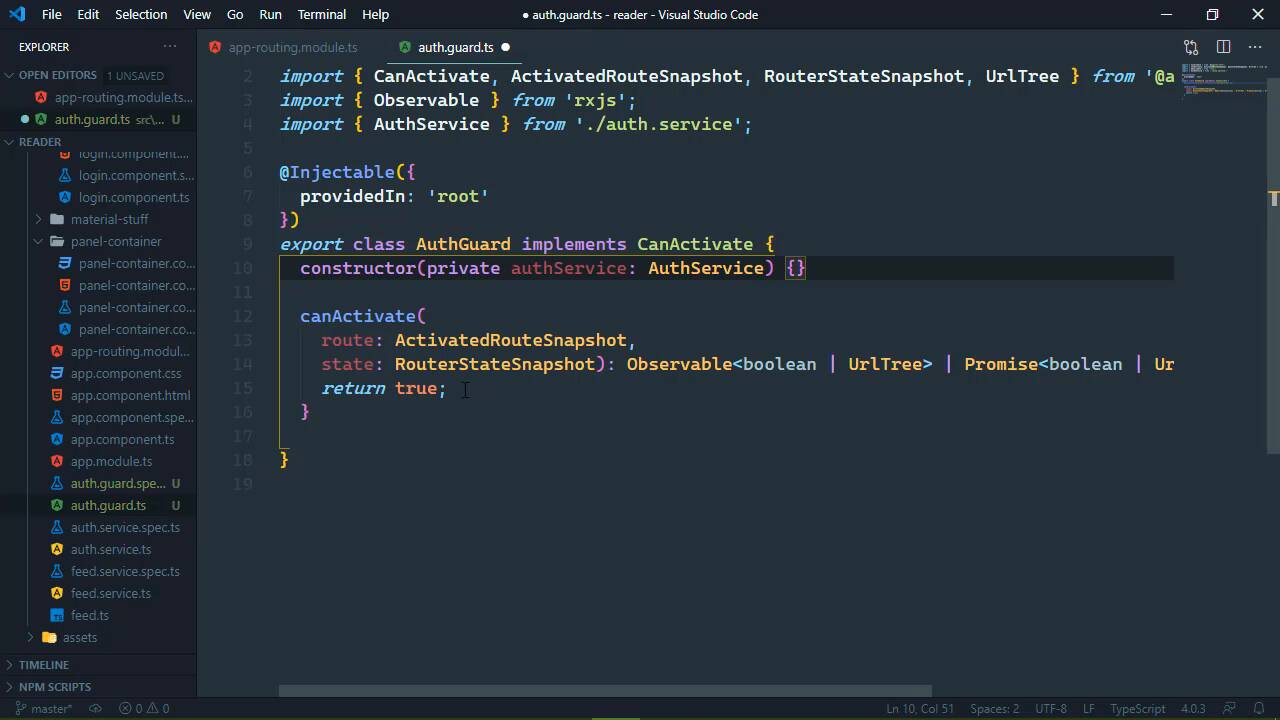
- Overview
- Transcript
6.4 Authorizing Routes
Unauthenticated users do not need to access the /feeds route, so we want to protect it. We can do so by using a guard.
1.Introduction
1.1Introduction01:23
1.2What You Need06:14
2.Getting Started
2.1Creating the Project08:21
2.2Designing the Basic Layout08:50
3.Writing the Basic Functionality
3.1Fetching the Feed List08:48
3.2Displaying the Feed List07:06
3.3Toggling the Feed List Drawer05:53
3.4Using Named Router Outlets09:22
3.5Displaying Feed Items09:11
3.6Displaying the Content12:16
4.Adding Settings
4.1Designing the Settings Panel10:03
4.2Using Services to Manage State07:13
4.3Finishing the Settings11:02
5.Managing Screen Sizes
5.1Using the `BreakpointObserver`08:03
6.Authentication and Authorization
6.1Refactoring08:24
6.2Authenticating With the Server07:58
6.3Sending the Token04:19
6.4Authorizing Routes07:05
7.Conclusion
7.1Conclusion01:06
6.4 Authorizing Routes
Usually when there is authentication, there is also some form of authorization. Now those two terms can be confused, it's very easy to do. Authentication is the process of verifying a user's credentials. So we are essentially making sure that the user is who they say that they are. Authorization is the process of making sure that the user can access only what they can access. So if we had permissions or privileges or whatever you want to call them, authorization is making sure that the user only has access to what they have permission to access. Now, let me also reiterate this, I sound like a broken record, but as far as our angular application is concerned, authentication and authorization is out the door. It's not guaranteed because all of this stuff is loaded in the browser. All somebody has to do is pull up the developer tools, set a breakpoint somewhere, modify what's in memory or even modify the code that executes. And then they can access things within the application, that's why the real source of truth is the server. So we react to what the server gives us, so that if somebody does access something that they aren't supposed to have access to, the application doesn't work. Like for example, here we are accessing the feeds URL, but we are not logged in. So of course, we don't see anything and as far as our experience is concerned, it just looks like the application doesn't work. And we don't want that, we want it only authenticated users to be able to access the feeds URL. So we can do that in a couple of different ways, but in this lesson, what we will do is use a guard, we'll essentially guard our routes, so that only authenticated users can access R feeds route. So let's go to the command line, we will generate a guard and let's just call it auth. It's going to create a class called auth guard but it's going to ask us what interfaces we want to implement. Now in our particular case, we just want the canActivate, basically this is going to allow us to ensure that the user can activate a route that we apply this guard to. So let's just take enter, and we now have that auth guard, so let's open up the TypeScript file and you're going to see that we have this AuthGuard implements canActivate. And we have this method already stubbed out for us, and it returns true here. Now notice that it actually returns one of two types of values. It will return a boolean or it will return a urlTree. And that's going to be very useful for us because what we want to do is check to see if the user is logged in. And if so, we'll just return true and that is going to allow the user to activate whatever route we want them to activate. So let's do this, let's have a constructor, so that's we can get our authService because we need that authService in order to determine if we are logged in. I'm gonna call this authService just so that we don't have any confusion between authService and authGuard. We of course need to import authService, but once we have that, well then we can use it inside of our canActivate. So, the very first thing that we will do is check to see if the user is logged in with our authService and we have that is logged in property. So if we are, we will just return true and there we go, now if we are not authenticated, then what we essentially want to do is redirect the user to the login page. Kinda like what we did in the previous lesson inside of the logging component, except that in that case we checked if the user was logged in and then we redirected them to feeds. Now we can do that very easily because this can activate returns either a boolean or a urlTree. So we could also pull in the router, which is of course of type router, so that then if we are not logged in we can simply return the routers parseurl method. We will just get the URL for the route of our application which is our login and voila, everything will just work like it should. Now this by itself isn't everything, we need to go into our route file. And we need to first of all import although let's do this, let's just see if we can use that authGuard. We want to add a property to R feeds route called canActivate. This is an array and we can apply all of the guards that we would want to apply to this route. But of course we only have one it is that authGuard, so let's see if we can automatically pull that in. We can, great, so there we go, we have now protected our feeds URL or our feeds route with the authGuard. So whenever we save all of these files and we go to the browser and it finally recompose everything and reloads, we should see us redirected to the login page. And we do, so if we try to go to feeds, that's not gonna work because of that authGuard. However, if we log in with user and password, that is, of course going to authenticate us, and there we go, we can access our feeds. And once again, if we try to go to the route, we get redirected, so that we can view our feeds if we want to manage them, we can manage them as well. Now, I mentioned that we kind of did the same thing in the previous lesson with our login component. And we could take the same approach so that we write another guard but it would essentially do the reverse. It would check to see if we are logged in and if so, then it would return a urlTree to our feeds route. And we could argue if that is the correct way or not to handle that particular case. As far as my own software is concerned, I tend to go for the simpler solution and using the init to check if we are logged in. That is definitely simpler than creating a guard and then applying that to the appropriate routes, but you can choose what you want to do. But by creating that guard, applying it to our feeds route,we can ensure that only authenticated users are authorized to access the feeds.


