
 Lessons: 19Length: 2.4 hours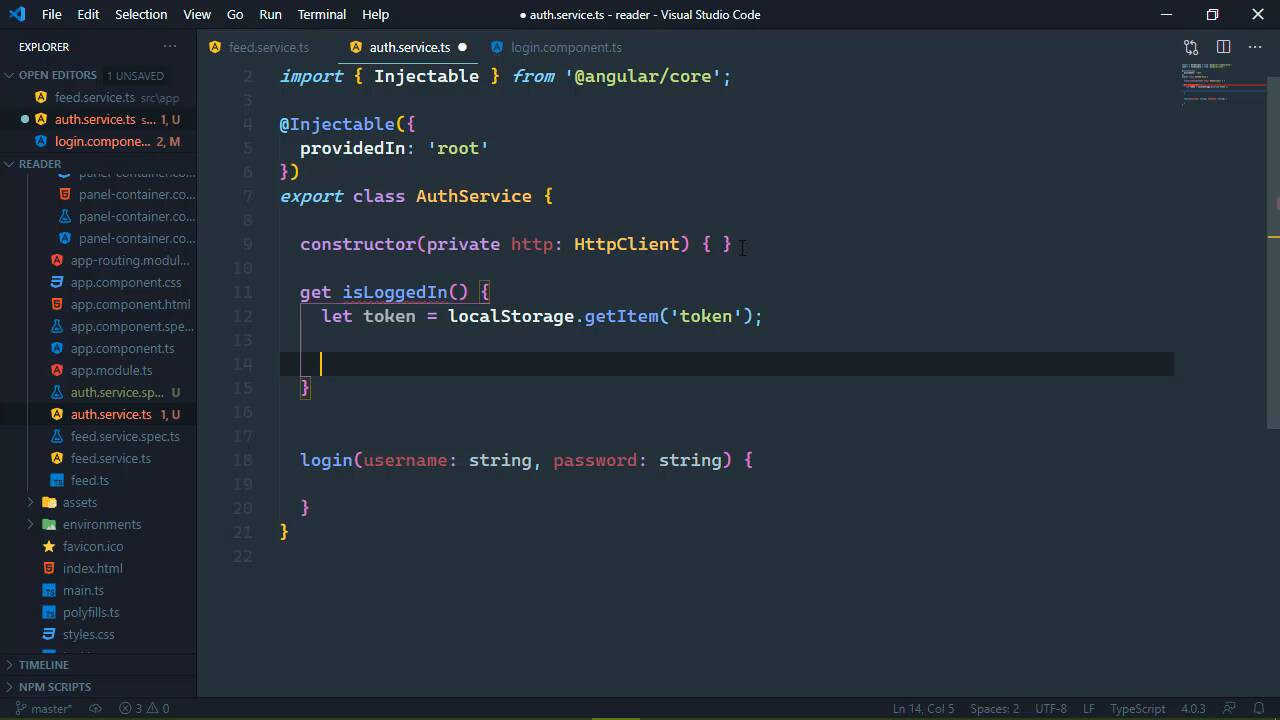
- Overview
- Transcript
6.2 Authenticating With the Server
In Single-Page Applications (SPA), the client receives a token from the server when the user authenticates, and the token has to be provided for every request. In this lesson, we'll write the functionality needed to authenticate the user and store the token for subsequent requests.
1.Introduction
1.1Introduction01:23
1.2What You Need06:14
2.Getting Started
2.1Creating the Project08:21
2.2Designing the Basic Layout08:50
3.Writing the Basic Functionality
3.1Fetching the Feed List08:48
3.2Displaying the Feed List07:06
3.3Toggling the Feed List Drawer05:53
3.4Using Named Router Outlets09:22
3.5Displaying Feed Items09:11
3.6Displaying the Content12:16
4.Adding Settings
4.1Designing the Settings Panel10:03
4.2Using Services to Manage State07:13
4.3Finishing the Settings11:02
5.Managing Screen Sizes
5.1Using the `BreakpointObserver`08:03
6.Authentication and Authorization
6.1Refactoring08:24
6.2Authenticating With the Server07:58
6.3Sending the Token04:19
6.4Authorizing Routes07:05
7.Conclusion
7.1Conclusion01:06
6.2 Authenticating With the Server
Of course the process of authentication requires us to send a request to the server that contains our credentials. That typically means that we need a service class and we don't really need to use, our feed service because this is responsible for working with our feeds, and nothing else. If we put our authentication code here, then it's just going to muddy things up. Now yes, we will need to incorporate the token that we get from the server, but that comes after authentication. So when it comes to authentication, we need a authentication service, so let's go ahead let's generate that, and we'll just call it auth. And to start with, we just need a method called login, and we're going to go ahead and stub that out. Because, when it comes to writing code like this, I like to actually write the code that I'm going to use and then implement that code. And let's open up our auth off service so, the first thing we need is the HTTP client so we'll go ahead and have that injected here. So we will have that available, then let's go ahead and stub out the login method, where we will accept the username, and the password. And of course we will use the HTTP client here, but we'll get into that. And really the only place that we're going to be using this is inside of the login component. So let's go ahead and open that up, and we already stubbed out log in here. So let's first of all, go ahead and inject the auth service, I'm just gonna call this auth. And I guess really the first thing that we should do is check to see if we are logged in because if we are, then there's really no reason to show this component. So right here inside of Init, we'll use our auth service and we will define a property called isLoggedIn, and if that is true then we will just simply use the router which we will need. So let's go ahead and inject that as well we'll just call it router. And so if we are logged in, then we'll just use the navigateByUrl method, pass in ('/feeds');, and that will take us to the feeds so there we go, we don't have to worry about anything else if we are already logged in. Now if we are logged in, then we of course want to use our auth service, and we'll use that login method. And this is going to return an any object, because I'm going to be lazy here. And really there's just two properties that we need to check for, which we will do right here. So we'll call the login method we'll pass in the username and the password, and then we will subscribe so that we work with the data that's coming back. And we will check to see if we have a token, because if we do well, then we are logged in and we can essentially navigate to the feeds URL, so there we go. However if there is not a token, then there is an error and we were going to display that error, whatever it is, and there we go, that is going to be our authentication code. So let's start with this logged in property, that will be the easiest thing first. So, let's just have a getter, we don't need a setter here, and we're going to check to see if we are logged in by seeing if we have a token, inside of our localStorage. So we will get to the item, let's just call it token, and if we do have a token, then we are logged in. Now, remember that as far as our client is concerned, there really is no authentication at all, all of that stuff is being done on the server, so the server is the source of truth, the server is the gatekeeper. All we know is if we have a token, and if we have a token, then the client assumes that we are logged in, but the server is going to actually determine if we are. Now if we have a token, then the client is going to assume that we are authenticated, but if we don't have a token, then the result of calling getItem is going to be null. So we're just going to check to see if token is not null, then we are logged in otherwise. So there we go, now as far as our login is concerned, it's going to start fairly simple. So we'll use our HTTP and we are going to make a POST request and work with an any object because I'm lazy. I don't want to define an interface with the properties that we want to check for, in a real application I would, in this case, I just want to get this working. So we're going to send a request to the login endpoint, our body is going to contain the username and password. But then we need to think about how we want to work with this, because really we need to do two things, we first of all, need to send the request, and that is normally done with a subscribe. But we can't really subscribe here, because remember, that inside of the logging component, the login method is returning an observable. We are subscribing here, so we can't subscribe, but we can call pipe because there's more than just wanting to read the response. We need to check to see if we have a token and if so, go ahead and store that inside of localStorage. That way we don't have to do that anywhere else, that's automatically done here inside of this login method. So we can use this pipe() method which returns an observable, and then we can pipe in multiple processes that would work with the result, and one of those processes is going to be called, tap(). Now we will need to include this tap() function it is given to us through the rxjs library, so let's go ahead and import {tap} and that is from 'rxjs/operators'. But you can think of it like this, we are tapping in to the result of our observable which is our post request, so that in this case, we can check to see if we have a token. And if so, then we are going to store that in our localStorage, we'll call the setItem method, and we call that ('token'), and then we will just pass in that value. So this way our token gets stored into our localStorage, we don't have to do that anywhere else it's just automatically done. And since the pipe method returns an observable, that means that we can use subscribe inside of our login component just like we have already done. So let's hop on over to the browser, and let's try this out. So as far as the username is concerned, let's just put something in, login, and we see that there is an invalid username and password, and that's great. So let's type in the actual user which is user, and then password for the password, and whenever we log in, that should take us to our feeds and it does. Now of course we're not seeing our feeds because we are not passing our token with our requests, but we will do that in the next lesson. But let's check this just make sure if we get rid of feeds, and go straight to the route that should redirect us back to feeds and voila, we are good to go there. So now in the next lesson, we need to include that token inside of our requests.


