
 Lessons: 16Length: 2 hours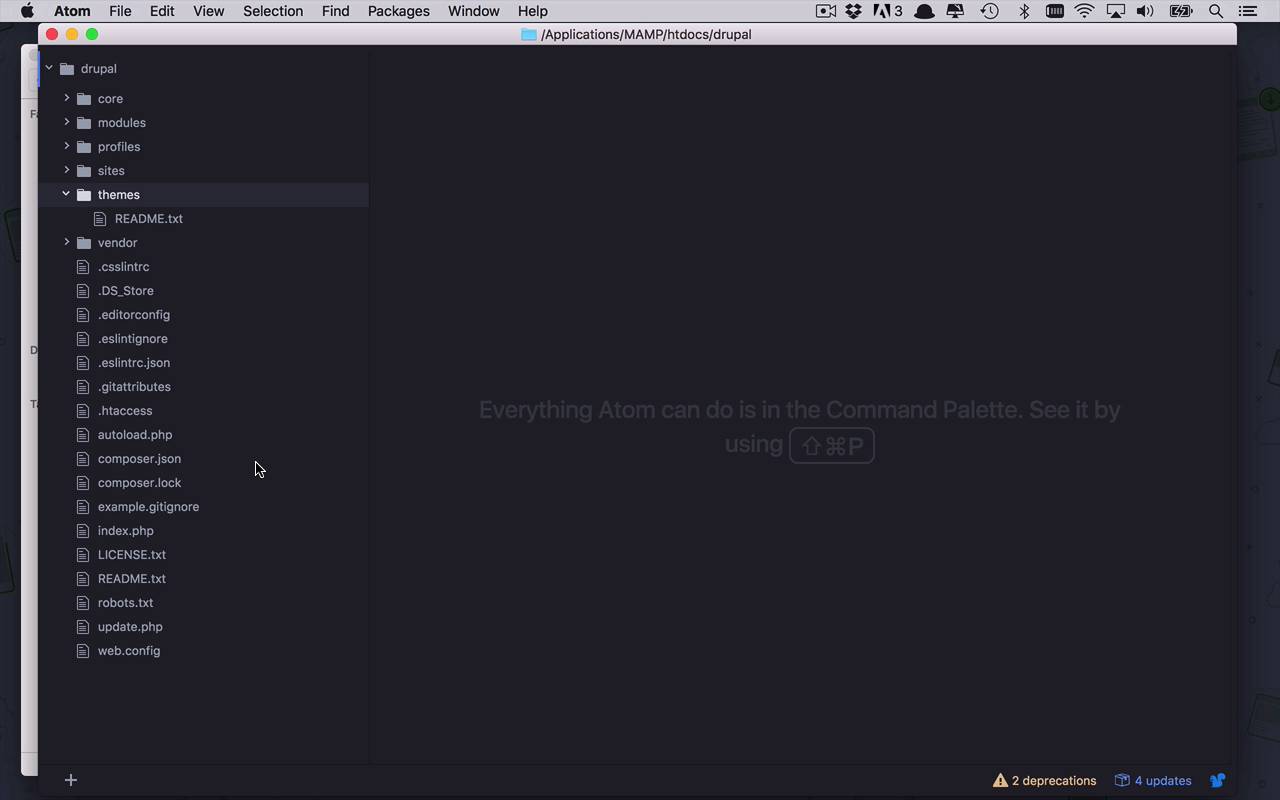
- Overview
- Transcript
2.1 What Are Themes?
Before building your own custom theme, it helps to understand what themes are and how they work. In this lesson, I'll begin to scratch the surface of Drupal 8 themes by looking at some built-in themes and exploring their structure.
1.Introduction
1.1Introduction01:07
1.2Prerequisites07:24
2.Building a Custom Theme
2.1What Are Themes?07:29
2.2Create Your First Theme06:55
2.3Regions, Blocks, and Debugging10:59
2.4Introduction to TWIG14:00
2.5Add Custom CSS05:47
2.6Add External Libraries07:35
2.7Add Basic Styles08:16
2.8Create a Main Page05:57
2.9Style the Header14:13
2.10Style the Navigation06:46
2.11Using Partials05:02
2.12More Partials and Content07:23
2.13Adding Styles to Views07:25
3.Conclusion
3.1Goodbye01:12
2.1 What Are Themes?
Before we go diving into the world of theming and Drupal 8, it would really be beneficial for us to spend a little bit of time thinking about what themes are in Drupal and just what exactly they are meant to do. Well, in the world of themes and Drupal, what exactly is a theme? Well, what you are seeing here is a theme, yes, this truly is a Drupal site, this is out of the box look and feel of a Drupal site. But if you look beyond the content, if you look beyond the visuals as to what's going on here, a theme is really a way for you to create the structure, the layout, the look and feel of your website, minus all of the content. Yes, the content is important and that is what ultimately drives your website, but what gives that content structure, what organizes it on the page, what moves around the regions and places those regions and blocks in certain places is your theme. So really, at the end of the day, in order of importance, we're probably talking about the actual installation of Drupal itself at the base. And then above that is your theme, and the layout and the appearance of the highest level, which is the content. So a very important piece of the puzzle when it comes to Drupal, and your Drupal 8 website is the theme. It gives it that structure. It gives it that appeal to the end user. Which is pretty cool because we get access to do all of these things. All of these structural design ideas, do I want a sidebar on the left? Do I want it on the right? Where do I want my footer? How do I want my content in the center of the page structured? How do I want my pages to look? How do I want all of those things laid out? We get access to all of those things by using something known as the twig template engine and we're gonna talk about that over the next several courses. I'm gonna show you what exactly that is and how it works. So this is all really well and good, but how do I get access to this? How do I really see what's going on behind the scenes? So if we scratch a little bit underneath the surface, and I head over to my system here, I have opened my MAMP directory. So you can see my MAMP installation here. This is the basic structure of any out of the box map installation, you are gonna see something that looks a little bit like this, and this is very common. If you wanna build websites and test them out and play around with them, you're ultimately gonna wind up creating several directories underneath this htdocs folder. And in my case, as you saw before, I am running this under my localhost port 8888, under the Drupal subdirectory and that lives right here. So that means that is literally being served up out of this folder right here. So we could go digging in and out of here and taking a look at everything that's in this particular folder. But I thought at this point, it would be a little bit more beneficial for us to look at this through the eyes of a text editor like Atom. So as you can see in here, here's that same Drupal folder directory structure, just open in Atom. Now, there's a lot of things going on in here, and there's really no reason for you to understand all of it. But when it comes to themes, there is a couple common areas that you are gonna be bouncing in and out off quite a bit. Now if you take a look at this high level structure under the Drupal directory, we've got few folders here, core, modules, profiles, sites, themes and vendor. Well, themes, that sounds interesting. So if we were to open that up, unfortunately in a base installation, you're gonna be awfully unimpressed. And that's simply because in this directory, by default, well there's nothing, except for this readme.txt file and this readme file is going to tell you that themes are what allow you to change the look and feel of your Druple site. And you can see all the different themes that are contributed by other users. And you can even create them on your own. And this is the directory that we're gonna be spending most of the time creating our own theme. This is where whatever themes that you create are going to live. Now, what about any other themes? What about the ones that come out of the box? So if I switch back over here to my Drupal installation and I go and take a look at appearance, you're gonna come down here and you're gonna see a number of themes. I have two themes installed by default which come with all Drupal 8 installations, Bartik 8.3.0 which is the default theme. And we also have the 7 theme which I could switch over to and set as default if I wanted to which is also used for the administrative pages within a typical Drupal site. And then we have an uninstalled theme here called Stark. So where exactly do these come from? Well these are built in by default, but we can find those within the directory structure as well. So where do all of those things live? Well, if we come up to core, and you can think of the core directory in a Drupal site as kind of the base functionality of everything that goes on within Drupal, and within your Drupal site. So when you start to create a theme, you're gonna quickly find that there's a whole lot of things that you can do but the nice thing is you don't have to do all of them. And for all of the holes that you don't fill in with your own custom theme, Drupal is going to be smart enough to say, all right, I see that you haven't fulfilled x, y, and z. I'm gonna go find x, y, and z in core and just allow you to use that out of the box which is kind of a nice feature. So there's always that fallback, instead of if you miss something, you don't get failures, you just get default functionality, which is pretty cool. So if we take a look at the core sub folder here, and come down into themes, we're gonna start seeing those themes that I just talked about. We see Bartick, we see Seven, we see Stark, and a couple other ones here too. And we'll talk about that a little later as well, but you can start to dig into these things and you're gonna see what do we have in here, well wow, we have some CSS, pretty cool. So as you can see here, a lot of the things that are being build into theme is going to be CSS. Now, there could be more complicated things in here, you could have CSS and JavaScript, and all sorts of other things in here, but it doesn't have to be complicated, it can be straight CSS and you could simply use that. Sure, we have some images, we have some templates, which are going to be very important. And we'll talk about these when we start talking about twig a little bit in an upcoming lesson. But those are pretty cool to use as well. And a couple of these things in here as well, these YML files are gonna become very important. We're gonna start playing around those in the next lesson. And YML is used, yet another mark up language, is used to define, not only the theme itself, but also a lot of these structural components of the themes that we're going to create. So we can define what sort of libraries we are using. Are we using Bootstrap for CSS? Are we are using some other libraries? What is the overall structure of our site? How many regions do we wanna use? And all sorts of things that we're gonna talk about in the upcoming lessons. But it's kinda nice to look through some of these built-in themes and see just what exactly make these things up. And there's a lot of things to it, we're gonna talk about a lot of the important aspects of these themes and how to start creating them on your own in the next lesson.


