
 Lessons: 16Length: 2 hours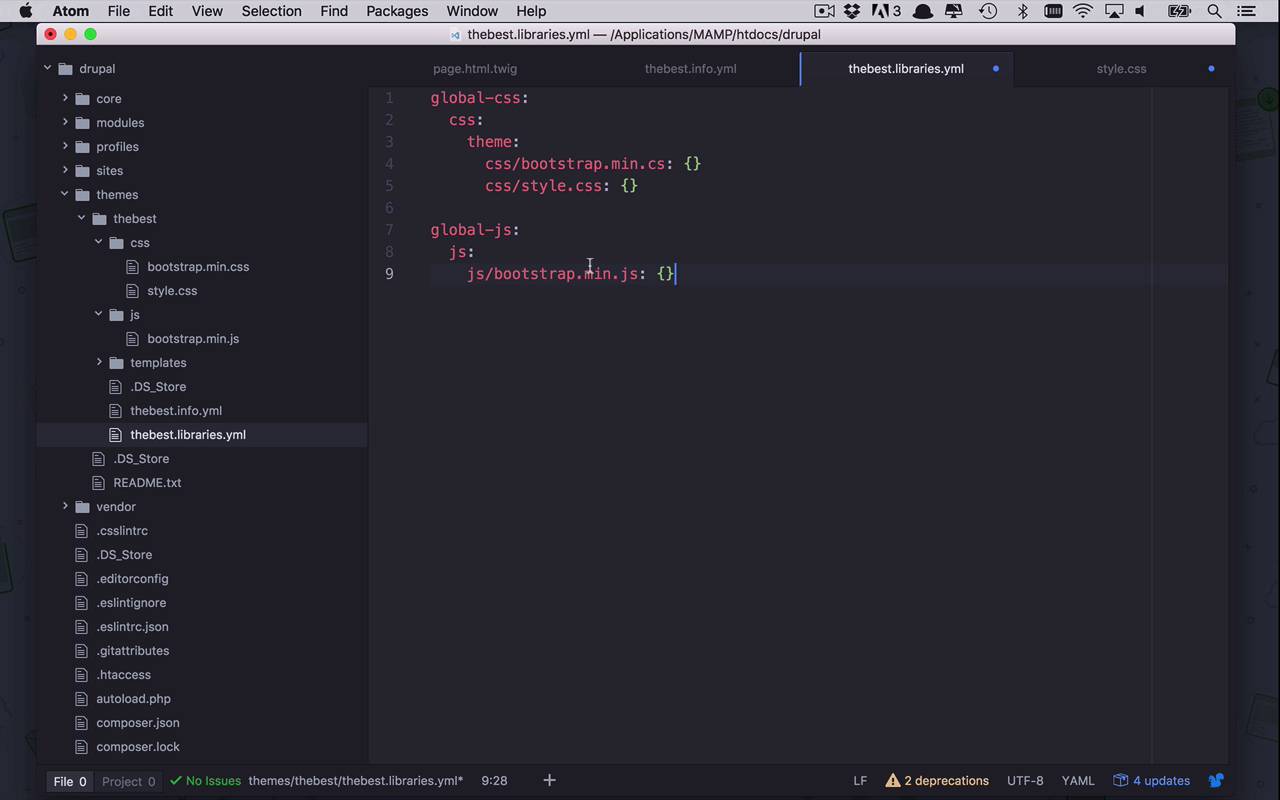
- Overview
- Transcript
2.6 Add External Libraries
Unfortunately, not everyone is born with a keen sense of design. There are many great designers out there, but for the rest of us, it is often helpful to start with a CSS framework. In this lesson, I’ll show you how to integrate Bootstrap into your custom Drupal theme.
Related Links
1.Introduction
1.1Introduction01:07
1.2Prerequisites07:24
2.Building a Custom Theme
2.1What Are Themes?07:29
2.2Create Your First Theme06:55
2.3Regions, Blocks, and Debugging10:59
2.4Introduction to TWIG14:00
2.5Add Custom CSS05:47
2.6Add External Libraries07:35
2.7Add Basic Styles08:16
2.8Create a Main Page05:57
2.9Style the Header14:13
2.10Style the Navigation06:46
2.11Using Partials05:02
2.12More Partials and Content07:23
2.13Adding Styles to Views07:25
3.Conclusion
3.1Goodbye01:12
2.6 Add External Libraries
Okay, so as I mentioned before, I am no web designer. But I want to start to add some structure and some styles to my website, to just start to provide some basic structure. And what is the answer when you are not a web designer and you wanna do that? Well, the answer is Bootstrap. So I'm gonna show you now how we can start to take some external CSS and styling frameworks. Whether it's Bootstrap or whether it's something else, whatever your favorite is. And how we can start add that into our theme, and use that across our entire site. So the first thing that you obviously need to do, is you need to download Bootstrap. So I'm gonna go over to the getbootstrap.com site, Getting started. And I'm going to download the latest version, in this case it's 3.3.7. So I'm gonna show in my folder. Let's go ahead and unzip that, and I already actually had it. And what I'm gonna do here is I'm going to grab a couple of files. So what you can do here actually, is grab just the bootstrap.min.css. We don't really need the full CSS, because we're not really gonna be looking this very much. And we are also more than likely going to need the accompanying bootstrap.min.js. Now, you don't have to but it's kind of part of the entire process, and you could bring in the fonts as well too. I'm not really gonna use those, but you could if you would like to. So I really just need the bootstrapmin.css and the bootstrapmin.js. So I'm gonna go ahead and copy those files. And now that I have these copied, I am actually going to go over to my application. So here we have Drupal, we have themes, we have thebest. And let's just go ahead and put those in here for the moment. So let's go ahead and paste these two items. And where we're gonna want these to live, is going to be in some sort of structure. Now, we already have a css folder here. So let's go ahead and grab bootstrap.min and stick that in our css folder. And then let's create a new folder called js, because I want that to be where my JavaScript lives. So let's go ahead and add that in there. So now here is my structure. So if we were to come back to Atom, you should see that represented here. I now have a couple more references to some libraries, from within my theme. But now I have to reference these, just like I did before. So we're gonna come into the libraries, and now I can specify more CSS in here. So I'm gonna say CSS/bootstrap.min.cs. And I'm going to define this just how I did before. Now, I can bundle a bunch of different CSS files within my global CSS. And then I only have to reference that one global CSS, within my library, within my theme. So that works out pretty well. Now, what I can also do, is I can then create another reference here within my libraries, and I can call this global-js. And within here, I can also define separate JavaScript libraries, that I want to add to my theme, and just basically do the same thing. But in this case, you would only have to say JavaScript, and then within here, I can then reference those JavaScript files like this. And I could say bootstrap.min.js. Now, while this is valid, at this point I would need to go back into my info.yml file. And I would need to specify a new library, because I gave this a different name. Now, that would be absolutely fine. But the problem with that is, at least in my mind at this point, is that this library right here, this JavaScript library, is part of my styling. Because it goes along with my CSS. So while this is valid, I am gonna say in this case I am not gonna do that. And I am going to simply create another section here within my global CSS. And it's gonna be js, so I can define another js section within my global CSS. And I'm gonna do the same thing in here, and I'm gonna say in this case, this is going to be in js/bootstrap.min.js: open and close curly brackets. Now, that is pretty good, but there's another difference when it comes to including JavaScript files. And if you've ever done this sort of JavaScript development, you're gonna know exactly what I mean. In the world of CSS, yes, it's cascading and you can add several layers and overrides to your CSS from different files, but it's really not required. But when it comes to the world of JavaScript, a lot of times you have dependent libraries that are necessary for your JavaScript library to function. And in that case, you're gonna need to define what those dependencies are, so that you're making sure that those are also included in the page. So the way that you do that, is you come in here and you define another section in here called dependencies, did I spell that right? Dependencies, and then within here you can specify the dependencies that are necessary to load for your theme. Now this could be other external dependencies, maybe you need jQuery or something like that, and that's fine. But the nice thing about Drupal and theming is that some of those, you already get by default. So what I can do in here, is I can say that my dependency is going to be, hyphen space core, because I'm going to borrow this from core. And I wanna use jQuery, just like that. So now I can save this file. And I have now included an external library, Bootstrap, I'm using both its CSS, And it's JavaScript files. And I'm also specifying that I have a dependency on core/jquery, so that I can make sure that jQuery is always present on the pages. Just so that in case it's referenced from within Java script files, it's gonna be there on the page and I don't have to worry about doing it manually. So once that's all saved, I can come back to my site. And I'm once again going to clear my cache. And then I am going to refresh my page. And nothing's really changed, cuz I haven't changed any stylings. But if I go ahead and view page source, once again if I come down here, I now see my bootstrapmin.cs. And it looks as though I have spelled that wrong, so we'll go ahead and fix that. And then if I were to come down to the bottom, I am also going to see in here drupal/themes/thebest/js/bootstrap.min.js. And also in here you should see jQuery, because that is just part of core as well. So what we need to do is come back in here and fix this. This should be CSS. So let's go ahead and save that. Everything else looks good. I got a couple CSS, I've got some JavaScript. Let's come back over here. Let's clear my cache. And let's go ahead and refresh my page here. And if I were to come back up to the top, we should now see bootstrap.min.css. So there you go, that is how you take external libraries whether they be cascading style sheets or JavaScript files, so you can add theme into your theme. So now that we have all this set up, in the next lesson, let's go ahead and start to add some bootstrap styles to our page.html.twig file.


