

- Overview
- Transcript
3.2 Working With Static Resources
Almost every website and application has some kind of static resources. I'll show you where they go and how to link to them.
1.Introduction
1.1Introduction01:53
1.2Set Up Your Environment05:37
2.Basic Routing
2.1Routing Requests07:07
2.2Working With Query Data09:37
2.3Route URL Parameters07:24
2.4Routing to Controllers08:22
2.5Creating a View08:10
3.The Blade Templating Engine
3.1Introducing Layouts08:15
3.2Working With Static Resources05:03
3.3Generating URLs for Routes03:26
3.4Organizing Views09:41
3.5Using Blade Directives07:37
3.6Showing and Linking Data07:31
3.7Setting Up the Database03:57
4.Working With Data
4.1Creating Migrations and Models10:08
4.2Saving Database Records08:57
4.3Validating User Input07:38
4.4Updating Data07:04
4.5Using Type Hints and Request Classes08:50
4.6Using Mass Assignment06:08
5.Conclusion
5.1Conclusion01:03
3.2 Working With Static Resources
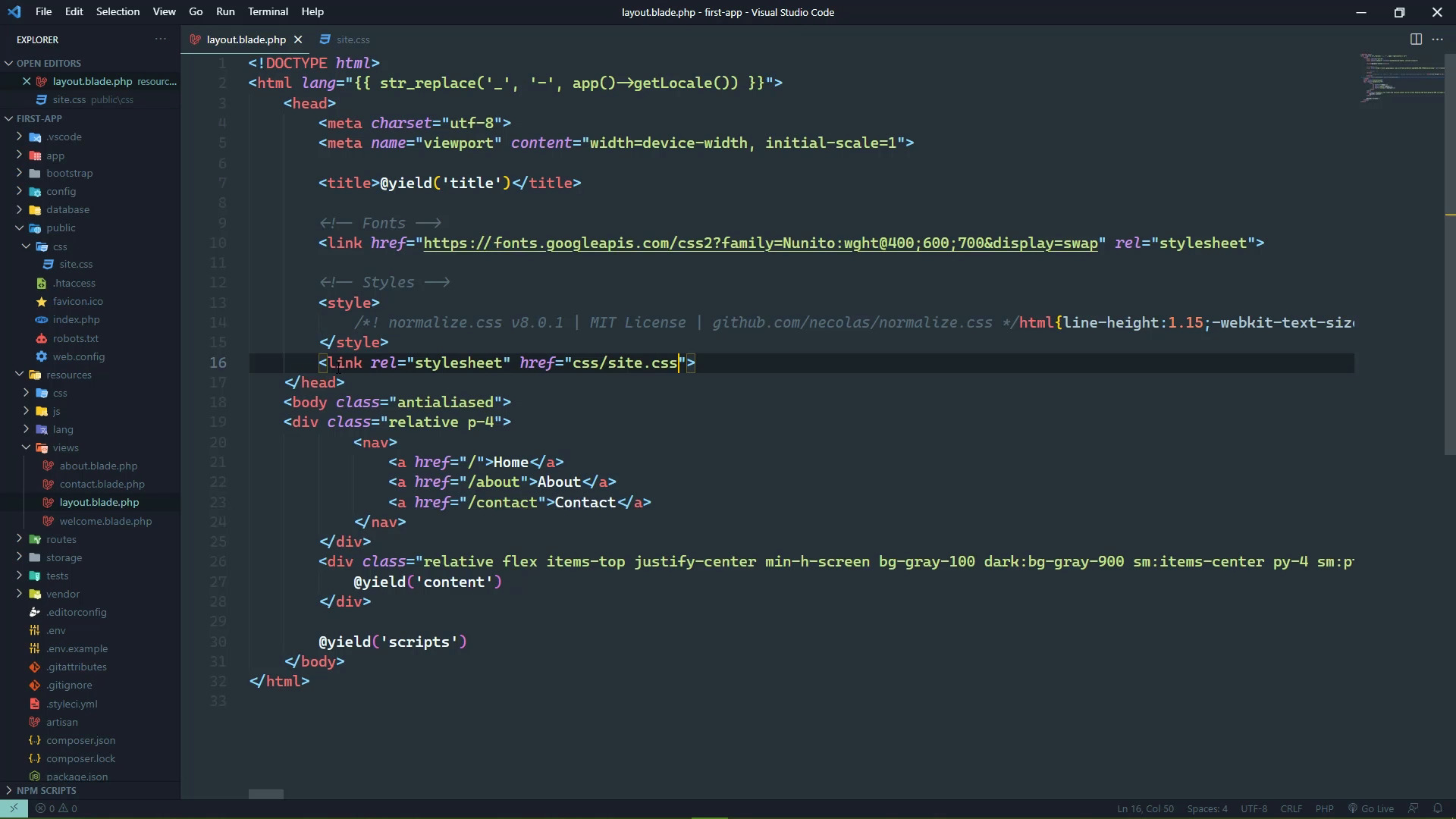
Valid and correct URLs are very important. In fact, they are probably the most important thing in a web application because without correct URLs, well, nothing is going to work. And it's not just navigating from page to page. It's also linking to other resources like CSS, JavaScript images things like that. So, in this lesson we are going to look at two things. First of all, where you can put your static resources, the second thing is how to link to them. And it might sound obvious, but there are some issues there. So, let's start by looking at where we can put our static resources and that is inside of the public folder. Now, there are already some files in here, one of those is this index.php. This is, well all of the files within our application are important, but this one is the entry point of our application, so, without this nothing works. But if you scroll down, you can see where the bootstrap file is being pulled in. Now, that is not the CSS framework, that is bootstrapping this application. And is creating the application, handling the request and giving the response. So, this is a very important file, we want to leave it alone, so let's just close out of it before we really screw something up. And everything inside this public folder is considered at the root of our application. So, what's exactly does that mean? Well, this index,php, for example, the URL for that would then be, let's see. We are at localhost port 8000/ and then index.php. The robots would be robots.txt and so on and so forth. So, this is where we can put our static resources like our CSS and stuff like that. And that is exactly what we are going to do, we are going to create a new folder, called CSS. And then inside of there, we will create a new file called site.css, and we are going to take the CSS inside of the style element. So, that is this body rule, as well as the p-4 class we created and then the rule for our navigation. And we are going to put that inside of site.css, which then means that we need to link to that. So, we'll use a link element and the URL. Well, that should be css/site.css, that should work just fine. So let's go to the about page, let's refresh. And everything looks like it did before, so that's great. But let's look at this, we're going to change the route for about and all we are going to do is just say /about/about. So, if we go back to the browser, let's refresh this page we are gonna get a 404 because we no longer have a page just /about. We have to go to /about/about. And this is going to look mostly the same, but notice the menu, the styling is off. And the reason is very simple, the browser is looking for our site.css in the wrong place. So, let's copy that link address and we'll take a look at that. So, it is looking for the css folder which we know is that the root because we put that inside of the public folder. It's looking for that css folder inside of about and that is definitely wrong. Now, there are some ways that we can get around this. But there is a foolproof way that's just going to make it so that we don't have to even think about this. All we have to do is use a utility that the blade templating engine gives us, it's a function called URL. So, let's go back to our layout page, and instead of just directly putting the URL inside of the href, we are going to use this URL function to where we pass in the relative URL. And the magic is just going to happen. So, if we go back to the browser, refresh the about/about, we can see that now it is pulling in the appropriate CSS file. If we go to any one of these other views, then everything is going to look the same because the URL is going to be correct. So, when it comes to not just linking to static resources, but any resource within our application, it makes sense to use the URL function. Because all we have to do is supply the relative URL and that's going to generate the appropriate URL and we don't ever have to worry about, having an incorrect URL once again. Now, in the next lesson we are going to take this a step further and we are going to look at how we can generate URLs based upon routes. So that, once again we don't have to worry about thinking of what is the correct URL for the correct route, blade will just handle that for us.


