

- Overview
- Transcript
4.5 Using Type Hints and Request Classes
We can clean up our code by relying upon some of Laravel's important features—such as using type hints to bind data to our model and using request classes.
1.Introduction
1.1Introduction01:53
1.2Set Up Your Environment05:37
2.Basic Routing
2.1Routing Requests07:07
2.2Working With Query Data09:37
2.3Route URL Parameters07:24
2.4Routing to Controllers08:22
2.5Creating a View08:10
3.The Blade Templating Engine
3.1Introducing Layouts08:15
3.2Working With Static Resources05:03
3.3Generating URLs for Routes03:26
3.4Organizing Views09:41
3.5Using Blade Directives07:37
3.6Showing and Linking Data07:31
3.7Setting Up the Database03:57
4.Working With Data
4.1Creating Migrations and Models10:08
4.2Saving Database Records08:57
4.3Validating User Input07:38
4.4Updating Data07:04
4.5Using Type Hints and Request Classes08:50
4.6Using Mass Assignment06:08
5.Conclusion
5.1Conclusion01:03
4.5 Using Type Hints and Request Classes
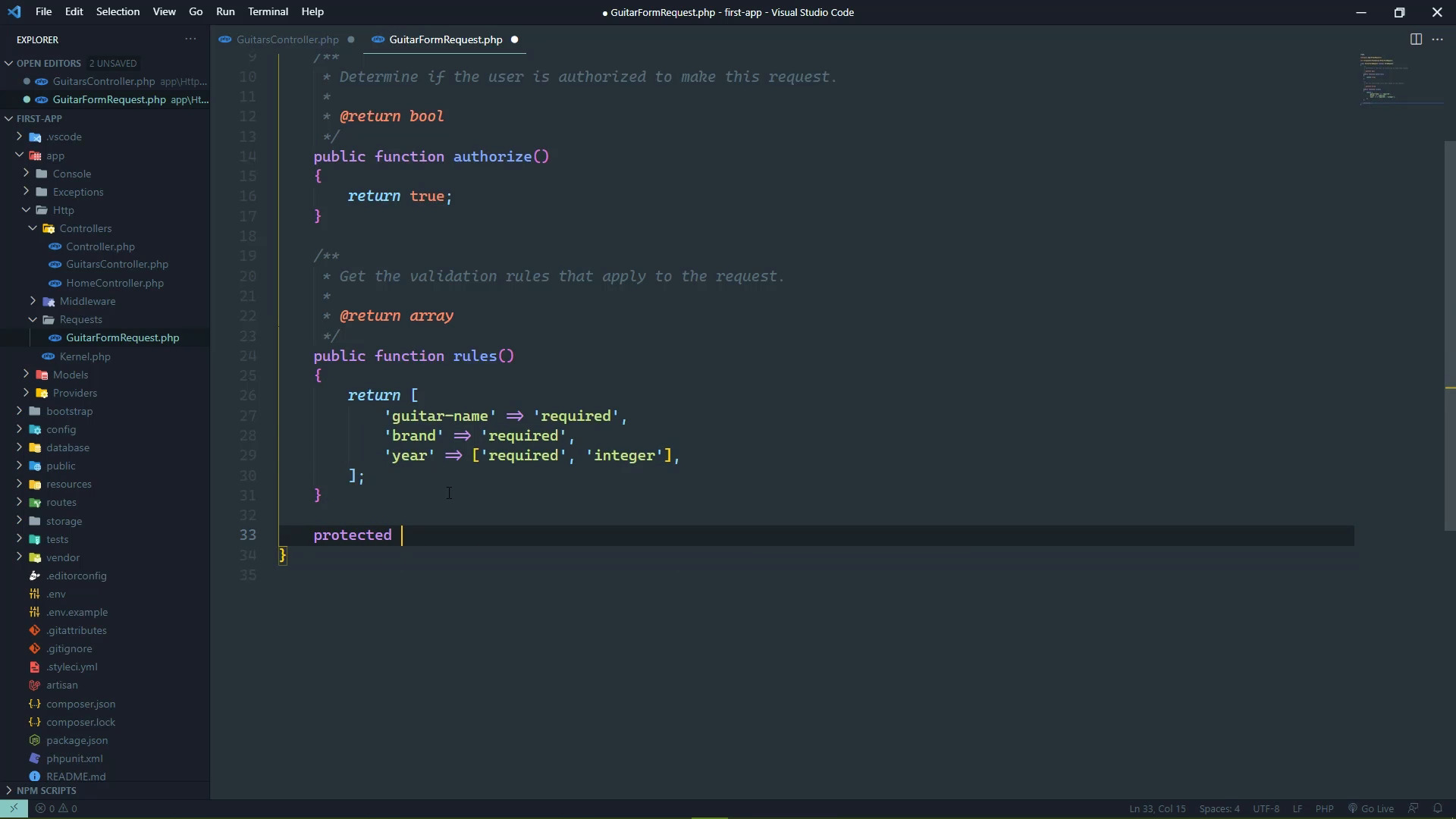
We have some duplicate code inside of our controller. And I wouldn't say that our controller is messy, but this duplicate code does add, well, quite a few extra lines of code. And it would be nice if we could clean this up just a little bit because I am a firm believer in having clean and concise controllers. Because that just makes maintenance so much easier. So the first thing that we are going to look at is essentially this right here where we are trying to find a guitar from the database. If we find it, then great. If not, then it returns a 404. We do this in three places. And really we would do it in four if we implement the destroy method because we would want to make sure that the given id exists in the database before we actually try to delete it. And the way that we can clean this up is just by using our model guitar as a type hint for the parameter. Because Laravel then is going to take the id that is given to us from the URL, and it is going to automatically try to find that guitar in the database. If it exists, then great, we have it. If not, it will automatically fail and return a 404. So we can eliminate that code very easily. So let's just do that. We will use a type hint for the show the edit and then the update method, except that update is going to be a little bit more involved because we need to change the name of the variable that we use. We are no longer going to be using the record variable because we will have this guitar. And then the id will need to be used for the redirect. And there we go. Now, we didn't really save a whole lot there, but at least it's a little bit cleaner. Besides, the bulk of this controller is really the store and the update methods. We are essentially doing the same thing where we are validating the user input. And then we are updating the values of the properties of the record that we are either creating or updating. And in the process of that, we are stripping the HTML tags. So it would be nice if we could do all of that in kind of one place so that we aren't repeating ourselves. Well, we're gonna have to repeat ourselves somewhat but we could eliminate that repetition because we have this request type here. And we can actually build our own custom request that would then be used for handling our guitar form requests. So let's go to the command line. We are going to use artisan to make a request and we're going to call it GuitarFormRequest. This is going to generate a new class for us. That is going to allow us to not only validate the information but also work with the request data before we validate it. Because it does kinda make sense to go ahead and strip out all of the tags before we validate. You can make arguments for either approach, it really doesn't matter, what does matter is that we can do this all inside of this class. This is inside of App > Http > Requests that was not there to begin with, but it is now. And then there is our GuitarFormRequest. Now by default, there are two methods, there's authorized and rules. Now, this is returning false for authorized, and this is going to mean that we are not going to be authorized to make this type of request. So the first thing we want to do is return true here. Now, of course, if there was a need to make sure that the user was authorized, then the code necessary would be inside of here. But we're not going to worry about that. We're just going to return true because, well, we want to authorize ourselves to make this request. And then we have this other method called rules. These are the exact same rules that we do inside of our validation code in the controller. So we can just copy and paste there, and that's going to give us the exact same thing. However, I also want to go ahead and strip out all of the tags so that we don't have to do that any other place. And we can do that by implementing another method here. It's going to be a protected method called prepareForValidation. And what we want to do is take the information that we were working with and merging it into this object basically that we are working with. So we have a method called merge. So if we needed to include another form field that didn't come from the user, like for example, if we had the code for user authentication, and we needed to supply the user id, then we could do that very easily by just merging that in here. But in our case, what we're going to do is essentially overwrite the values that we have as far as the guitar-name and the brand and the year. So that it would look like this to where we are going to strip the tags here. And then we are going to work with the data that's coming from the request. So in this case, it's going to be this guitar-name, then we will do the same thing for the brand, so that we will strip the tags out of that input field. In this case, I'm going to use just the object properties syntax. The only reason why I didn't for the guitar-name is because, well, guitar-name is not a valid PHP identifier, but brand is as well as year. So we will essentially do the same thing that we did for brand. So we are taking the existing data from the request and then merging that in so that we are essentially overriding those values by stripping out any HTML tags, and that's automatically going to be done for us. So that then all we have to do is use this GuitarFormRequest instead of our controller. Let's first of all import that. We need to use App that's Http Requests and then the GuitarFormRequest. Then for the store method, it's already being typed entered as request. We're going to use a GuitarFormRequest, and then we are going to do this. We will have our data but we only wanted the validated data. So we're going to take the request, and we're going to get the validated data. Now, there's a difference between validated and validate. Validate is the method that we just replaced. We want the validated values, so that then we can use them whenever we assign the name, brand, and year made. So with a few modifications, that's all that we are going to do. And then we just need to do the same thing for the update method. So let's just once again copy and paste. As I mentioned, we can't completely get rid of the code duplication, but we can make it easier to work with. So there we go. With that done, we can go back to the browser. Let's go to the edit field, and I guess I better make sure that I did set that, I did, okay? So here is the edit for the first guitar. Let's first of all, clear out the Guitar Name and let's submit it. We should see the error that says that this is required. Although no wouldn't validated does not exist. Why does it not exist? And that's because I did not use the GuitarFormRequest. So that's kind of an important piece there. So let's refresh, we will continue so that we resubmit the same information and we can see that the Guitar Name field is not required. Now it automatically filled back in the data from the database. That's fine. So we're going to change this back so that it doesn't have the edit value. We can also change the year made. I believe we had 2015 originally, we can submit and that is going to work just fine. But let's also try creating. So if we create a new guitar, then this can be what? We can have an Explorer, which is made by Gibson, and the year can be 1977. So we will submit that. We should then have three guitars in the database. We do, and while we still have some duplication, our code is indeed cleaner and easier to understand.


