

- Overview
- Transcript
2.2 Working With Query Data
Requests can include a query string. Laravel lets us easily access that information, and you'll learn how in this lesson.
1.Introduction
1.1Introduction01:53
1.2Set Up Your Environment05:37
2.Basic Routing
2.1Routing Requests07:07
2.2Working With Query Data09:37
2.3Route URL Parameters07:24
2.4Routing to Controllers08:22
2.5Creating a View08:10
3.The Blade Templating Engine
3.1Introducing Layouts08:15
3.2Working With Static Resources05:03
3.3Generating URLs for Routes03:26
3.4Organizing Views09:41
3.5Using Blade Directives07:37
3.6Showing and Linking Data07:31
3.7Setting Up the Database03:57
4.Working With Data
4.1Creating Migrations and Models10:08
4.2Saving Database Records08:57
4.3Validating User Input07:38
4.4Updating Data07:04
4.5Using Type Hints and Request Classes08:50
4.6Using Mass Assignment06:08
5.Conclusion
5.1Conclusion01:03
2.2 Working With Query Data
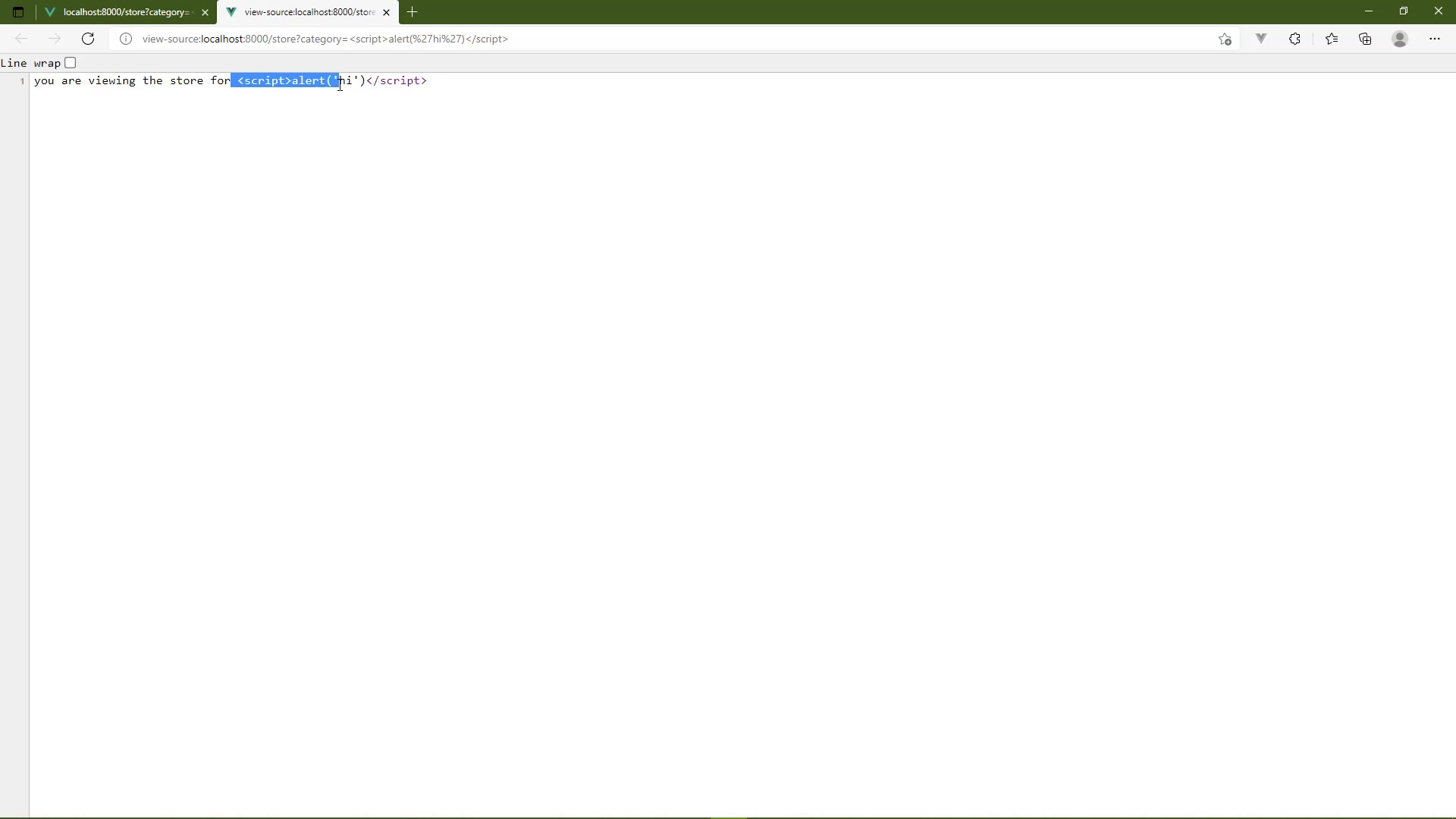
In this lesson, we are going to be talking about user input because our applications are interactive, they accept user input. Now one very important thing to be aware of is that a web application is actually at least two other applications. There's the application that runs within the browser. That's the client application. And we aren't really that concerned with the client application. We are concerned with the server application, that is our Laravel application. Now, of course, yes, the Laravel application is going to supply the content that is going to be in the client application but we won't worry about that right now. Think in terms of a server side application. Our server is just sitting there doing nothing until it receives a request. And that request always contains information from the user. That information could be the result of the user filling out a form and submitting it. Or it can be something as simple as the user typing in the URL in the browser, and then hitting enter so that they go to a particular page. It doesn't matter what kind of request or what generated the request. If the user initiated that request, that is our user input. So in this and the next lesson, we are going to be talking about URLs and specifically how we can pull information from the URL, because that's one of the primary ways that the user will provide input for our application. So in this lesson, we're going to be talking about query strings. So let's assume that we are going to build a store that sells musical instruments so we will have a URL that is slash store but then we need to know what types of products to show. So, the slash store could be the generalized URL to where we show kind of a little bit of everything but then if we wanted to filter the results like on category. So if we wanted to show only guitars, then we could have a category query parameter and its value could be guitars. That is a very common use of a query string. So let's write the code that's going to be looking for that type of URL. Let's first of all add a new route so that we have a new endpoint here, the URL is going to be slash store. And then we of course need the function that's going to execute for this particular route. So for right now, let's just return a string that says you are viewing the store, the reason being we wanna make sure that we have some code that works here. And of course this is something very simplistic but it's always a good thing to see code that works and there we go. We are viewing the store, that's great. So let's say that we want to now pull in the information from that category query parameter. Well, we have a built in function called request. And then we simply pass it the string of the query parameter that we want to get the value for. So in this case, it's going to be category, just nothing complex about this. So let's store this in a variable, we'll just call that category. And then we could use this in the output, so that we are viewing the store for and then we can concatenate that category. So we would have category there. We can go back to the browser, let's add the query string so that we will have category, and then we will start off with guitars. So now we see you are viewing the store for guitars and no matter what we change the category to be, the content that is displayed in the browser is of course going to change accordingly. Now, that's all well and good, but the first rule of handling user input is to never trust users. That might sound a little harsh to hear, but yes, the vast majority of people are nice people. They don't care about your application as long as it works, but there's just the small few that will want to do something malicious. And it doesn't matter how big or small your application is. If it's on the internet, you are at risk and you are a potential target. So never trust user input because somebody could do something like this. Instead of submitting just a typical string for category, we are going to alert, let's just say, hi and Chrome or this isn't Chrome, this is Edge but it's built on Chrome, is going to, well I did not expect that, that's good to know. So you can see what just happened. And the reason there is very simple. If we view the source, we are going to see that the script that we typed in the query string was output directly into the HTML. Let's see if I have Chrome installed. I do, I don't use Chrome very much anymore, that's just personal preference, but Chrome will actually block that. So if we open this up in Chrome, we will, okay, Chrome used to protect you from this but you can see the problem here. And if we can inject something as simple as an alert box, then an attacker can inject something far more sophisticated that will then cause a lot more damage. So we want to protect our applications as much as possible and it is our responsibility to do that. They are our applications, we are responsible for them. So to fix this, one thing we can do is just take the value from the query string and then pass that to strip tags. And if we view this in the browser, then we are not going to see that alert box display, thankfully. And instead we just see the text that was inside of the script tags. Now as we start talking about views and the blade view engine, there are other tools that we can use. But for right now, this is going to work just fine. So just be aware that the user can supply malicious code. You want to protect your application from that code as much as possible. So we typically call that sanitizing inputs. Always sanitize your inputs. So instead of stripping tags wherever I use category, I'm going to strip tags whenever I grab the value from category. That's a much safer approach there. Now, that's all well and good. But what if there's not a category in the query string? And that is a valid URL. Because if the user just goes to slash store, then we would want to show just all of the instruments. And [LAUGH] right now, we just say, you are viewing the store for, and there's nothing else there. So this is where we can start to introduce some logic here. So we're going to take out this call to strip tags, we still need to do that but we'll do that a little later. So for right now, we are going to attempt to get the value of the category query parameter. Now I say attempt because it's either there or it's not and if it is, then great, we have something in the category variable so that we could check if it is set. So if it is set, then we of course want to display our message that they are viewing the store for that category. But this is where we want to use strip tags. So once again, we will call strip tags right there. But if we don't have a category, then we just want to show all of the instruments. So we will just have that content, you are viewing all instruments. So if we save this, our code is still going to work. If we refresh the page, we are viewing all instruments but if we specify category, then we will see the store for that category. And so that is how we work with data in the query string. We retrieve the information from the query string by using the request function, we simply pass in the query parameter that we want to get the value for. But remember, always remember to never trust user input. So before we output that input, we want to sanitize it. And in our case, we strip out all of the HTML tags. Now there's more things that we need to do in order to protect ourselves in our application. But we will talk about that when we start getting into databases. Right now, this is going to be sufficient. And if we don't have a category, then we display the content for all of our instruments. Well, in the next lesson, we are still going to be talking about URLs. But we are going to be talking about URL wildcards. Because while this works, and this has been around for tens of years, 20,30 years. Okay maybe not 30 years but it's been around for a while, we tend to not do that anymore. Instead we might have a URL that looks like this where we have store slash guitars or drums or whatever category that we want to display here. And we will look at how we can handle those kinds of URLs in the next lesson.


