


- Overview
- Transcript
3.5 Using Blade Directives
Most views will use some form of Blade directives. In this lesson, I'll show you the directives for iterating over arrays and making decisions.
1.Introduction
1.1Introduction01:53
1.2Set Up Your Environment05:37
2.Basic Routing
2.1Routing Requests07:07
2.2Working With Query Data09:37
2.3Route URL Parameters07:24
2.4Routing to Controllers08:22
2.5Creating a View08:10
3.The Blade Templating Engine
3.1Introducing Layouts08:15
3.2Working With Static Resources05:03
3.3Generating URLs for Routes03:26
3.4Organizing Views09:41
3.5Using Blade Directives07:37
3.6Showing and Linking Data07:31
3.7Setting Up the Database03:57
4.Working With Data
4.1Creating Migrations and Models10:08
4.2Saving Database Records08:57
4.3Validating User Input07:38
4.4Updating Data07:04
4.5Using Type Hints and Request Classes08:50
4.6Using Mass Assignment06:08
5.Conclusion
5.1Conclusion01:03
3.5 Using Blade Directives
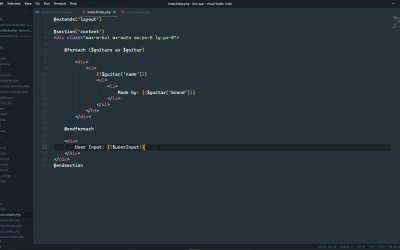
In this lesson we are going to start working with data. Now, for right now, the data is going to be static, and that it will be hard coded into the application. But eventually, once we get into working with databases, we will remove this static data, so that we can work with actual data. So I have pasted in a method called getData. It simply returns an array of arrays, and each one of those arrays have an id to represent the record id, and then the name of a guitar, and then the brand of that guitar, and we just want to display this information. So the first thing we need to do is pass this data to the view, and the way that we do that is by passing a second argument in the View function. It's an array where the keys are essentially the variables that we are going to use inside of the view. So it makes sense to just call this guitars. And then the data for this will be from calling the getData method. Let's also do this. Let's assume that's for whatever reason, we are handling user input. So the user fill out a form, and we want to do something with that data in the view. Now we aren't going to sanitize anything here, but I want to stress, sanitize your inputs. This is strictly for demonstration purposes. So please remember to sanitize your inputs. But in this case, we aren't. We are going to assume that the user that submitted the form is trying to inject some highly malicious JavaScript so that they can well alert a message that says, hello. So this allows us to pass as much information to the view as we need, and we have complete control over how we refer to that information. All right, so let's go to the view, and let's just start implementing this. So instead of our content, let's start with the div element that was being used in the About and Contact views, so this one right there. And we will encapsulate everything inside of that div there. So we have our guitars and it's an array. So we want to display the list, that means we need to loop over that array. So we have a foreach directive, which is pretty much exactly like the foreach loop in PHP, except that it begins with @foreach, and then ends with endforeach. There are no curly braces or anything like that, but other than that, it's just a normal for each loop. So that inside of the parentheses, we have guitars as guitar, and then we just need to output the HTML. Which let's have a div that's going to have an h3 elements that's going to output the guitar's name. And then we will have an unordered list, where the list item would have made by, and then we would include the guitar's brand. So there we go. And then after the loop, let's have another div element where we will say, User Input, and then we want to output that user input. So bear in mind we are not sanitizing anything as far as the user input, I want to make that clear. We should, but we aren't. So this could potentially be a very, very bad thing. Thankfully, it's not. So let's go to the browser. Let's refresh the page here and we see our list of guitars. And then at the very bottom, we can see the user input. And we can see that the HTML was not rendered as actual HTML. So the scripts didn't have a chance to execute, because it was HTML encoded. So there's a couple of things that I want to talk about regarding these double curly braces. First of all, what is inside of the double curly brace is a PHP expression. So that means you have to follow the same PHP syntax rules as just normal PHP code. That's important because there's times, I don't necessarily forget that, but there's times that I guess I'm in too much of a hurry and I do have some syntax errors. I might forget to put a $ sign in front of a variable, which of course is a syntax error. And you will definitely see an error if you make that type of mistake, just like that. So just try your best to remember that it is a PHP expression. It can be something more than just a simple variable, like we are using here, it can be a complete expression. The second thing to remember is that it automatically HTML encodes the output. So it is a safe way to output information, especially if it is coming to the user. Once again though, sanitize the input. Because even though blade is essentially saving you by encoding the output, that is still stuff that you don't want to store in the database if that is what you were going to do with it. So just sanitize your inputs, you will be fine, as a secondary blade will protect you as long as you output information using the double curly braces. All right, so that's all well and good, but let's also assume that we might call that getData method and not get anything in return, it might be an empty array. That would represent that there would be nothing in the database. So let's write some code that's going to handle that situation. So let's comment out the records, if you will, inside of the array and let's go back to the index. So we only want to display the list if there is, in fact, a list to output. So we can wrap this with another directive, the if directive, it's just like a normal if statement in PHP, to where we can check to see if the guitar's length or the count is greater than 0. If it is, then we want to show our guitar list. Otherwise, we want to display at least a message saying that there is no guitars or something like that. So we will use the else directive there, then we will have the output for no guitars, there are no guitars to display. And then finally, we end the entire block with endif. So now we have some logic inside of our views. If we have guitars, we show them, if not, we show the message, there are no guitars to display. And once again, thankfully, Blade is protecting us from not sanitizing our inputs. But of course if we change this back to where we do have guitars, well then our content is going to change. We will show the list of guitars, and then that message saying that there are no guitars are gone, which is of course what we would expect. So in the next lesson, we are going to implement the show view.


