

- Overview
- Transcript
3.1 Introducing Layouts
Our web application needs a consistent look, but we don't have to replicate the same markup and layout on each page. Layouts solve this problem.
1.Introduction
1.1Introduction01:53
1.2Set Up Your Environment05:37
2.Basic Routing
2.1Routing Requests07:07
2.2Working With Query Data09:37
2.3Route URL Parameters07:24
2.4Routing to Controllers08:22
2.5Creating a View08:10
3.The Blade Templating Engine
3.1Introducing Layouts08:15
3.2Working With Static Resources05:03
3.3Generating URLs for Routes03:26
3.4Organizing Views09:41
3.5Using Blade Directives07:37
3.6Showing and Linking Data07:31
3.7Setting Up the Database03:57
4.Working With Data
4.1Creating Migrations and Models10:08
4.2Saving Database Records08:57
4.3Validating User Input07:38
4.4Updating Data07:04
4.5Using Type Hints and Request Classes08:50
4.6Using Mass Assignment06:08
5.Conclusion
5.1Conclusion01:03
3.1 Introducing Layouts
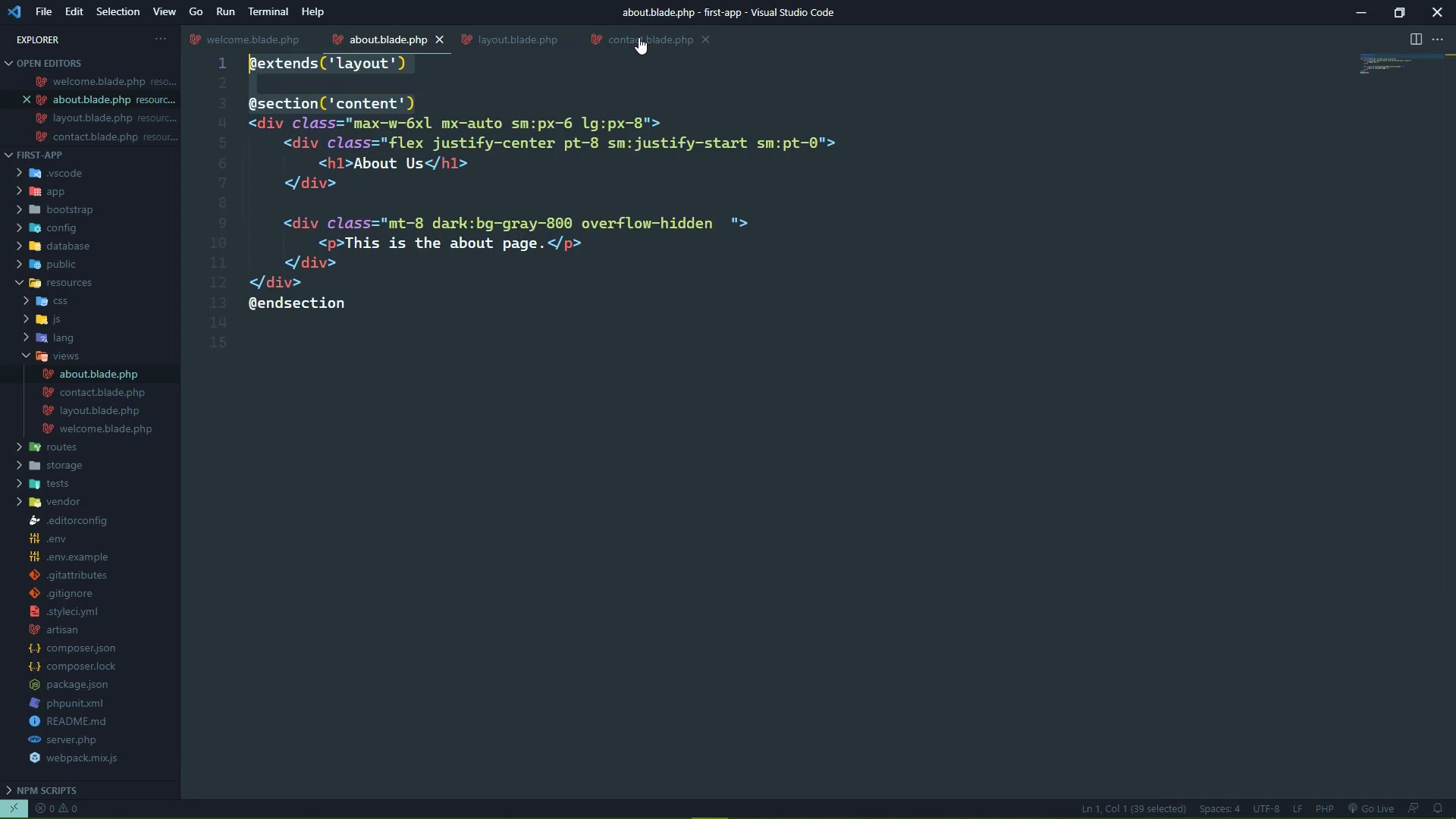
In the previous lesson, we created two new views, one for about, the other for contact. And we also created this nifty little menu so that we can navigate in between our different end points. And we added that to each one of these views, including the existing welcome view. And that's all well and good, but the problem is how we went about implementing that. We first of all copied all of the markup for the menu, and we went inside of each individual view file and pasted it into the correct place. We also needed to paste in some CSS rules, so that it would be displayed how we wanted it. And for a small amount of views, that's okay, I guess you could say. But as our application grows, that's just not feasible. That is a maintenance nightmare. Because any change that we would make, we would have to go into each individual view and make those changes. So the way that we get around that is by using what's called a layout. It is a specialized view that essentially contains all All of the layout of our application, and what is the layout? Well, it's basically all of this boilerplate stuff that all of our views use. So the layout in our case would start with the doctype. And it would consist of basically everything inside of our view except for the actual content which we could say would be this. This div with the class of max-w-6xl, and so on and so forth. This would be the content, so let's start by creating a new file. And since this is the layout view, we're gonna call it simply layout, and .play.php. And we are going to take the entire contents of about, and then paste it inside of layout. And the only thing that we want to take out is what we would consider the actual content. So we're going to delete that from inside of our layout. And for right now we're gonna have the content placeholder. This is where we will put our content. We'll get to that. Let's go to our about view. And we want to get rid of practically everything except the content. So let's go ahead and let's do that. And then we need to tell this about view that we want to use the layout that we just created. And we do that with a directive, a directive in Blade templates, basically starts with an @ sign. And in this case, we're going to use a directive called extend. Now this is a lot like the extends that's used for classes. You have a class that extends a base class. Well, here we have a view that is going to extend a layout. And then we simply just pass in the name of the view that we want to use as the layout. And there we go, but that's not enough. We also need to create a section that essentially denotes that we have some content here. So we can just call this section content because well, that's what it is. And then we would denote the end of that section, so that's in between the section and in section that is the content section. So now we just need to display this inside of the layout and we do that with a special directive called yield. We pass in the name of the section that we want to yield, and there we go, so content in this case. So if we go to the about view, let's just hit refresh, it's going to look the exact same. But to prove that we are using the layout, we can do anything. We can just put layout in front of the yield directive, and we will see layout somewhere right over there. All right, so we have this layout that we are now using, and we just need to update the other views to use the layout. Let start by going to the about view. Let's copy the extends and the opening section. And then we will replace everything before the content. With that, then we will close out the section with the end section directive. And I'm going to change the formatting here just so that it looks nice and clean. And we can do the same thing for the welcome view. So let's find that though. In this particular case, the content starts here, really. So we want to get rid of everything before that. And I guess we should have done it like this. So that we can collapse everything, so that we can see what is and isn't going to be content. So this would be the end section here. Then we would have layout and section directive there. So there we go, we have our views and of course, we can go to the browser and view this just to make sure that everything looks okay. And it should, so let's go to about, that's great. We can go to contact and we can go to home, everything looks the same as it did before. Now something else that you might want to do is add another section because this gives us the flexibility to do that. So let's say that we might want to have certain JavaScript on certain pages. So we could have a section called scripts so that if we had that section defined, let's say inside of contact, because that would make sense. This would be a contact form really, so we would have some JavaScript for client side validation and stuff like that. So we would have a section called scripts, and then we would have our script here. And let's just do this, we will say alert, contact us, just so that we can see that happening. That will probably get annoying here in a little bit but that's okay. And there we will have our end section directive. So if we go to contact, now, we can see that we have that Contact Us. But if we go to about, there's no error or anything else, it just recognizes that there wasn't a section called scripts inside of the about view. So there was no reason to actually output anything as far as the scripts are concerned. And that's all well and good, but something else that we could use this for is the title. Because each one of these pages would have a different title. So here we could, instead of the title element, we could yield. Well, let's just call it title, so that the inside of our other views, we will simply just specify this section. And this is going to be a little bit different. We can still do that the same way that we have done with the section directive, and then the end section directive. But since this is something much more simple, what we can do is this. We still need section, we still need to specify the name of that section. But we can pass in a second argument which would be the value that would be displayed for this section so that this is about, this could be about us. And then let's just copy and paste this so that we can add the title to those others. So there is still some repetition, at least as far as copying and pasting is concerned. But it's mostly for showing different content, it's not so much showing the same thing across all of the views. So let's go to welcome, we will add that section and this will just say welcome. So now we can go back to the browser. And we can definitely see in the tabs, now we have about us. If we go home, we'll see welcome. If we go to contact, we'll see contact us along with our script. So, layout views are very important, they allow us to define essentially the layout of our application. The key thing to remember is to use the extends directive inside of your views so that they will use the layout. And then to yield the sections that you want the layout to well, yield.


