

- Overview
- Transcript
2.3 Route URL Parameters
Query strings have their uses, but they're ugly. We can design and use clean, memorable URLs by using route parameters.
1.Introduction
1.1Introduction01:53
1.2Set Up Your Environment05:37
2.Basic Routing
2.1Routing Requests07:07
2.2Working With Query Data09:37
2.3Route URL Parameters07:24
2.4Routing to Controllers08:22
2.5Creating a View08:10
3.The Blade Templating Engine
3.1Introducing Layouts08:15
3.2Working With Static Resources05:03
3.3Generating URLs for Routes03:26
3.4Organizing Views09:41
3.5Using Blade Directives07:37
3.6Showing and Linking Data07:31
3.7Setting Up the Database03:57
4.Working With Data
4.1Creating Migrations and Models10:08
4.2Saving Database Records08:57
4.3Validating User Input07:38
4.4Updating Data07:04
4.5Using Type Hints and Request Classes08:50
4.6Using Mass Assignment06:08
5.Conclusion
5.1Conclusion01:03
2.3 Route URL Parameters
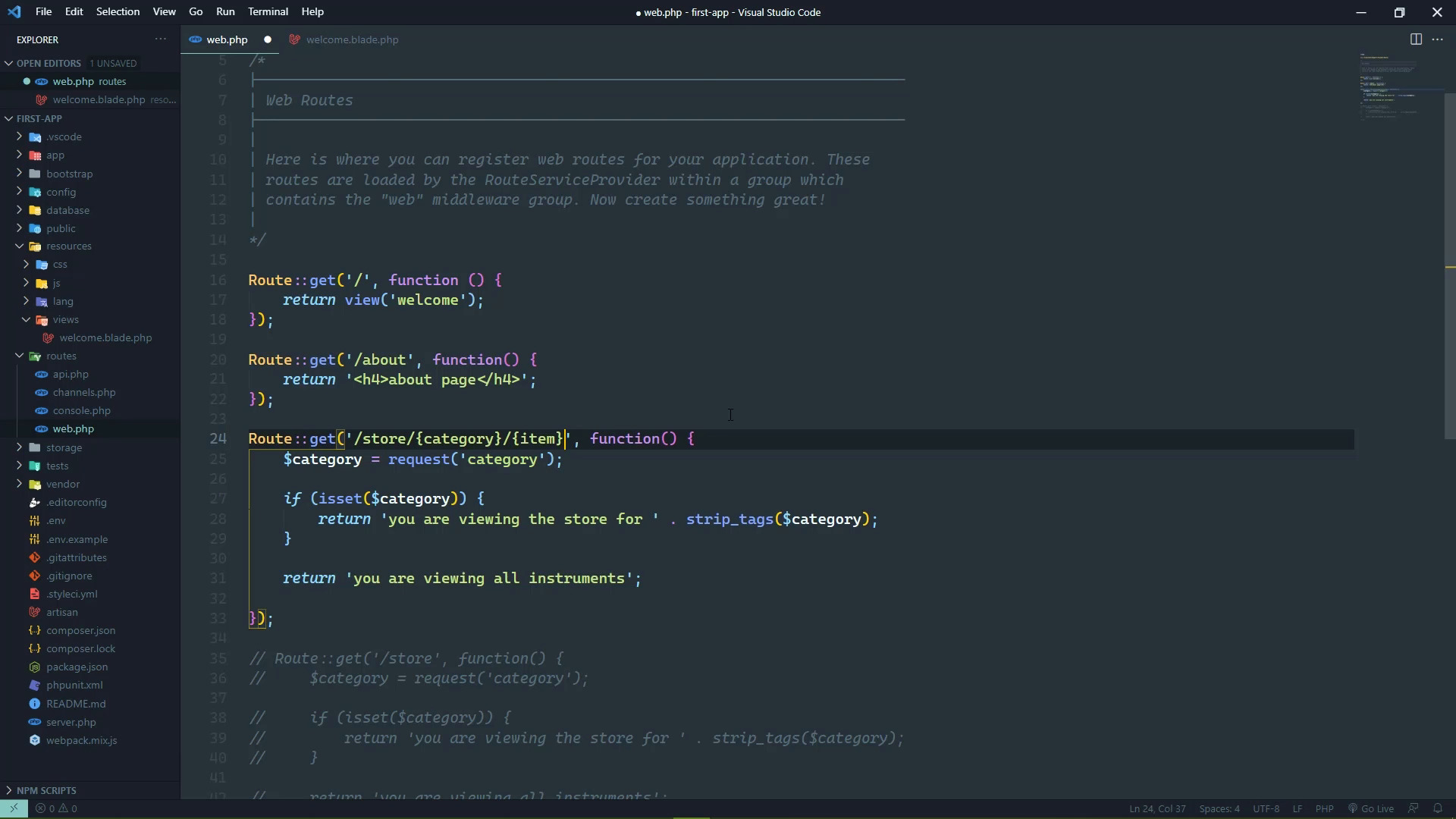
In the previous lesson you learned how we can pull data from the URL query string, it was really straightforward. We just use the request function, pass in the query parameter name, and then that will give us the value for that parameter. If that parameter is in the query string, otherwise we don't get anything. So if you need to rely upon that value you need to make sure that you have a value to work with, otherwise codes gonna break. So in our case, if we had a category, we simply displayed content for that particular case, otherwise we show to the generalized content for just all of the instruments. So that's all well and good, however, that means that we have a URL that looks like this. It has a query string. And the problem with query strings is that it makes the URL less friendly. I mean for us, our brains are automatically parsing this out as we look at it. So it makes some sense to us but for non technical people, they're not really gonna remember this. And it gets even worse if we have characters that have to be URL encoded. And then you can also make the argument that we really shouldn't even be using a URL like this for displaying like the categories or a particular item within a category. And instead we would do something like this, where we would have of course store but then we would have the category. And then the item this is much cleaner, it's also easier to remember and it also makes a whole lot of sense. Because from left to right, we are going from something that is very generic to something that is specific. And the more we go to the right, the more specific things get. Whereas with the query string, the order of the parameters doesn't matter at all. What matters is that they're there or they're not. So you can end up with URLs that make absolutely no sense whatsoever. But again to us they do but for normal people they don't. So having a clean and a hackable URL. What do I mean by that? Well, we can keep taking segments off or adding segments in order to filter down the content even more. I mean, we could take that to the extreme to where we would have the store followed by the category, followed by the manufacturer, followed by the individual item. Or if there were different lines of products from this manufacturer you could have a line one. And then you could have the item, I mean you can make things kinda absurd. And of course the more segments that you add to a URL, the more difficult it is gonna be to remember it, you want something that's nice easy for people to remember. So in our case, we're gonna stick with just this three segments in the URL store, category and item. And we can make this work very easily by using route parameters. So I'm gonna take our store route. I'm gonna copy it and we'll comment out the current version. So that we can replace it with this new version and our URL is gonna start off the same because we want this to be for our store. So the store is always gonna be part of the URL. Then we wanna specify the individual segments that are gonna be dynamic. And we do that using a set of curly braces and then inside of the curly braces we have the routes parameter. So we have store followed by the route parameter for category, followed by the route parameter for the item. And these map directly two parameters to the function that is handling this route. And there is a direct link between the names, so the route parameter category Maps to the Function Parameter category. So this means that the names of your route parameters have to be valid PHP identifiers. But the beauty of this approach is that now the information is in the URL and it's automatically being passed to the function. So we don't even have to use the request function here. So the first thing we can do is check to see if we have a category, and if we do, then we can start branching our code here. Because if we have a category, then we possibly have an item. If we don't have a category, we don't have an item. So inside of our check to see if we have a category, we will do essentially the same thing for the item. And if we have an item then we will show the content for that particular item. Otherwise we will just show the content for the category. So as far as our item content is concerned, we'll do this you are viewing. The store four and then we will include the category. Another nice thing about this approach is that, you don't really have to strip tags or sanitize this, because if there's any characters that are not valid URL characters. Then this isn't gonna work at all, so in this particular case we don't have to strip tags for category. Because if there were tags in the segment of the URL, it would not be a valid URL. And so we will finish this up with the individual item, so there we go, we have our content for the individual item, we have the content for the category. Then finally, we have the content for just the store in general. So if we go to the browser, let's refresh the page here. We're gonna see that it doesn't work, 404, and this is why. Because by default, the route parameters are required. We have defined a URL with three segments. It starts with store, but then we have two segments defined after that. So what we wanna do is make these route parameters optional, and we do that, by just following up the identifier with, a question mark. So we will have category question mark, and then item question mark. Then we can give default values, to our function parameters. And then our code is gonna work. So if we go back to the browser, let's refresh now we see. The all instruments content. If we look at just pianos, I don't know if it's es or just s, doesn't matter. If we look at pianos then we can see that we are viewing the store for pianos. And then if we wanted to look at a Steinway, then we can see that we are looking at the store for pianos for Steinway. And so that is how we can build clean and memorable URLs, e simply define parameters inside of our route. And match them up with a function parameter if we want the parameters to be optional, then we have to follow that parameter with a question mark. We also need to provide a default value for the function parameter. And in most cases you will wanna use URL parameters, there are some cases where it makes sense to use a query string. But I would argue that those are few and far between.


