

- Overview
- Transcript
4.4 Updating Data
Updating data is a lot like creating; there are just a few small differences.
1.Introduction
1.1Introduction01:53
1.2Set Up Your Environment05:37
2.Basic Routing
2.1Routing Requests07:07
2.2Working With Query Data09:37
2.3Route URL Parameters07:24
2.4Routing to Controllers08:22
2.5Creating a View08:10
3.The Blade Templating Engine
3.1Introducing Layouts08:15
3.2Working With Static Resources05:03
3.3Generating URLs for Routes03:26
3.4Organizing Views09:41
3.5Using Blade Directives07:37
3.6Showing and Linking Data07:31
3.7Setting Up the Database03:57
4.Working With Data
4.1Creating Migrations and Models10:08
4.2Saving Database Records08:57
4.3Validating User Input07:38
4.4Updating Data07:04
4.5Using Type Hints and Request Classes08:50
4.6Using Mass Assignment06:08
5.Conclusion
5.1Conclusion01:03
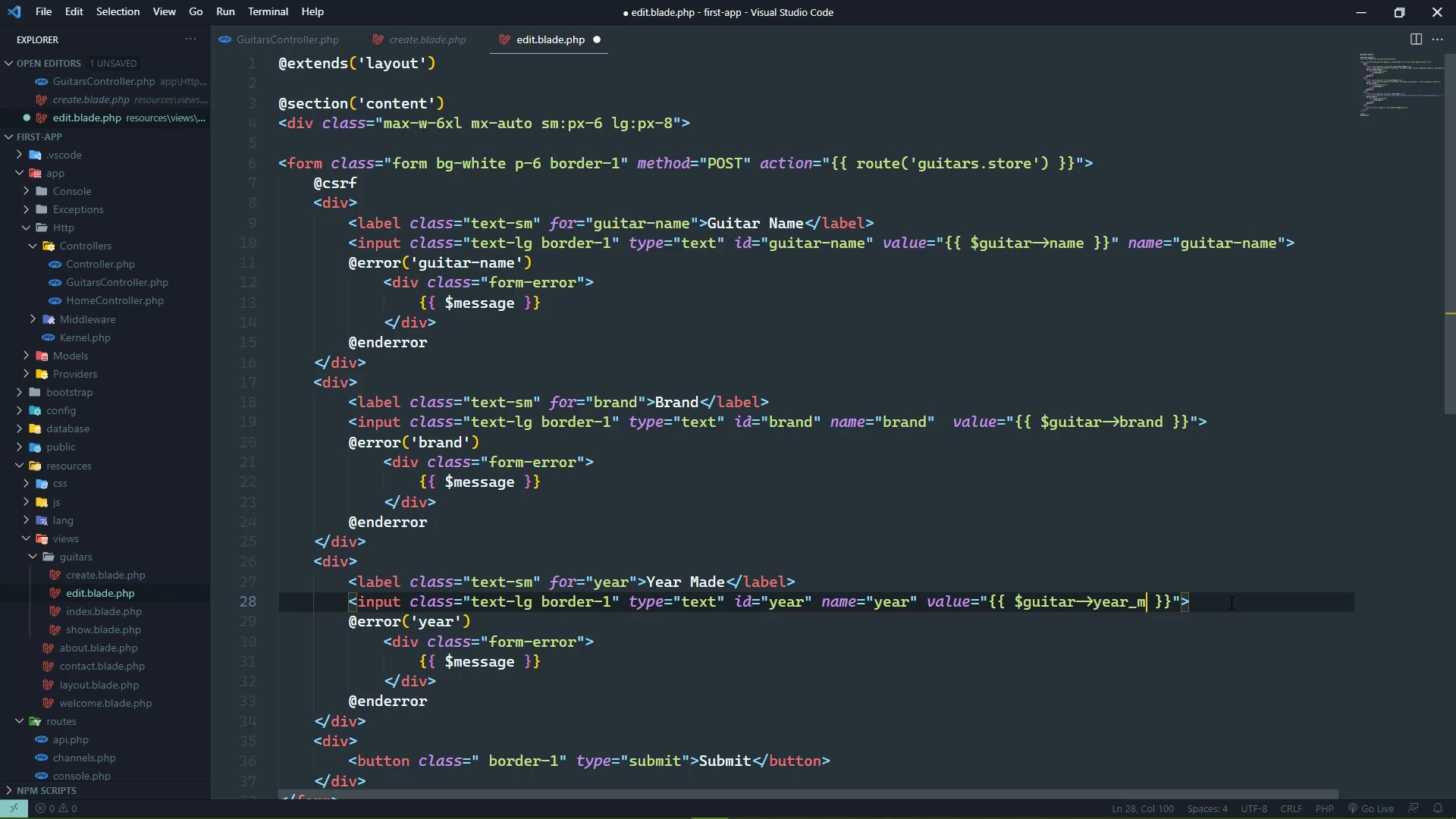
4.4 Updating Data
Editing is very much like creating. We are working with the same data. We are almost doing the same exact processes. There's just a slight difference between the two, but other than that they are the same. So there's going to be a lot of copying and pasting. So let's start by showing our form. Now, well actually we should start with the show method because this is still showing the data that is hard coded. So let's do that, let's go to the individual page of the guitar. We can see that is not right. So here's what we can do. We can fetch the data from the database using our guitar model. There's a find method that we could pass the ID to, and then it's going to find the record with that ID. And then we would have a record, then we could check if it existed and if not then we get a 404. Otherwise, we pass that record on to the view, that's fine. An alternative is this find or fail. Almost the exact same thing except that it is going to automatically fail and return a 404 if it can't find that record. So in fact, we could inline this so that our show method is going to be very, very clean. So there's nothing like code that works, except clean code that works. So there we go. We have that same exact functionality. If we go back to the browser, this is of course going to show data from the database except that it's not because, that was a syntax error, but now we can go back and there it is. We do need to add the year there because since we are going to be editing this information, I wanna be sure that we show all of the information that we have. So actually, we could copy this from the index view and we could paste that inside of the show view. And that will be fine. For our edit action method, we can essentially do the same thing except that we want to display a different view, we want to display the Edit View. And we need to change the parameter name to guitar, but other than that that's going to be fine. Now our edit view is going to be a copy of the Create View because remember, this is the same exact data. So the Create Form is already there ready for us to use. We'll just copy it and use it as the basis for our edits form. Now, we don't want to display the old information because that was what the user typed into the form field after they submitted it the first time and validation failed. Instead, what we wanna show is the data coming from the database. So we are going to be working with the guitar that is passed to this view. And I'm going to use object property syntax here. We could use the associative array syntax if we wanted to. That's what we did inside of the index and show views. However, just to show you that we could use this other syntax. I'm going to use object, property syntax. Of course, in your applications, pick one and stick with it. Consistency is very important. All right, so we will have the name, we'll have the brand. And then finally, the year made and for the most part, that's it. We do need to change how this form is submitted because it is currently being submitted to the guitars store route. We want the update route. But we also need to supply the guitar that is going to be updated so we need to include that. That is coming from the guitar object. And we can provide the ID there. And that is the completely wrong syntax we want arrow there. But that's going to give us the correct URL. The other thing that we need to change is the method. We want to use a put because put requests are for updating data. However, browsers don't understand put when it comes to a form submission. It only understands get and post. So we have to emulate a put request by using a blade function called method. We pass in the HTTP method that we want to emulate, and then we're good to go. So even though this is an actual post request, our application is going to accept the request. It's going to see that we want to emulate a put request. And it's going to route it to the update route. So everything is going to be just fine. So if we go to /guitars/ID/edit, we should see our form and we do. If we go to the guitars/2/edit, we should see that other guitar. If we go to /3, which does not exist, we should get a 404. And there we go. So we are good to go there. So now we just need to write the code that's going to handle the submission. And for the most part, we can almost copy the exact same code from the store method and use that because we still want to validate the user input. We are still going to need to assign values for name brand you're made. The only difference is, we need to fetch the guitar from the database as opposed to creating a new guitar. So we are going to copy this entire thing and we're going to paste it inside of our update method. And instead of creating a guitar, we are going to fetch it from the database, but once again, we are going to use this find or fail. Because if the record doesn't exist we don't want to do anything we want to 404 there. So we do need to change the name of this variable because guitar is the parameter with the ID. So we are going to use record here and we're going to save it. As far as the redirection, I think it makes more sense to redirect to the show route. But we also need to supply the ID and we can do that with just the guitar there. So now let's just test this and make sure that it's actually going to work. So we could edit the name. Let's also edit the year, but remember that the year has to be an integer value. So let's do something that's very different, 2000. So if we submit this, we should be taken back to the page for that guitar. We can see that the name is different. We can see that the year is different. So we successfully updated that data. Now as I mentioned at the beginning of this lesson there's a lot of repetition because these processes are almost identical. So in the next lesson, we are going to start to see how we can eliminate some of that duplication.


