


- Overview
- Transcript
3.2 Working With the Database
There are several ways to work with data in a SQLite database. In this lesson you will learn how to access the database using the command line with the Python shell. You will learn basic commands that will retrieve and insert data into a SQLite database.
1.Introduction
1.1Introduction00:53
1.2What You Need05:26
2.Django App Basics
2.1Install Django and Create a Project05:49
2.2Create an App and Run the Web Server05:15
2.3Responding to Requests06:29
2.4Creating Models07:21
3.Using a Database With Django
3.1Adding Models to the Database05:28
3.2Working With the Database06:29
3.3The Admin Portal04:59
4.Building Out the Lawn Care App
4.1Defining the App Routes07:08
4.2Rendering HTML07:27
4.3Rendering Data in an HTML Template05:08
4.4Displaying Available Fertilizers06:15
4.5Saving Time With the Render Function02:25
4.6Handling “Not Found” Exceptions06:26
4.7Using Forms and Saving to the Database09:05
4.8Adding Some Business Logic08:54
4.9Adding Some Style06:31
5.Conclusion
5.1Conclusion01:06
3.2 Working With the Database
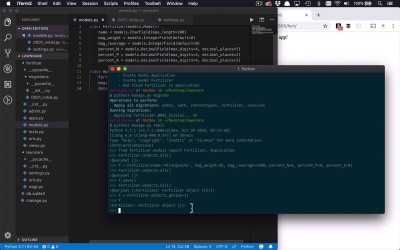
So now that we have these tables and models that are in our database, we can start to interact with them a little bit. So as I mentioned before, there's a couple different ways that you can do that. But the way that I want to do it is through a shell so I can show you some of the commands that you're going to be using from your Django application. So we're gonna start by saying Python3managed.py. And we wanna open up a shell. So what this is going to do is this is going to create a shell within our application, or within our project, where we can start to interact with the database and kinda see what we're doing. So the first thing that we're gonna have to do is say from fertilizer.models. I want to import these two classes. I want to import Fertilizer, I want to import Application. So just like that. So now what I can do is I can start to play around with the data. So if I wanted to get all of the data out of a particular table, I can say Fertilizer.objects.all. And when I do that, you're gonna see that I get back a QuerySet that's empty because there's nothing in that table right now. So if I wanted to create a new instance, then I can use that fertilizer class as well and simply define the data that's represented in there. So let's go ahead and try that, we'll say f = Fertilizer. Now I can define all of these. I can say name =, and this name is gonna be, one of my favorite ones is Milorganite. And then I can say that the bag_weight is gonna =, typically somewhere in the 30 pounds range, about 36 pounds we'll say. Then I can say bag_coverage is gonna =, usually it's about 2,500 square feet, give or take. Then I can do the percent_N. Now there's different formulations, but I can get a 6, percent_P is gonna = 4. And then percent_K is gonna = 0. So I can simply create a new instance of a fertilizer, I can hit Enter. And if we've done everything correctly, we now have a new object but it's not actually in the database yet. So if I were to, once again, do my Fertilizer.objects.all you're gonna see that that's still an empty QuerySet. So in order for me to actually put that data in the database, I'd have to say f.save. Cuz I actually wanna persist it into the database. And now if I were to go ahead and do a Fertilizer.objects.all, you're gonna see that I have a single instance of a Fertilizer object in my QuerySet. Now that's fine and that works, but this is kinda not very easy to see or very easy to understand what's going on here. Because it's just basically telling me here that I have a Fertilizer object but I don't necessarily know which one. Now, I can retrieve one out if I wanted to, I can say f = fertilizer.objects.get. And then I can specify the primary key which is inserted for me. And I can go ahead and retrieve one out. And then I can say what's f, well, it's a Fertilizer object with an ID of (1). But once again, it's really hard to see what's going on. I can say f.name, and that will give me the name here. But what if I wanted to have a different kind of text representation for that fertilizer so that it's a little bit easier to see? How would I do that? Well, let's go ahead and quit here, and I wanna come back into my models, in my Fertilizer class. And I want to define a function __str, which is basically going to allow me to kind of override the string representation of this particular instance of my class. And so all I really wanna do is I want to return a formatted string. And so formatting in Python is pretty simple. You just create a string, and you put in some placeholders, and then you define what those placeholders are outside of the string. So in this case I'm gonna wanna do a couple things, I'm gonna wanna put a string in there which is gonna be the name. And then I'm gonna wanna put three more strings in there that are gonna represent the NPK values of my fertilizer. Which is a pretty common way to reference these things. So we'll say %s-%s-%s since I'm gonna put in three strings here. And then I do a %, and then within parentheses I can define what are those values I want to inject in here. So I wanna inject (self.name, self.percent_N, self.percent_P, and self.percent_K). Now I'll go ahead and save that. So now, when I refer to a particular instance of a fertilizer, and I just say I want to print that out in certain instances, it will format the data within this particular model. And format it in such a way so you can see what it is like this. So let's go ahead and try this again. We'll come back in here, let's clear this out so we get a little bit more space. Let's open up our shell again. So now I don't have to do anything to insert anything into my database cuz it's already there. So I could simply go into fertilizer, well, but before, I have to actually do an import here. Because once the shell disappears, anything that was imported into it is gonna be gone. So now I can say, fertilizer.models, I want to import. In this case, I'll simply import Fertilizer cuz I'm not gonna do anything with the applications for this. So now I can say Fertilizer.objects.all. And when I do that, you're gonna see now that I have a QuerySet that contains a single item. In this case, it's gonna be Milorganite 6.00-4.00-0.00. So that's pretty cool. So now as you can see here, I can have a text representation or a string representation here of the models that I have stored in my database. And this is also gonna show you how we're gonna be doing a lot of interacting with the database throughout our application. Where we're retrieving everything, where we're gonna be creating some, or saving some new instances and things like that. So now you have the basic kind of feel of how we're gonna interact with the data, we can start to build out some of the base functionality and start to interact with that data.


