

- Overview
- Transcript
4.6 Handling “Not Found” Exceptions
One of the most common situations that a web developer has to handle is when the user is trying to find something that doesn't exist. That's when you need to make friends with the 404 response code. In this lesson, you'll work on the fertilizer detail page and also generate a 404 for when users request a fertilizer that doesn't exist.
1.Introduction
1.1Introduction00:53
1.2What You Need05:26
2.Django App Basics
2.1Install Django and Create a Project05:49
2.2Create an App and Run the Web Server05:15
2.3Responding to Requests06:29
2.4Creating Models07:21
3.Using a Database With Django
3.1Adding Models to the Database05:28
3.2Working With the Database06:29
3.3The Admin Portal04:59
4.Building Out the Lawn Care App
4.1Defining the App Routes07:08
4.2Rendering HTML07:27
4.3Rendering Data in an HTML Template05:08
4.4Displaying Available Fertilizers06:15
4.5Saving Time With the Render Function02:25
4.6Handling “Not Found” Exceptions06:26
4.7Using Forms and Saving to the Database09:05
4.8Adding Some Business Logic08:54
4.9Adding Some Style06:31
5.Conclusion
5.1Conclusion01:06
4.6 Handling “Not Found” Exceptions
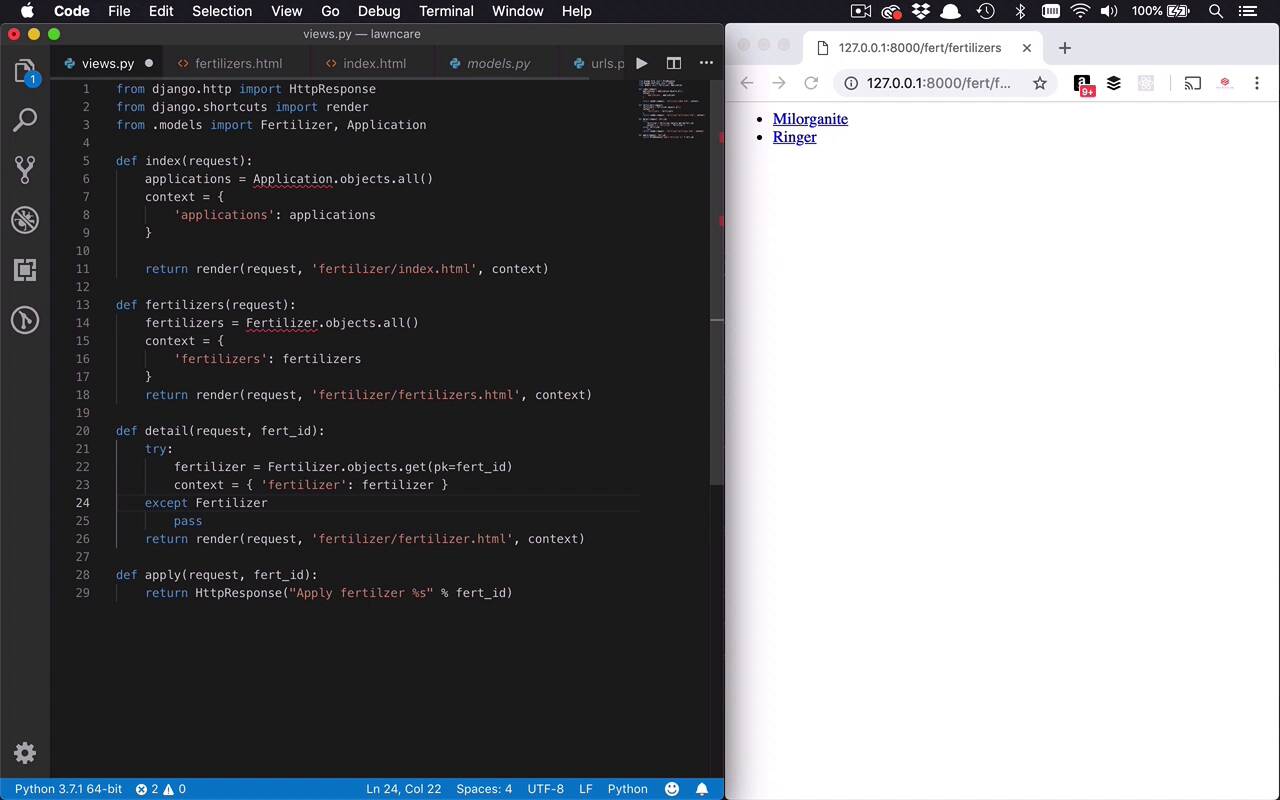
The next thing that we're gonna do is we're gonna work on the detail function so we can actually start to get more information about a particular fertilizer. This is gonna bring into light another function, another way or thing that we're gonna have to do to retrieve data from the database. And we're gonna look for something by a unique identifier. So as you saw before with these links that we created, if I hover over, you can see the Milorganite down the bottom left is at fertilizers/1, which means its unique identifier is 1. And Ringer is 2. So wanna be able to find individual fertilizers or individual objects in the database, regardless of what they are, by a unique identifier. And it's actually pretty simple. So let's go ahead into our Detail function. And we wanna do something similar to what we've been doing before, is I actually wanna look for a particular fertilizer. So there's a number of different ways that you can do this. But what I typically like to do, or the pattern that I like to follow when retrieving an individual item is looking for that individual thing by an ID. And if for some reason we find that it doesn't exist, then I want to raise an exception. And I want to tell the user at the other end that this object doesn't exist. And typically the way that you do that in web applications is by responding with an HTTP response code of 404, meaning not found. So that sounds like a lot, but how do we do that? Well it's actually not too hard. The way that I like to do it is I like to use a try except block, just like this. And within here, I'm gonna say, all right, I wanna get a fertilizer, and I want it to be an individual fertilizer. So I'm gonna go into my fertilizer model, and I'm gonna say objects once again. But this time, instead of saying all, cuz I don't want all of them. I want to use a get function. And I can use a get function and search for an individual item by the primary key by using PK equal to. And then I can say what am I passing in, what's the id, is that fert_id. So I can look for an individual item that way. So let's just continue down the happy path and say, all right, if that fertilizer does exist, what do I wanna do? Well, I wanna do the same things that I've done before. I'm gonna create a context, I'm going to set that = to fertilizer. And its object is going to be fertilizer, the value of that particular key in the context is going to be fertilizer. So now I have that, so what can I do at this point? Well, just like I've done before, I'm going to come down here, assuming that everything works properly. And I'm simply gonna return render. And I'm gonna pass into that my request. I'm gonna pass into it fertilizer/fertilizer.html. And then I'm gonna pass in the context. So that should work if that particular fertilizer does exist. But what happens if it doesn't? Well, if I try to get a particular fertilizer by a primary key, or honestly, any other model in the database by a primary key, and it doesn't exist, I'm gonna get an exception. And that exception is of a particular type. In this case, it's gonna be my type or my model .DoesNotExist, just like that. And if that happens, then I wanna handle this properly. And like I said before, typically what you're going to do is you're going to raise a 404 exception. Now, Django actually has something built in to handle that. So I could go up to from django.http import, I want to import that HttpResponse. Which I'll be able to get rid of pretty soon, cuz we're not using it anymore except for in this apply now. But I also want to have HTTP 404. So this is a special exception that we can raise or return so that we can let the user on the other end of the page know that something went wrong. So I'm gonna say raise Http404. And I could pass in to it a string to say what happened. And I can say, fertilizer does not exist, just like that. So that'll work, so I go ahead and save that. Now obviously, if I come back over here, refresh my page. We're gonna see that we have some issues going on here. And I forgot a semicolon there. So we'll go ahead and save that. Let's refresh our page, we get our list here. And if I click on one of these, we're gonna see a Page not found, because we don't have a template that's matching what we're looking for right here. So let's go ahead and fix that. We'll come on in here to our fertilizer. We'll create a new file, just like we've done before, fertilizer.html. And then in here, and we'll just drop a little bit of markup in here, nothing too crazy. We have an h1, which is gonna display the fertilizer name. And then we have some other information about it. We have the bag weight, we have the bag coverage. And then we're just kinda displaying that data. So let's go ahead and save these changes. So now we have that template. I should be able to come over here and refresh this page. And now you can see that I can now see the name of the fertilizer as well as some information about it. And that's pretty nice. But the reason that we put our check into our view for this 404 is what happens if we search for something that doesn't exist? So I can come over here to Ringer, that has an ID of 2. And that works out pretty nicely. But, if I were to come back over here and I could say I want to go to 3. And if I go ahead and try to do that, you're going to see that I get to this 404 Page not found. And here's the little error that I passed along with it. I say, fertilizer does not exist. So that's pretty nice. So now I can start to create these error pages to let the end user know, hey, that page doesn't exist or this thing doesn't exist, and give them a little bit more information about it. So as far as the views, we're getting pretty close to the end. What I wanna do next is I wanna take a few minutes to talk to you about how we can now start to work with applying these fertilizers. And basically the process of doing that in any sort of web application is providing a form. And we wanna put a form on this page. And then I wanna be able to put some things in there, like how many bags we're applying, what's the date we're applying them. And then I wanna save that information into the database. And then after I do that I wanna redirect my user back to the main page, which is gonna show this. And we would then be able to see the actual things that are being applied to the lawn. So let's start to work down that path next.


