

- Overview
- Transcript
4.9 Adding Some Style
Finally, we'll add some visual style to our app with Bootstrap. We'll create a base template for our app styles and then extend that template in all of our other templates. Let's get stylish!
1.Introduction
1.1Introduction00:53
1.2What You Need05:26
2.Django App Basics
2.1Install Django and Create a Project05:49
2.2Create an App and Run the Web Server05:15
2.3Responding to Requests06:29
2.4Creating Models07:21
3.Using a Database With Django
3.1Adding Models to the Database05:28
3.2Working With the Database06:29
3.3The Admin Portal04:59
4.Building Out the Lawn Care App
4.1Defining the App Routes07:08
4.2Rendering HTML07:27
4.3Rendering Data in an HTML Template05:08
4.4Displaying Available Fertilizers06:15
4.5Saving Time With the Render Function02:25
4.6Handling “Not Found” Exceptions06:26
4.7Using Forms and Saving to the Database09:05
4.8Adding Some Business Logic08:54
4.9Adding Some Style06:31
5.Conclusion
5.1Conclusion01:06
4.9 Adding Some Style
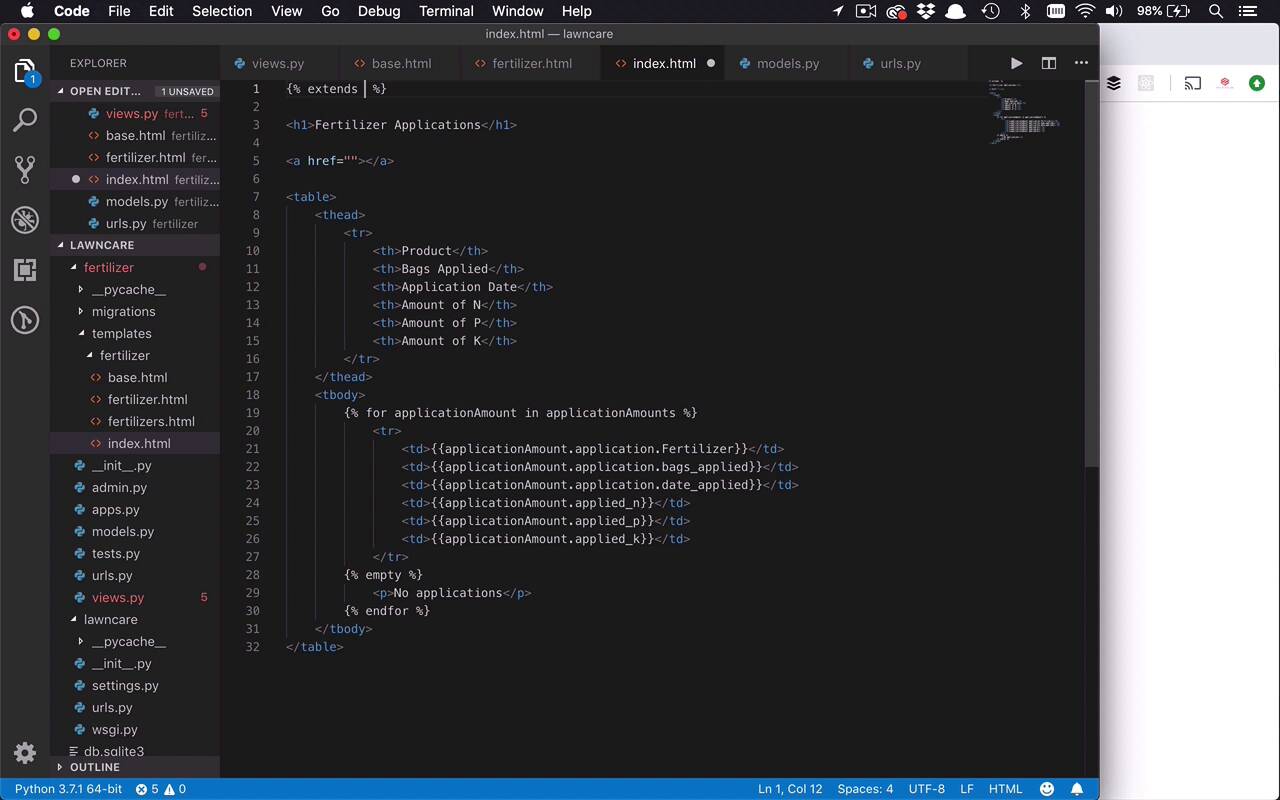
Well, it probably comes to no surprise to you that this is not a very pretty application. And it really wasn't meant to be, it was really just to teach you the fundamental building blocks of building a Django application. And how to get in there and really start to write the code, create the views, use the templates, and do all those types of things that are very important for you to get up and running with Django quickly. But having said that, it's probably not very likely that you're ever gonna show this application to anybody, unless you are at least able to apply some styles to it. And when it comes to building proof of concept applications for myself or for others, I typically revert back to my old comfort zone, and that's really just using Bootstrap. So what I wanna do right now is I want to show you how to take a front-end framework like Bootstrap or whatever you want, or even simply your own CSS files, and be able to apply those styles to a Django application. And it's actually quite simple. So what I wanna do is I wanna start by creating basically a base template that everything else is going to be built off of. Because if you look at our application right now, if I were to come in here, and look at this, and say View Source, you're gonna notice that there's really no HTML in here. Yes, there's HTML elements and attributes, but this is not in an actual HTML element. We don't have the HTML elements, we don't have the head, we don't have the body. So I wanna introduce all of those things into our application and ultimately our CSS styling so we can start to give this a little bit of shape. So the way that we're gonna start by doing that is we're going to go into our Fertilizer folder with the rest of our templates and we're gonna create a new file. And you can call this anything you want. I tend to call it base.html because this is gonna be the base template. So now what I wanna do is I wanna throw in here some boilerplate. So I just dropped in a little bit of HTML boilerplate, I'm gonna change the title here to, maybe, fertilizer tracker or something like that, right? And let's go ahead and save that. So really, what I wanna do is I wanna use this as my kinda template for my templates, and I wanna inject the body with all of the other pages that I'm creating using those templates. So how do we get the content of these injected into here? That's really the first step. Well, it's really very simple. So what you do is you take a base file like this, and you create a block that is able to receive extensions on it and be able to inject other HTML in there. So what I'm gonna do is I'm gonna use my curly brackets and my percent signs because I wanna put in a little bit of code here, and I wanna define a block and I wanna call that block content. Now, just like anything else with Python and with Django, you need to end this block as well. So I'm gonna create a block and then I'm gonna end a block. So that's all I need to do to this base template file right here. So I've created this block, this area where I can inject other markup into. So then what I wanna do is I wanna go to any other template file that I'm gonna be working with that's ultimately going to get injected into here and I need to make a small change to it. So what I need to do is I need to do two things. The first thing is I need direct this template know that I want this to extend another template. So I'm gonna use the extends key word and then I'm gonna say what it is I want to extend, well, I want to extend my fertilizer/base.html file. So I'm looking to extend this base template, and then what do I wanna extend it with? Well, I wanna extend it with the content that I'm putting in this block, so I'm gonna say this is a block right here, and it's gonna be called content. And then I'm gonna come down here and I'm gonna do the same as I did before, I'm gonna end my block. So what I've done now is I've created an area in my base with a block called content. And now in my index, I'm going to extend that base HTML file, and I'm going to create a block called content. And so now when I go ahead and I refresh my page, what you should see is my HTML in here for my index page, you should see it wrapped in this base template. So if I have everything saved correctly, and I come back over to my application, and I refresh, you can see it changed a little bit. The Fertilizer Applications, everything dropped down a little bit. Well, let's come back in here and go ahead and do View Page Source again, and now you're gonna see that I actually have my HTML in here again. So as you can see now I'm able to inject any sort of HTML content that I want inside of my base template. Well, that's pretty nice, but that still doesn't solve the issue of styles and CSS. Well, it gets us pretty close. So now if I come over here to Bootstrap, and I'm sure most of you are probably familiar with that already. But if I go to the Getting Started section and I come down here to CSS, I'm simply gonna copy that to my clipboard. And I'll come over to my base, and I'll go ahead and drop this in towards the bottom of my head section, and we'll save that. And then we'll come over here, and we'll grab this JavaScript from here. And we'll put that down towards the end of our body, just like that, and now I can save that. And if I come back over here and refresh my page again, you're gonna see everything changes just a little bit more. Once again, I can come in here, and I'll take a look at my page source, and now, you're gonna see that I have references to that style sheet, I have references to these script files for Bootstrap. So I'm getting a little bit closer. Now, I could spend several hours making this entire application look a little bit nicer. But instead of doing that, I just wanted to show you how to get this in there. So now I can come in here and I can start to use any sort of bootstrap styles that I want. So I could come to my table if I wanted and I could say that this is going to use the class table. And technically what you typically will do as well is you will wrap all of this in a div with a class of containers. So let's go ahead and do that, cuz that's typically the format you're going to use, or the process that you will use when you are using Bootstrap, so let's just go ahead and do that. So now I'll save those changes, and if I come back over here and refresh, you're gonna see that everything is changed. We now have a nicely formatted table here, and everything is kind of spaced out, and it's easy to read. And I could start to continue to do this, I could continue to use Bootstrap styles, I could start to use my own CSS, or SAS, or whatever have you. And I could start to really build a very nice-looking website using any sort of styles that I want inside of my Django application.


