
 Lessons: 24Length: 3.5 hours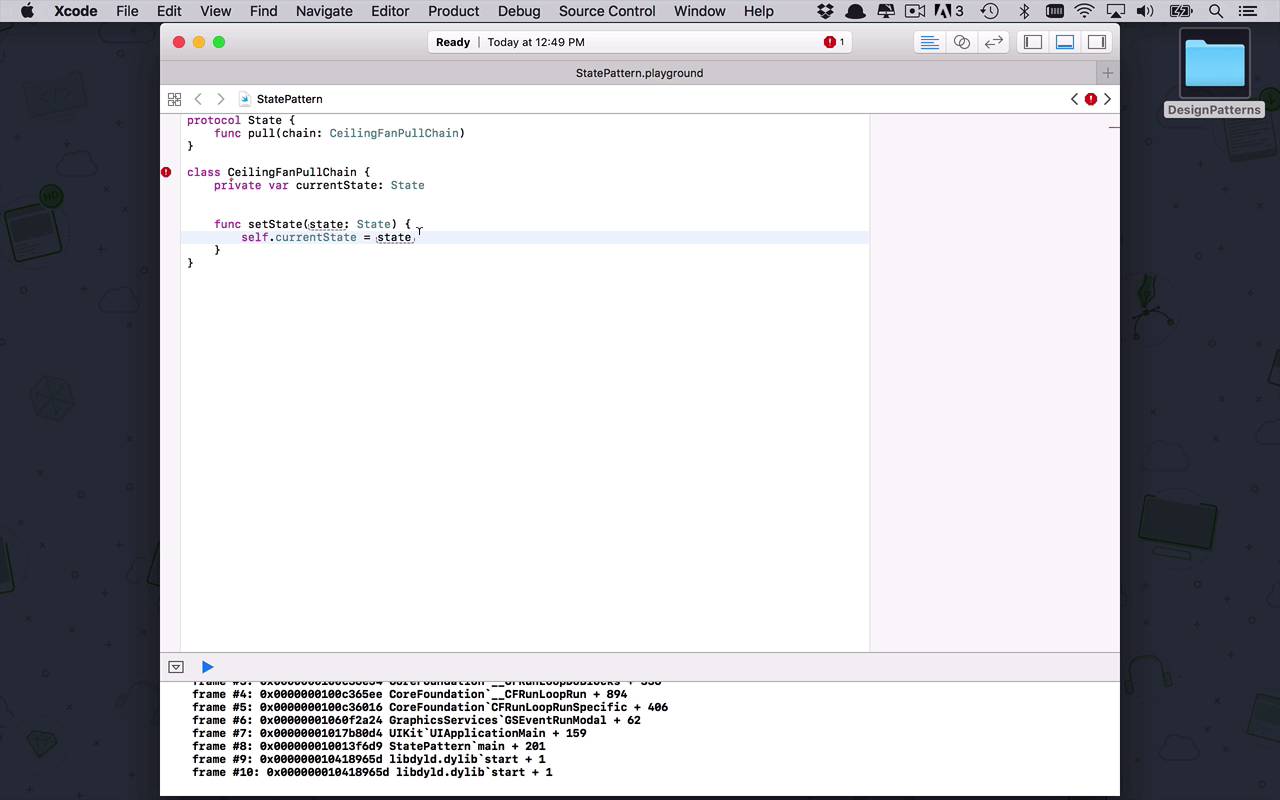
- Overview
- Transcript
4.9 State
The state pattern is very useful when your classes need to change their functionality based on their current state. Instead of using if...else blocks everywhere in your code, you can use the state pattern to extract these states into their own classes so you can transition between them very simply.
1.Introduction
1.1Introduction01:39
1.2Prerequisites02:48
2.Creational Patterns
2.1Factory10:16
2.2Abstract Factory12:24
2.3Singleton09:09
2.4Prototype09:18
2.5Builder11:40
3.Structural Patterns
3.1Adapter10:07
3.2Flyweight10:33
3.3Proxy05:53
3.4Bridge10:35
3.5Decorator11:44
3.6Composite09:43
3.7Facade07:19
4.Behavioral Patterns
4.1Iterator09:32
4.2Command07:48
4.3Chain of Responsibility13:47
4.4Mediator08:16
4.5Memento08:53
4.6Interpreter14:31
4.7Observer08:58
4.8Strategy07:36
4.9State06:21
5.Conclusion
5.1Conclusion02:42
4.9 State
Behavioral pattern that I wanna spend a little bit of time talking about is the state pattern. Now the state pattern is an interesting one in that what it allows you to do is to, based on the current state of an object or some piece of your application, to change the functionality. So at the end of the day, what it really looks like is based on the state of your object, or of your class, you are able to customize the implementation. So that it almost looks like the application can dynamically change its functionality, based on what's currently going on within it. Which is incredibly powerful, but let's start to break this down to a very simple example, so you can see where it's most applicable. So, let's create a state pattern playground and within here let's talk about a certain scenario, let's start by creating a simple scenario. Let's imagine that we're dealing with a ceiling fan, now how do ceiling fans typically work? Well initially, for the most part unless you have children that like to play with fans, when you walk into a room the fan is probably going to be off. Now if I walk up to the ceiling fan and it has a chain on it and I pull the chain one time, it's gonna change the current state of the fan to be rotating at a slow pace, or a low speed. Unless sometimes, depending on your implementation, depending on your brand of ceiling fan, maybe it goes to high, but let's assume for this case it goes to low. Now I walk up to it again and I pull the chain a second time, it's gonna change the state of the ceiling fan to start rotating at a medium speed. And then finally I can go pull one more time and it's going to go to high, and then if I am all done with the fan, I can pull it a fourth time and it's going to change the state to off. So that's the basic concept of changing states within an application, now changing the current state of the pull chain is going to change the implementation of what's going on. With the ceiling fan, and that's the basic concept behind the state patterns, let's create a protocol that's going to be our state. And within this particular implementation, we're gonna have a function that's gonna say pull, so I'm gonna be able to pull on something, but what am I gonna be able to pull on? Well I've gotta define that first, so let's create a class and let's say I can pull on a ceiling fan pull chain or a ceiling fan chain or something like that. Okay, so that's what I can actually pull on so I'm gonna say, this is the chain and the type is gonna be a ceiling fan pull chain, okay? Now based on what's going on with that pull chain, it's going to change the internal state of my ceiling fan and ultimately affect its performance. So we're gonna need to know what the current state is so I'll say var currentState is going to be equal a state, and then at any given time I want to be able to set the current state. So let's create a function to handle that and I'll say set state, which is going to take in a state, which is going to be a state or an instance of my state protocol. And I'll simply say self.currentState is going to be equal to state, okay, so now I can set that state and then I also want to be able to pull on that chain. So I can create a function now that's gonna be pull, and when I pull on the ceiling fan chain I'm going to go into my current state. And I'm going to execute pull on myself, since I am, or within this class, I'm a CeilingFanPullChain. Now it would also be beneficial to initialize this ceiling fan to a starting state but we don't really have any states to speak of yet, so let's start to define some of those. So like I said, we're gonna talk about off, low, medium, and high those are the states that we're gonna cycle through, so let's start by creating some of those. We'll say off is going to be a state and then within here we're going to have a single pull function, which is going to say chain, which is what's being passed in. I want to set the current state equal to another state, so whatever that next state is, so what we're gonna do here is, we're actually going to create three more of these. Or one class for each state that we want to deal with, so we're gonna have a low, we're gonna have a medium, and we're going to have a high. So let's go through these and let's talk about where we're gonna go, so if I'm currently in off and I pull the chain, I want to set the state to low. If I'm in low and I pull the chain, I want to set the state to medium, if I'm in medium then I wanna set the state to high, and if I'm in high I wanna set the state to off okay, so what do I wanna do in addition to those? Well, I want to kind of put in a little bit of text here to let us know what's going on, so I'm going to say changing speed to low. All right, so now I'm going to copy this, and I'm just going to put these down in here so I'm now changing the speed to medium, I'm now changing the speed to high. And then, finally, I'm going to be changing the speed, or maybe turning off the fan so we'll say, turning off fan, just like that. So these are the different states that we're gonna cycle through, and by default, when we kind of initialize our ceiling fan pull chain here, we're gonna set our current state equal to off, so that's where we're going to default. So now, based on the current states of my ceiling fan pull chain, I can now change the functionality that's going on internally based on these state classes. So let's go ahead and give an example, I can say let fan equal to a ceiling fan pull chain all right, and within here I can start to change the state. I can say fan.pull the first time, and that should change from off now to changing speed to low, and then I can do it again, I can pull the chain again and that should now set the save changing speed to medium. I can change it to high, and then after it's at high, I can change it to off or I can turn the fan off. So as you can see now, using the basic state pattern I can now wrap the different states of my class or of my application into sub classes that are gonna contain certain functionality. That when I change the state of my parent object, I can then basically change it's functionality and from the outside world look like it's very dynamic


