
 Lessons: 24Length: 3.5 hours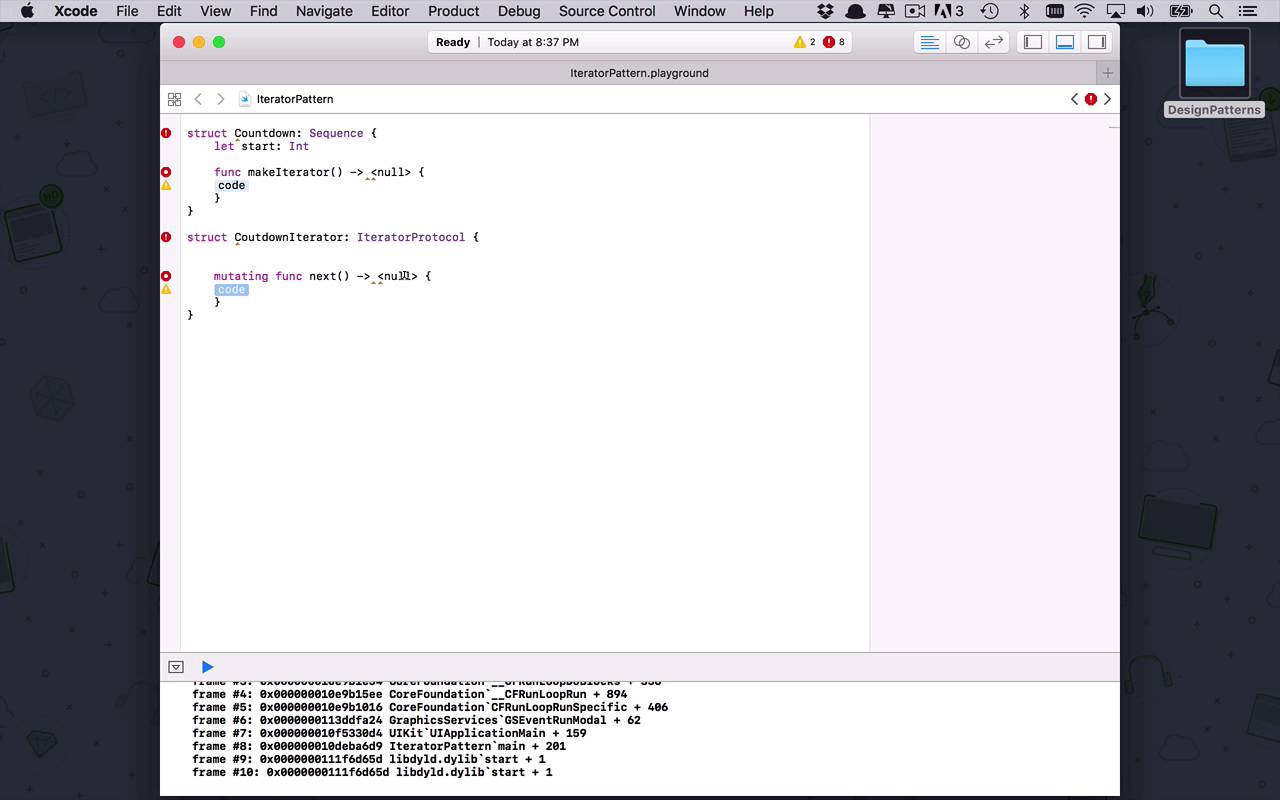
- Overview
- Transcript
4.1 Iterator
Most languages provide mechanisms to easily iterate, or loop over, collections of objects. What if you need to create a class that has some internal components that you want to iterate over in a simple way? That could be complicated, but not with the iterator pattern. And with some of Swift's built-in protocols, it's even easier.
1.Introduction
1.1Introduction01:39
1.2Prerequisites02:48
2.Creational Patterns
2.1Factory10:16
2.2Abstract Factory12:24
2.3Singleton09:09
2.4Prototype09:18
2.5Builder11:40
3.Structural Patterns
3.1Adapter10:07
3.2Flyweight10:33
3.3Proxy05:53
3.4Bridge10:35
3.5Decorator11:44
3.6Composite09:43
3.7Facade07:19
4.Behavioral Patterns
4.1Iterator09:32
4.2Command07:48
4.3Chain of Responsibility13:47
4.4Mediator08:16
4.5Memento08:53
4.6Interpreter14:31
4.7Observer08:58
4.8Strategy07:36
4.9State06:21
5.Conclusion
5.1Conclusion02:42
4.1 Iterator
We have now graduated from the structural design patterns, and we're ready to move on to the final category of design patterns for this course, and that is gonna be behavioral. So we've started with the creational patterns, where we have learned how to, in a very sophisticated manner, how to create objects and how to build those objects from some basic rules. Then we moved into the structural design patterns, where we're able to provide some structure and some backbone to the design of our systems. And now we're moving onto behavioral patterns, where we're able to start to dictate how objects operate and how we can design them in such a way that they're easily maintainable and that they're reusable across different parts of our application. So the first one that I wanna spend some time with is gonna be the iterator pattern. Now the iterator pattern is an interesting one because it's something that you basically use, I could imagine, daily. The iterator concept is something that is all around you. The iterator pattern is pretty simple and you might say well, I've never used it before. Well, I imagine you probably have. Let's begin with a simple example. How many times have you seen something like this, where we have maybe some sort of collection, this could be an array or whatever. So let's just build out a very simple array here. We have Derek, John, Robert, and we have maybe Andrew. And you could add some other ones in here if you want. But the concept of iteration is pretty simple. Every time we do a for loop for name in names, this has to be names. I wanna come in here and I simply want to print that name. This concept right here is iteration, so we have a collection of names and we've now using a for loop, we have iterated over it. And what makes this happen, what makes this iterable, is the fact that all of these collections within Swift have or implement behind the scenes what's known as the IteratorProtocol. Now, this is very nice because Swift provides this functionality for us. So that we can incorporate this idea of being able to iterate over our custom objects without us having to do a whole heck of a lot of work. So it's kinda nice because now we can use the IteratorProtocol and its friend the Sequence protocol, to be able to take advantage of using for loops on our custom objects, even if they aren't pre-built collections or arrays. So let me show you how that's going to work. So the first thing that we want to do, is we want to create the concept of whatever our object is that we want to be able to iterate over. So let's create a very simple Countdown object. So we're gonna be able to use this object to count down from some number down to zero. So what we're going to do is, let's just mix things up so you know that everything doesn't always have to be a class. We can create a struct here and we're gonna call this our Countdown struct. And this is going to implement the Sequence protocol. Now what the Sequence protocol allows us to do, is to say that this particular type is going to have a special function within it, known as makeIterator. And what makeIterator does, is it allows us to say, I can now return from my type a special iterator that knows how to handle that iteration over my object so that we can use it in a for loop. So what we're gonna need is we're going to need first some sort of number that we're gonna start with. So what number do we wana start with in our countdown. So we're going to say let start be an Int. So what we wanna do is we wanna start with some sort of number. Now like I said, sequence needs to have a function in it called makeIterator. Now this is kind of interesting, because now I said makeIterator, but the problem is that it gave us a null. What is it returning? Well, it says null here because it doesn't know what we want to use as our iterator yet. We have to build that. So let's go ahead and do that now. We can make this struct as well. So this is going to be struct, this is going to be our CountdownIterator. And we're gonna take advantage of the built in IteratorProtocol. And once again, the IteratorProtocol is going to require us to build out an individual special function called next. Now once again, next is a function that doesn't know what it's returning because it needs to return a sequence of something, but to this point we haven't informed it of what our countdown is going to return yet. So we need to kinda do these things in parallel and build them together. So now that I've created my CountdownIterator, I can now say that makeIterator within Countdown is going to return a CountdownIterator, just like that. And then within our code we need to return a new instance of our CountdownIterator, but we haven't created the rest of the functionality yet, which is going to specify what the Countdown is. All right, so what we're gonna do now, is we're going to say within our CountdownIterator, we need to have an instance of our Countdown. That's gonna be what's ultimately gonna drive all of this functionality, so this needs to have an instance of Countdown. And then it's also going to need some sort of variable that will allow us to keep track of where we are within the iteration of the numbers. So remember, Countdown is gonna take in an integer, say ten, and then it needs to know how many times it's run through to keep track of where it is in its countdown from ten down to zero. So we're just going to call that times, we'll say var times is going to be equal to 0, so it's going to be an integer. All right, so we have those pieces of the puzzle. But now we need an initialization function where we can pass in our Countdown. So we're gonna be able to pass in our Countdown and we're gonna say, self.countdown = countdown, like that. So now that we have this initialization step done here, we can actually fill in where we're going to return a new instance of a CountdownIterator. And we're gonna pass in ourself, just like that. Okay, so now we've got our countdown mostly taken care of, now we need to come down here and we need to take care of our CountdownIterator. So we're gonna come down into our next function and now we know that basically for our countdown, what we wanna be returning all the time, is we wanna be returning an integer. So we're gonna have an integer here. And I suppose we could make it optional, depending on how we're handling this, cuz there's a couple different ways that we could handle this. And I'll show you probably one of the more accepted ways that you could handle this countdown process. So the first thing that we need to do is we need to determine what the next number is in our order. So we can say, let next number be equal to. And what we wanna do is we wanna take our countdown.start number and we want to subtract from that the number of times we have iterated. So right now it's at zero, so if I were to pass in ten we would be starting with ten, minus, and since it's times a zero, we would subtract ten, and that would give us ten to start. And then the next time times got iterated, or incremented, it would be ten minus one which would take us down to nine, and go all the way down. Which is fine, but we need to kind of check to see when we're done. So the way that you can do this is we can use a guard function here or our guard operation, where we can say we wanna make sure that next number is greater than 0, and if it's not we're simply going to return nil. So that's why we kinda made this optional here. So if we're done we're just gonna return nil and that's gonna say, hey, we're done now. But if we're good to go, then we're gonna come down here and we're gonna increment times by 1, and then we're simply going to return nextNumber, since that's the next number that we want to output in the iteration process. And that is basically all it takes. So remember now when we're creating an iterator within Swift, there are two things that we can use built into the language, known as the sequence and the iterator protocol. And by combining these things together, we can create a pretty cool iteration process out of our own custom types. So how do we use this? Well, we could say let, we'll say ten is going to be equal to a Countdown. And because we are creating a countdown that is a sequence protocol, there is an initialization function built in that takes a start value. So I can say 10, that's why I called it 10. So now we have this one. So what the iteration allows us to do is, I could put my custom ten object here into a for loop. And I could say for count in ten, I want to then print count, just like that. And by implementing the sequence and the iterator protocols, now what I've done is I've been able to create a custom type that doesn't really look like a collection or an array like the first example that I showed did. And I'm able to iterate over my custom class and do any sort of iteration process that you would normally see, just like when I iterated over the names to begin this lesson.


