
 Lessons: 24Length: 3.5 hours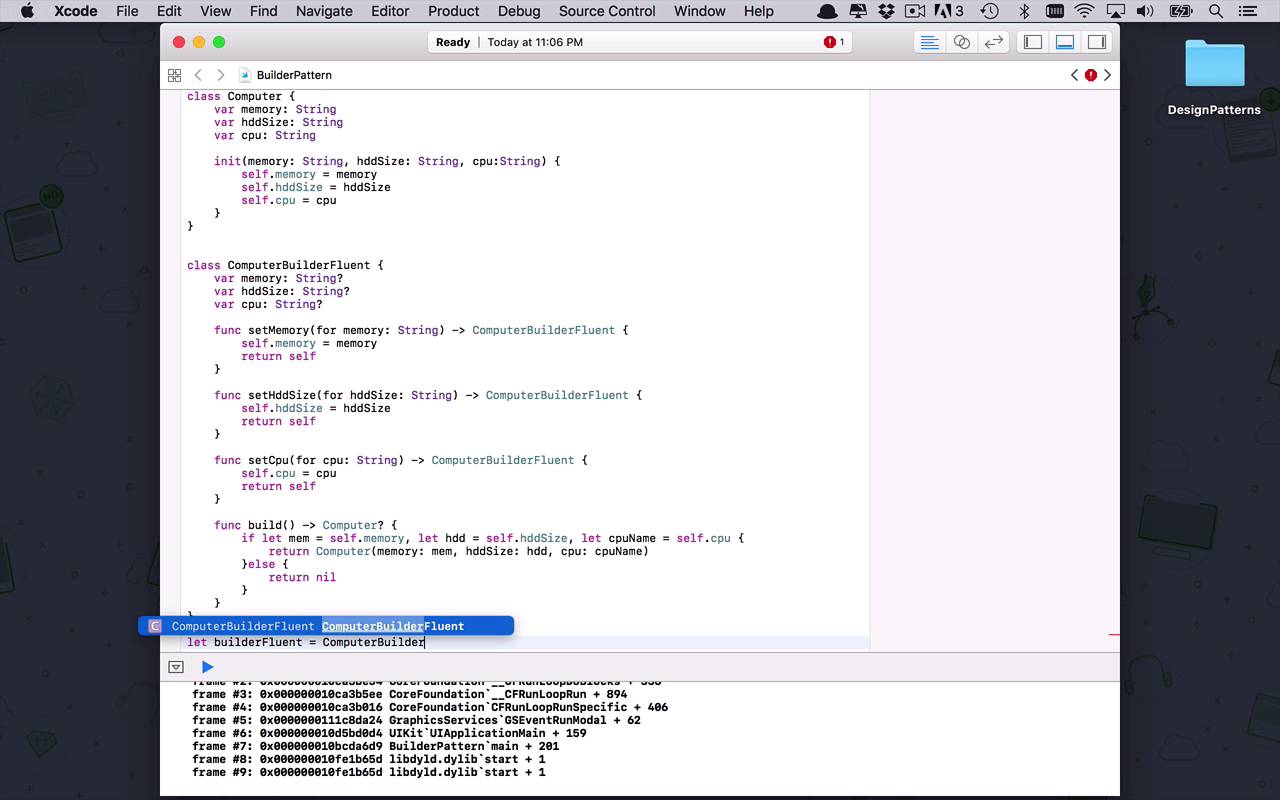
- Overview
- Transcript
2.5 Builder
Builder is another powerful pattern that becomes very useful when trying to build complex objects. Many times in software development, we need to create a large complex object, but don't always have all the information needed to build it all at once. Maybe we get little pieces that we need over time. If that's the case, the builder pattern is the one for you.
1.Introduction
1.1Introduction01:39
1.2Prerequisites02:48
2.Creational Patterns
2.1Factory10:16
2.2Abstract Factory12:24
2.3Singleton09:09
2.4Prototype09:18
2.5Builder11:40
3.Structural Patterns
3.1Adapter10:07
3.2Flyweight10:33
3.3Proxy05:53
3.4Bridge10:35
3.5Decorator11:44
3.6Composite09:43
3.7Facade07:19
4.Behavioral Patterns
4.1Iterator09:32
4.2Command07:48
4.3Chain of Responsibility13:47
4.4Mediator08:16
4.5Memento08:53
4.6Interpreter14:31
4.7Observer08:58
4.8Strategy07:36
4.9State06:21
5.Conclusion
5.1Conclusion02:42
2.5 Builder
I'd like to wrap up the creational pattern section with one final pattern known as the Builder pattern. So let's begin by creating a BuilderPattern playground. What next, this is going to be a creational pattern. And what we're gonna do here is we're going to specify a scenario. On the scenario is, let's say we're building a system that's going to allow end users to configure, build, and order a new computer. So as you could probably imagine, there's going to be nearly an infinite number of ways to configure this thing. We could do all sorts of different chassis and power supplies, fans, motherboards, CPUs, memory, hard drives, monitors, there's just a whole slew of different ways to order these things or configure these things. But for this particular example we're gonna keep things fairly simplistic. So let's start by creating a computer class and what a computer is going to look like. So this computer is going to only have three properties. But as I mentioned before this could have hundreds of different configurations and for each one of those configurations there could be n number of different options, so things could get very out of hand very quickly. But for our particular instance, we're only gonna provide three different configurations. There's going to be memory, which is gonna be a string so we can specify 16 gigabytes or 8 gigabytes or 32 gigabytes or whatever have you, just in text form. And then we're going to allow for the hard drive size configuration, which is gonna be the same thing. 500 gig, one terabyte, whatever have you. And then, finally, we're gonna specify the CPU. So, maybe what type of CPU or what speed of a processor it is, things like that. So, typically, where the builder pattern comes in handy is, let's say I wanted build this computer but the only way to build this computer was via an initialization function where I had to pass all of these things in. So, as you could imagine, I could wind up having an initialization function or a constructor that could be incredibly long. And then I would have to get all of that data and then slam it all in here at once just to create this configuration. So let's just finish initializing this here to make sure that everything is setup correctly. So now, like I said, this is a very simplistic example, but if this were big and I had 100 different configuration options and each of those options had a few different possibilities, this could get out of hand very quickly. So what I wanna be able to do is, I wanna create a mechanism that's going to allow me to create the configuration for this computer somewhat incrementally, so I don't have to know everything all at once. And I can just kinda keep building and building and building, maybe from one page to the next to the next. And I'm just kinda keeping track of all that configuration, until the very end when I build and verify that the configuration works and is correct. So there's a couple different ways that you can do this traditionally with the Builder pattern. You would typically see a fluent way of doing this which I'm gonna show you here momentarily. And then we can make some tweaks to it and take advantage of some characteristics of the Swift programming language to maybe make it a little bit more elegant. So I'm gonna drop a little bit of code in here right now. And what this is is a computer builder fluent style. So this is a more traditional way that you would see the Builder pattern implemented. So one of the common characteristics of the Builder pattern is creating a class that's going to have the same properties of the target object we're trying to create or the target type. So as you can see here, we have memory, hard drive size, and CPU, just like the computer does, but notice that the types are optional, or depending on what language are you using. Maybe they're nullable or what have you, but they're all optional here, which means I don't have to specify them all at the time when I create this class. Whereas in this case, I have to specify. I either have to give them all a default value or I have to assign them in the initialization function. Which is what I'm trying to get away from by using this pattern. So what you'll typically see in this fluent style of Builder pattern, is you will see a set function or some sort of function that's going to allow you to incrementally set each and every one of those properties over time. So I can set my memory, I can set my hard drive size and then I can set my CPU. And then ultimately, the goal is you wanna be able to build that configuration or build that target object with a single method call, once you're done doing all the configuration. And that's what Build is for. So as you can see here, I can spend some time setting each and every one of my properties, and then when I'm done I can call Build, which is going to return a target instance or whatever that instance of my target object is. Which once again is going to be optional because if I don't set all of these before I need to build, then I would get an error. Because I haven't set all of them properly but they're all required in the initialization function for computer. So that's what I'm doing here, I'm checking to see if memory is set, if hard drive size is set, if CPU name is set, if all of those things pass, then I can go ahead and return a new instance of computer just like this. And if for some reason everything isn't set then I'm returning nil. So let's see how we would use this particular instance of the Builder. So let's say that we'll call this BuilderFluent is equal to ComputerBuilderFluent(). And now what I can do is I can say builderFluent.setCpu, and we'll call this 3.5 GHz, or something like that. And then we could say, all right, now I wanna set my memory. And this is going to be 8 GB. And then I want to set my hard drive size to be 500 gigabytes, something like that, maybe some sort of base configuration. Now the reason that I'm able to chain all of these things together is all of these set functions are all returning an instance of the same builder that I'm in. So as you can see, after each one of these sets I'm returning self. So then I can just chain all of these operations together and everything continues to work just fine. Now is everything set properly, how do I know? Well I can come in to my fluent builder, and I can say, builderFluent.build(). Now if everything worked correctly, I should be getting an object of type computer from which then I could go into and I could say what's the CPU, and the CPU is going to be 3.5 gHz, just like that. So that's not a bad way to do it, that's a more traditional style of a Builder pattern. Now another way that you can do this using some Swift systems is using a closure. So let's see what that might look like. So let's build this one out a little bit. So let's say computer builder and we're gonna do the same thing. Once again, like I said, this is a very common characteristic is to have the properties of your target object within your builder, same way that I had for the fluent version. But in this case we're gonna use a couple little tricks. So we're gonna create a type alias because I wanna create a closure which is basically just a first class version of a function that I can pass around. So what I wanna do is I wanna create a Builder closure which is simply going to take in a computer Builder and that is pretty much it for now. And then, what I wanna do is I wanna create an initialization that's going to take in a Builder closure which is going to be a tight Builder closure. All this thing is going to do is call Builder closure on itself. So now we're done with everything for the Builder, so we've kinda cut everything down from all of this, to this. Now it looks like we got rid of some work, but in order for this to really work, we have to augment our target object just a little bit. So here's how we're gonna do that, we're gonna create a new initialization function, but this initialization function is going to be optional. So we don't know that it is necessarily going to return a computer object back. It will only work similarly to if everything is set properly. So let's see what we're gonna do here. We're going to then pass in a Builder object which is going to be of type computer Builder. And then, within here, we're going to do something similar to what we did down here to make all of those checks. We'll go ahead and say, if let memory = builder.memory, let hddSize = builder.hddSize, let cpu = builder.cpu. Now if all of those things worked properly, then all I have to do at this point is initialize my object, computer object with these values. So all I have to do is say self.memory = memory, self.hddSize = hddSize, and self.cpu = cpu. Now, that's all great, as you can see, I'm still getting a little error here. And that's because I'm not handling all of the situations where I might actually run into a problem and then return something. Because if for some reason one of these things is not set properly, then I have to handle that case which would be else I want to return nil. So as you can see here now, I now have a different style computer Builder using a closure. And then that closure is allowing me to pass an instance of computer Builder into my initialization function for computer and be able to create it that way. So let's take a look and see what that might look like. So now I can say, let's do let's Builder be equal to a new instance of my computer Builder. So then what I can do here is use my closure functionality to say that my Builder, that I'm going to reference as b, in b.cpu = *3.2 GHz, b.memory = *16 GB, and then b.hhdsize = *2TB, just like that. So, now I've created a new instance of my Builder closure. So, then I can say, let computer, or maybe we'll call this one newComputer = an instance of computer where I'm passing in a Builder like this. And now, I can say newComputer.hddsize should be two terabyte, so there you go. So, now you have two different ways using Swift, to be able to use the Builder pattern to ultimately create a fairly large complex object using both a more affluent interface, as well as function closures.


