
 Lessons: 24Length: 3.5 hours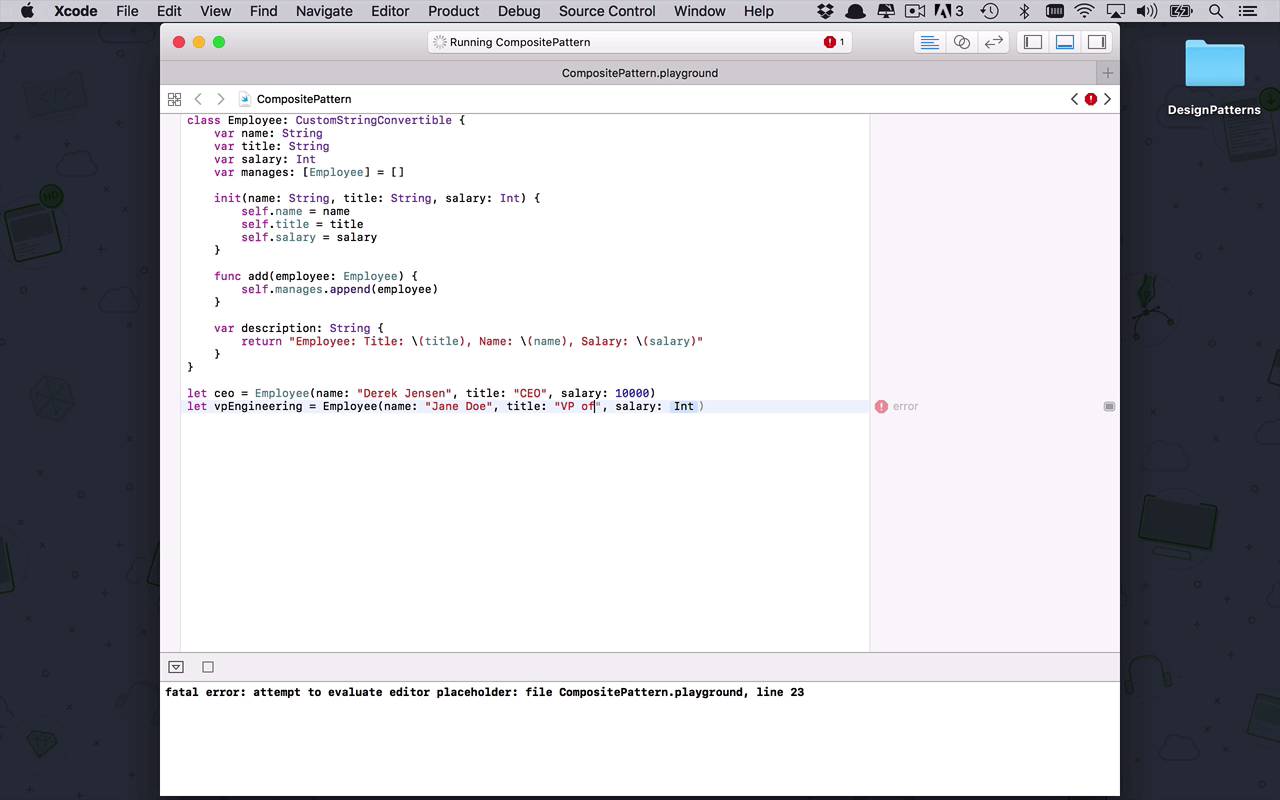
- Overview
- Transcript
3.6 Composite
The composite pattern allows you to create a single common type in your application that you can then use to create complex hierarchical structures (for example, trees). The composite pattern, moreover, makes it simple to work with the elements of these structures, by defining a uniform interface for accessing them.
1.Introduction
1.1Introduction01:39
1.2Prerequisites02:48
2.Creational Patterns
2.1Factory10:16
2.2Abstract Factory12:24
2.3Singleton09:09
2.4Prototype09:18
2.5Builder11:40
3.Structural Patterns
3.1Adapter10:07
3.2Flyweight10:33
3.3Proxy05:53
3.4Bridge10:35
3.5Decorator11:44
3.6Composite09:43
3.7Facade07:19
4.Behavioral Patterns
4.1Iterator09:32
4.2Command07:48
4.3Chain of Responsibility13:47
4.4Mediator08:16
4.5Memento08:53
4.6Interpreter14:31
4.7Observer08:58
4.8Strategy07:36
4.9State06:21
5.Conclusion
5.1Conclusion02:42
3.6 Composite
Let's talk a little bit about the composite pattern. Now the composite pattern is an interesting one and often times is overlooked because of its apparent simplicity. And it could be very possible that this is something that you've used before, but not really realized it. But the basic gist behind the composite pattern is I wanna be able to create some sort of hierarchical structure. But all the different nodes, or leaves, within that hierarchical structure, I wanna be able to access and have all the same functionality across them. So I don't wanna have to manage a bunch of different classes and link them together in very disjointed and complicated ways. I simply wanna create a simple class that's going to be able to represent all of the leads within that hierarchy. So let's see how that's going to work. This is going to be the composite pattern, now let's go ahead and start to build this out. So the most basic scenario that I can think of when we talk about hierarchies is maybe when you're starting a business or work for a company. That's a very hierarchical structure. There's the CEO, and then maybe under that there's the VPs of something and then maybe directors, and then senior levels, and junior levels, and entry levels, and interns and all that sort of stuff. And whatever that hierarchy looks like within your organization But when it boils down to it, everybody in the company is an employee, and that's the most simplistic way to think about it. So instead of starting to build CEO classes, and VP classes and all those types of things, let's boil it down to its absolute basics. And define everything in one simple common way. So what we're gonna do is, we're gonna create a class called employee. And I'm going to use the custom string convertible protocol here, just to have an easy way of printing out what this employee looks like later on, and you're gonna see why in a little bit. But in order to do that, I need to define some properties. I'm gonna have a name property so employee's can have a name. An employee's going to have a title. An employee's going to have a salary, very important to have a salary. That's just gonna be an integer. And we also have to account for the fact that these employees can obviously be managing other employees. So that's where we get that hierarchical structure. So the simplest way to be able to handle that is to create a manages array of employee objects, and by default, that's just going to be empty. So by default, we're not assuming that any employee actually manages anybody, we're just gonna say that it's a possibility. So now in order to populate these things, I want to create an initializer and the initializer's gonna have a name. It's gonna have a title and it's going to have a salary. And all of those things need to populate our object. Just like we've done before. So this should not come as too much of a surprise. Self.salary is going to be equal to the salary we past did. Okay, now we also wanna be able to say I want to add somebody to this employee that they might manage, so I can start to create that hierarchical structure. So let's just create a simple function here. It's going to be an add function, where we're going to add an employee to this employee. And then ultimately all that's going to do is going to go into manages, and it's going to append to that collection this new employee. All right, so that's fairly simplistic. And now to satisfy the custom string convertible, I need to add in a description property. And that description property is gonna do nothing more than return a formatted string about this employee. So the employees have a title, so I'm simply going to print out that title, and they are going to have a name. And so I will print out the name, and then finally I will print out the salary, like this. So as you can see, I'm beginning to treat all of these objects the same way regardless of what level they're at. As you can see, I'm starting to build out that functionality. All right, so I have this concept of an employee, now let's build this hierarchical structure, how can we do that? >> Well, we're gonna start with the CEO obviously. So the CEO is going to be an employee, and the CEO's name, obviously, is going to be Derek Jensen, because I'm just that good I guess. All right, so my title is going to be CEO. My salary is gonna be 10,000 whatevers. And that's just going to be my CEO object. Now that I have my CEO, let's go ahead and create some VPs. So let's say VP of Engineering is going to be a new employee and that employee is going to be Jane Doe, who's title is going to be the VP of Engineering and the salary is going to be 7500. Let's go ahead and create another VP, maybe this time of Marketing and that's going to be another employee and this person's name is going to be James Johnson. [LAUGH] I've never been very good at coming up with fake names. This is gonna be the VP of marketing and he's also gonnamake 7500. All right, so now that I have some VPs let's create a director. So I can say let the director of engineering be equal to another employee and this employee is going to Robby Bobson whose title is the Director of Engineering. And salary here is gonna be 5000, something or others, okay. And then finally, maybe we'll create one senior engineer, something like that. Obviously, you can build this out to look like anything you want. This is going to be an employee, and this is going to be, how about Jenny Williams. And Jenny Williams is going to be a senior Engineer, whose salary is going to be how about 3750, something like that, okay. So now we have this collection of employees, we wanna start to build this hierarchy. Well, obviously, we start with the CEO and with the CEO, we're going to add the VP of engineering and then we're also going to add the VP of marketing. So that would make sense, right? But I think it would also make sense to say, we have the VP of engineering, we're gonna add in the director on engineering there that would make sense. And then I think we're also going to take that director of engineering and we're going to add our senior engineer to that director. So we are starting to create this hierarchical structure. We have the CEO at the top, then we have two VP's, and then we have a director, and then we have a senior engineer. All right, so that's really great, but now how do we actually take advantage of the fact that this is the composite pattern, and we can treat everything the same way? Well, we're just gonna create a very simplistic function here, that's going to be recursive, so I can say, print employee. And this is going to take in an employee, which is going to be a type employee, and we're gonna take in the level, so at which level we're dealing with here. All right, so now what I wanna do here, is I want to create some spacing. So every time we go down a level of the hierarchy, I wanna indent a little, or put like a hyphen in there. So we're gonna say, let spacing be equal to a new string and we want to use the string that allows for repeating for account. So our string that we're gonna repeat is just gonna be a hyphen and we want to do as many as there are in the level that we're starting at. And then all we wanna do is we want to print. We're going to print a string here, that's going to be our spacing. And then next to that, we want to print the employee. Now this is where we're going to take advantage of the fact that we're using the custom string convertible. So now when I try to print this employee, I'm gonna print out this description line right here. So that's pretty nice. All right, so that's looking pretty good now, but what about all of the people that I manage? Well, we're simply gonna create a loop here, and we're gonna say for each e in employee.manages so in that collection, I want to simply call my print employee function, with the current employee. And I want to specify, this is the level plus 1 that I'm dealing with right now. All right, so that's my little recursive function here. So now that I've created my hierarchy, I have this function here that I can treat the same way no matter what level I'm at, to do something with, but right here, I'm just going to simply print it out. I'm gonna come down here, and I'm going to say, I want to print employee, I wanna print the CEO, and the initial CEO level is at level zero. So once it runs, now you're gonna see here, at the highest level I have my employee who has the title of CEO, and it's myself with my salary. Then one level down I have two employees. I have the VP of Engineering, and I have the VP of Marketing. Then underneath the VP of Engineering I have a Director of Engineering. And then underneath there I have my Senior Engineer. So as you can see now we've started to build this complex hierarchical structure of all of these different objects which can seemingly be different. But if we use the composite pattern and keep things very simplistic, we can actually deal with all of these objects in here the very same way without adding additional complexity.


