
 Lessons: 24Length: 3.5 hours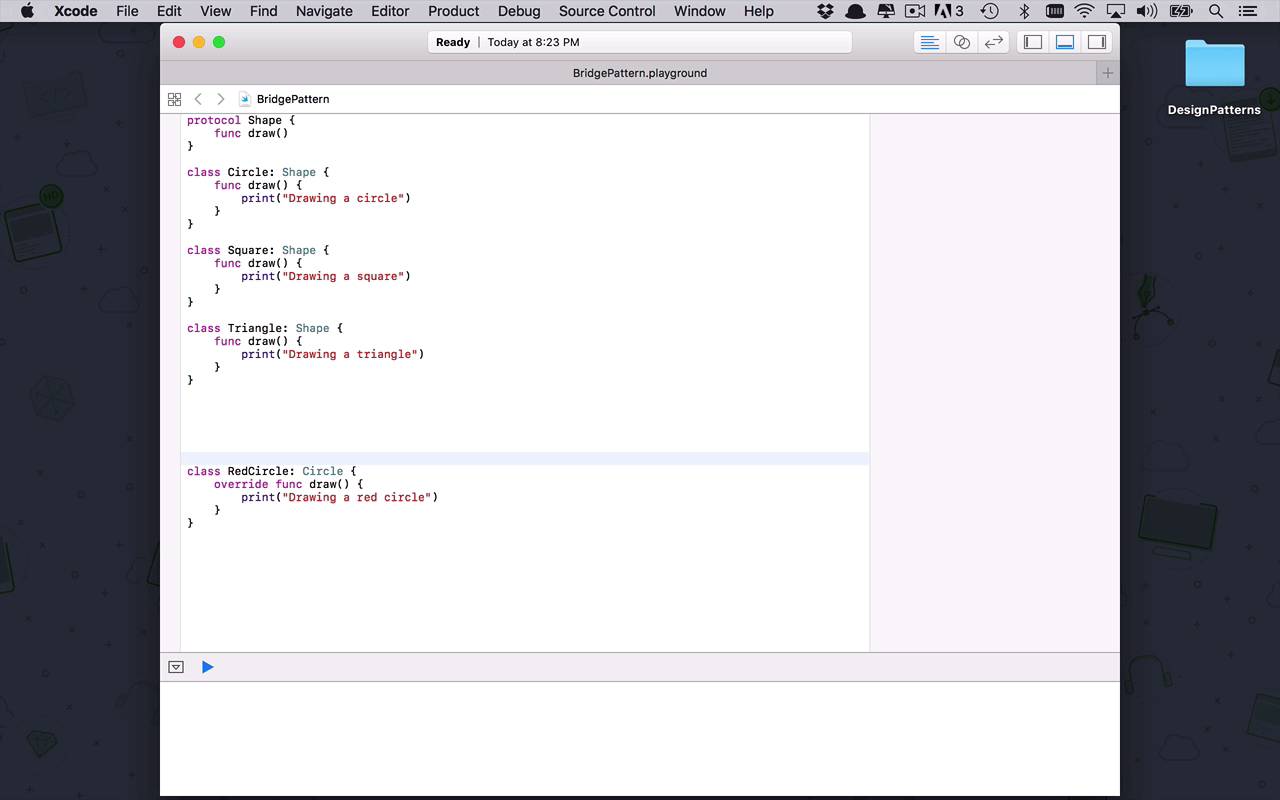

- Overview
- Transcript
3.4 Bridge
The bridge pattern can be one of the most difficult to understand. The basic idea is to reduce the complexity that can arise when creating structures of inheritance to add functionality to existing classes. The bridge pattern suggests that instead of creating new types every time we need more functionality, we can instead code that functionality into its own classes and combine it with existing objects at runtime.
1.Introduction
1.1Introduction01:39
1.2Prerequisites02:48
2.Creational Patterns
2.1Factory10:16
2.2Abstract Factory12:24
2.3Singleton09:09
2.4Prototype09:18
2.5Builder11:40
3.Structural Patterns
3.1Adapter10:07
3.2Flyweight10:33
3.3Proxy05:53
3.4Bridge10:35
3.5Decorator11:44
3.6Composite09:43
3.7Facade07:19
4.Behavioral Patterns
4.1Iterator09:32
4.2Command07:48
4.3Chain of Responsibility13:47
4.4Mediator08:16
4.5Memento08:53
4.6Interpreter14:31
4.7Observer08:58
4.8Strategy07:36
4.9State06:21
5.Conclusion
5.1Conclusion02:42
3.4 Bridge
It's time to move on to our next structural pattern, and this one is going to be the bridge pattern. Now the bridge pattern can sometimes be a little bit confusing, but we're gonna boil it down to a very simple example and I think it's gonna make sense. So let's begin by creating a new playground, and this is going to be for the bridge pattern. And we're going to save it into structural, and now what we want to do is we want to kind of give a basic example. So let's say that we are creating some sort of application that can build things or draw geometric shapes. Or something like that. But you could extrapolate this concept to just about any other kind of manufacturing building type application. So let's say we're starting with something simple like shapes. And everything is based on a protocol and that protocol is going to be a shape. And it's going to have a single function and it's gonna be draw. So these shapes are going to know how to draw themselves, to manifest themselves on the screen or something like that, so that's the basic concept. Now let's say we want to start to build these shapes. So how would we start building these shapes? Well we would start off probably fairly simple and we would create a class and we would have this class maybe be a circle. And this circle is gonna be a shape and it's going to have to implement draw. And we are just going to do something really simple here. We are just going to say drawing a circle, something like that. Alright, so then now we are getting very good at drawing circles or manufacturing circles or some sort of product and now we want to expand a little bit, we want to be able to maybe go off and do squares, so we're going to start creating squares. And now we are printing, drawing a square. All right, nothing too big here, and you know business is booming. So, we still needing to expand a little bit, now we're creating triangles or some other sort of shape. You know, this is a fairly logical pattern, one that we follow quite often in our software development. Now, where we start to run into trouble here is we're starting to build out this kind of tree or pyramid shape where we started off with a simple concept, the idea of a shape. And then we started to go down a single level and build the shapes where we now have a circle, a square and a triangle, which are all shapes. Well, this is all great but maybe one size doesn't fit all. Maybe not everybody wants the same circle. Maybe somebody wants a red circle or something like that. So we're like, okay, we can do that. So let´s create a class, this time it´s gonna be a red circle. And this is going to inherit from circle cuz we´re gonna use good old inheritance, like we know we should, and then we´ll come in here and we´ll override our draw function and this time we´re going to print, drawing a red circle. It doesn't seem like a big deal, we´re all fine, we can just augment our existing implementation and build on that circle. Well, what if now we need to build red squares? Well we would do the same thing right? We would create a red square and we would create a new class to do that and so now we're at our third level. Where we started off at level one we had shapes. And then we had one level of inheritance here. And then we needed to augment those things. So we started to create a third level where now we're having colors integrated into our types, into our classes. Like red circle, yellow triangle, blue square. Well what if we need to then start talking about sizes, maybe we have small, medium and large. Well now as you can probably see the problem here is growing exponentially where now I'm gonna have to support all these different colors for the different shapes and now I'm gonna have to support different sizes for all the different colors, for all these different shapes. And as you can see, the complexity and the amount of classes and things that we are gonna have to support, because we are incorporating all of these characteristics into classes, like red circle, small red circle, things like that. This is a very dangerous pattern to get into, because what we wind up doing is just having this large explosion of different types, when we could be a little bit smarter about how we handle these things and the way that we can handle breaking apart some of this augmentation and some of the functionality of our base classes is to use the bridge pattern. So let's start to talk a little bit about how we can augment this current design that we have here, and take advantage of the bridge pattern. What the bridge pattern says is, let's talk about and isolate some of the functionality from the abstractions that we're talking about. So the abstraction we're talking about here is a shape, and we have basic shapes here. Circles, squares, and triangles. But now we're starting to additional functionality on to those abstract concepts like colors and sizes. But instead of baking those things into these actual classes, we're going to extract that functionality and we're gonna pass it into our base classes, so that our base classes can use them. So let's keep this here, this red circle concept, just so that we can see how it would work if we were to change this design into using a bridge pattern. The bridge pattern says, now let's kind of abstract some of these augmentations. What are we trying to augment these shapes to do? Well we wanna incorporate something like color, but you could do the same exact thing for size, so the first thing that we would do is we would create another protocol. This protocol is going to be the color protocol. And this is what we're going to use to define what this color functionality is all about. This is gonna have a single function in it, and it's going to be called fill. Fill is going to return a string. So it's pretty basic stuff but you can imagine this could be just about any bit of functionality that we would want to apply to some base kind of abstract idea. So now that we have this color protocol, let's implement it in a base format. And the way we're gonna do that is we're going to create a class called color. This is going to inherit or implement the color protocol and the way that we're gonna do this is we're going to add our fill here,but the fill itself needs to be adaptable. Because this is a base class, we need to be able to pass something into this color,so we can modify it's functionality. And make it a little bit more expressive. So the way that we're gonna do that is we're simply gonna create a private variable here, and this is gonna be called fill color. It's gonna be a string, and let's create an initialization function here where we can actually pass that fill color in. So we're gonna pass in a fill color that's of type string, and we're gonna set that fill color on ourself to be equal to whatever we passed in. So this is gonna be that base functionality so now when I come down to my fill function I can simply return fill color, right? So I'm not doing anything too crazy here, this is all fairly basic stuff. But where this really becomes a little bit more powerful now is I can create concrete types of this abstraction to represent any number of colors that I want. So let's start with the example that we had before with the red color. So let's create a class, which is gonna be called red, which is going to inherit from color. And then we are going to create an initialization function. We don't need to pass anything in, but what we want to do is we want to initialize the super class of color, and the way that we do that is by specifying super dot init and that fill color is going to be red. So we'll just pass it in as text, but you could very easily create an innumeration or some other representation to contain this red class, or this red value. So now we have this concept of a red, now how can we take this idea, this concept of a color, and integrate it into our shape concept? Well, we're gonna do the exact same thing that we've been doing before, but we're gonna do a slight augmentation here. Now we're going to come into our circle, and we are going to now begin to bridge the functionality from our base shapes to other functionalities like color as the example here. Or you could do the same thing for size and things like that. So what I want to do within my circle now, is I wanna create a private variable or actually a private constant for color that's going to be of type color of this base class type that I've created before and now, I'm going to also need a initialization function so I'm going to pass in whatever color this is and then I am going to save that. I'm going to say self dot color,equal to color. Alright so now we've kind of passed in that functionality into circle, how do we take advantage of it? Well now we can integrate this concept of a color or whatever sort of augmentation we're Introducing into these different shapes, and we can pass it into the draw. So now instead of just drawing a circle, I can now draw a color dot fill circle, all right? So now instead of having to create a red circle, and a blue circle and a green triangle to support these different colors, I can now still deal with my base class, my base circle, and I can just inject that functionality into it via the bridge pattern. So how do we use this? Well we don't need this class anymore so let's see how we can use this pattern. Let's start by creating an instance of red and red is going to be an instance of red, the class. And now I also wanna create a circle, and that circle is going to be an instance of a circle. And now I'm gonna pass in a color, a color of red. And so now I can simply call into circle and I can say draw my circle. And the result of this is going to be drawing a red circle, so as you can see now we're starting to cut down on the kind of horizontal explosion of this pyramid scheme that we're building here. Remember we started with a shape and then we did one level of all the shapes and then we went down another level and we started to build colored shapes. Now we've kind of brought all of that implementation up to that first level that's those first two levels, and we've been able to introduce all this additional functionality without having this great big explosion of different types to support all of this different functionality.


