
 Lessons: 24Length: 3.5 hours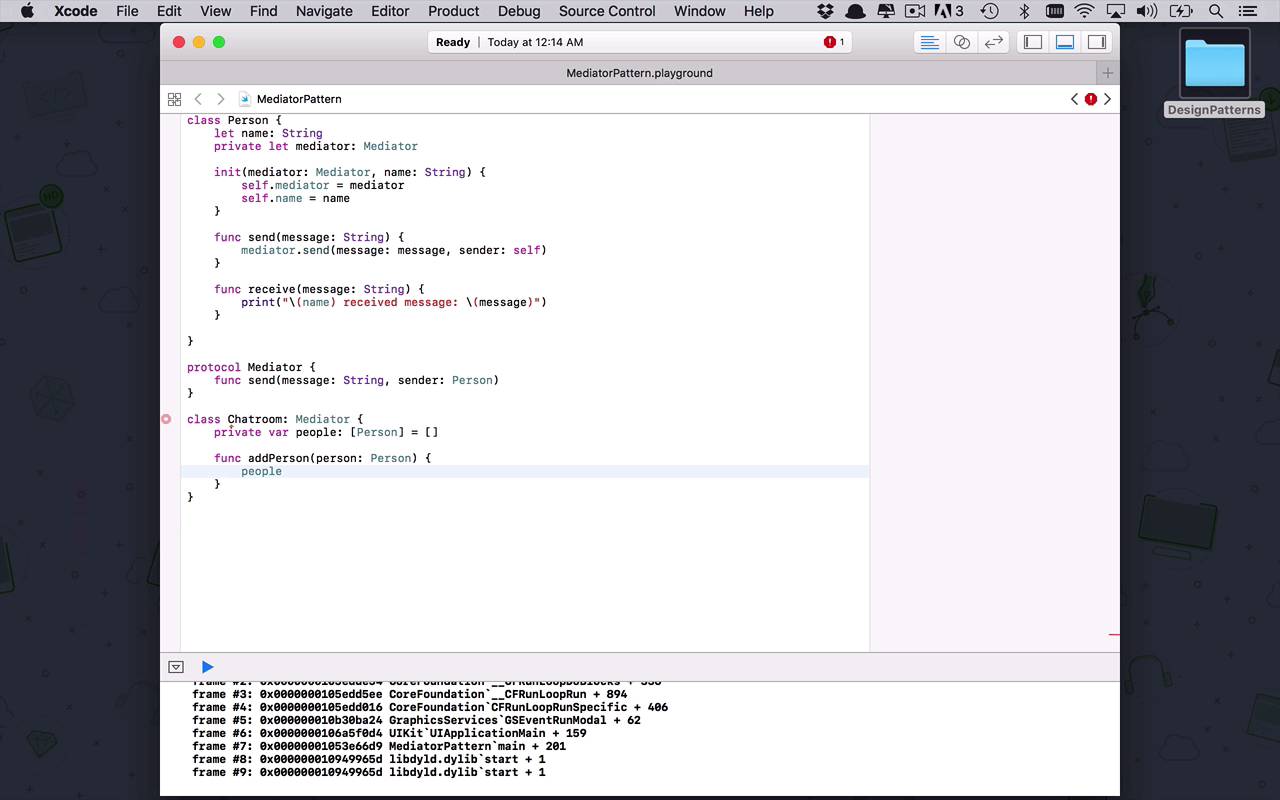
- Overview
- Transcript
4.4 Mediator
When thinking about the mediator pattern, simply visualize your favorite room-based chat application. The application is the mediator. It is the mechanism by which certain people, or classes, can communicate with each other without needing to communicate directly.
1.Introduction
1.1Introduction01:39
1.2Prerequisites02:48
2.Creational Patterns
2.1Factory10:16
2.2Abstract Factory12:24
2.3Singleton09:09
2.4Prototype09:18
2.5Builder11:40
3.Structural Patterns
3.1Adapter10:07
3.2Flyweight10:33
3.3Proxy05:53
3.4Bridge10:35
3.5Decorator11:44
3.6Composite09:43
3.7Facade07:19
4.Behavioral Patterns
4.1Iterator09:32
4.2Command07:48
4.3Chain of Responsibility13:47
4.4Mediator08:16
4.5Memento08:53
4.6Interpreter14:31
4.7Observer08:58
4.8Strategy07:36
4.9State06:21
5.Conclusion
5.1Conclusion02:42
4.4 Mediator
We're now moving on to one of a couple different behavioral design patterns that have to do with communication amongst different classes or different instances of classes within our application. Now this particular pattern is known as the mediator pattern. So let's go ahead and create a mediator pattern playground. And what we wanna do now is, as usual, we want to come up with a basic scenario. And the scenario that we're dealing with here is much like, I would say a group chat style application or a chatroom or something like that. The mediator is basically a pattern that allows you to communicate with other objects but do it indirectly through another mechanism, and that other mechanism is a mediator. So imagine we have a number of people that wanna communicate with each other but don't wanna communicate directly. So it's more like sending a message into a chatroom. And then the chatroom notifying and having these other people within the room receive that message. So let's start to build this out, it's a fairly simple concept and you'll probably agree that it's not too difficult to understand. So first we need some actors, we need some clients in this pattern here. And we're just gonna have these be people. So we're gonna create a person class, and we're gonna let this person have a name so it's easy to see when we are showing this example. And then we're also going to need a mediator. And initially, we're just going to create a protocol for this mediator. But like I said before, it's ultimately pretty much gonna be a chatroom. So we're gonna have a function here called send, and we wanna be able to send a message, which will be a String. And we want to be able to specify who is the sender, and the sender is going to be a person. Now this person is also going to be associated with a mediator. So this is the concept of a person communicating with other people through this mediator. And the person really needs to know who or what that mediator is to be able to send those messages. So let's go ahead and initialize these. We're going to initialize our mediator as a type of mediator, and we're going to initialize our person's name as a String, so then we can set these up. And now a person can do two things. A person can send a message, and a person can receive a message. So let's go ahead and handle that. So the sending of a message is going to be done via the mediator. So we don't want this person to have to directly communicate with another person or another object. We're gonna facilitate all that through the mediator. So the mediator is simply going to send a message, whatever the message is that we want. And the person that's going to be sending it is ourself, so that we're able to say that I'm sending this message out, and I'm the one who's sending this message, instead of directly sending it. And then the second thing the person is gonna able to do, is receive a message. So we'll just go ahead and put message as a String. And once this person receives a message, we're just going to print this out to say that this person's name received message and we'll just print out the contents of that message. Okay, so that's the basic structure of the person, we now have the protocol mediator. Now it's time to actually create the concrete mediator, which is going to be a chatroom. So we'll call this the chatroom. You can also call it a chatroom mediator, that would be fine as well. But I think we can not worry about that too much. Okay, so the first thing the chatroom needs to know about is, it needs to know about all the people in the room. So the people array is going to be an array of persons, and we're going to initialize it to be empty first. But now we wanna be able to add people to it so we can add person, and we're just gonna be able to specify a person that we wanna add to the chatroom. And then of course we'll just go into people, and we will append a new element of type person which is going to be our person argument. Okay, so now we're able to add people to the chatroom which is good. But via the chatroom, we also wanna be able to send messages. All right, so now this is where the interesting thing comes in. What we wanna do, if I was in a chatroom and I wanted to send a message, I would want to send it into the chatroom and have the chatroom notify everybody that I put a message out there. But I really don't wanna notify myself. It doesn't make much sense to have a message go out there and say, hey, Derek sent this message, but I am Derek, I don't really wanna know that. So we really wanna send it to everybody else. So we're going to create a for loop. And we're gonna say for all p in people, I want to check to see that P is not equal to the sender. And the not double equal sign like I've mentioned in a previous lesson, just shows you or is able to determine whether or not those two objects are references to the same memory space. So it's gonna know if that person that I'm looking at is the same as the sender. If it's not, then we'll go ahead and say p.receive, whatever that message was. Okay, so that's the basic idea behind the chatroom. Now we can go ahead and start to fill all of this up. So let's begin by creating a chatroom. And the chatroom is going to be a new instance of our chatroom. Then let's create some people. I'll say let Derek be equal to a person, whereas the mediator is going to be my chatroom, and my name is going to be Derek. Okay, so let's create another person here. Let's say Amanda is going to be a person who is gonna have a mediator. It's gonna be a person in that same chatroom, and this is going to be Amanda. And then let's just create a third person. We'll say let Adam be equal to a person. And that person is going to belong to the same chatroom, and this person's name is Adam. Okay, so we have all these people and a chatroom. But one other thing that we need to do is we also need to add these people into the room. So what we've done is we've associated this chatroom as the mediator or the communication mechanism for all these people. But now we have to register all of these people in the chatroom so that they can receive these messages. And we do that with the addPerson function that we created, so we wanna add in Derek. And I want to add in Amanda, and then finally I want to add in Adam, just like that, okay. So now I've got everything set up now I just need to start sending and receiving messages. So let's begin by saying Derek wanted to send a message to the chatroom to say, hello, is anyone there? So now you can see at the very bottom of the screen once it refreshes, that I sent a message, Derek sent a message. Hello, is anyone there? And Amanda and Adam both received that message. Okay that's great, well let's say one of them saw that message and Amanda wanted to respond, and Amanda said, hi, Derek, I'm here. Okay, so now we're gonna see the entire thing play out. Now Amanda and Adam both received, hello, is anyone there? Because Derek sent it so you don't see Derek receiving that one. And then Amanda sends a message, hi Derek, I am here. And then Derek and Adam both receive that because Amanda sent it she doesn't need to receive it. So that's the basic concept behind the mediator pattern which is going to allow different objects to communicate with each other without actually having to directly have any knowledge of each other. But they also are able to communicate via this mediator which is kind of the hub at the middle of the spoke so they can send messages in. And then the mediator will then send messages out to let those other people know that there is some sort of communication going on that they should be a part of.


