
 Lessons: 24Length: 3.5 hours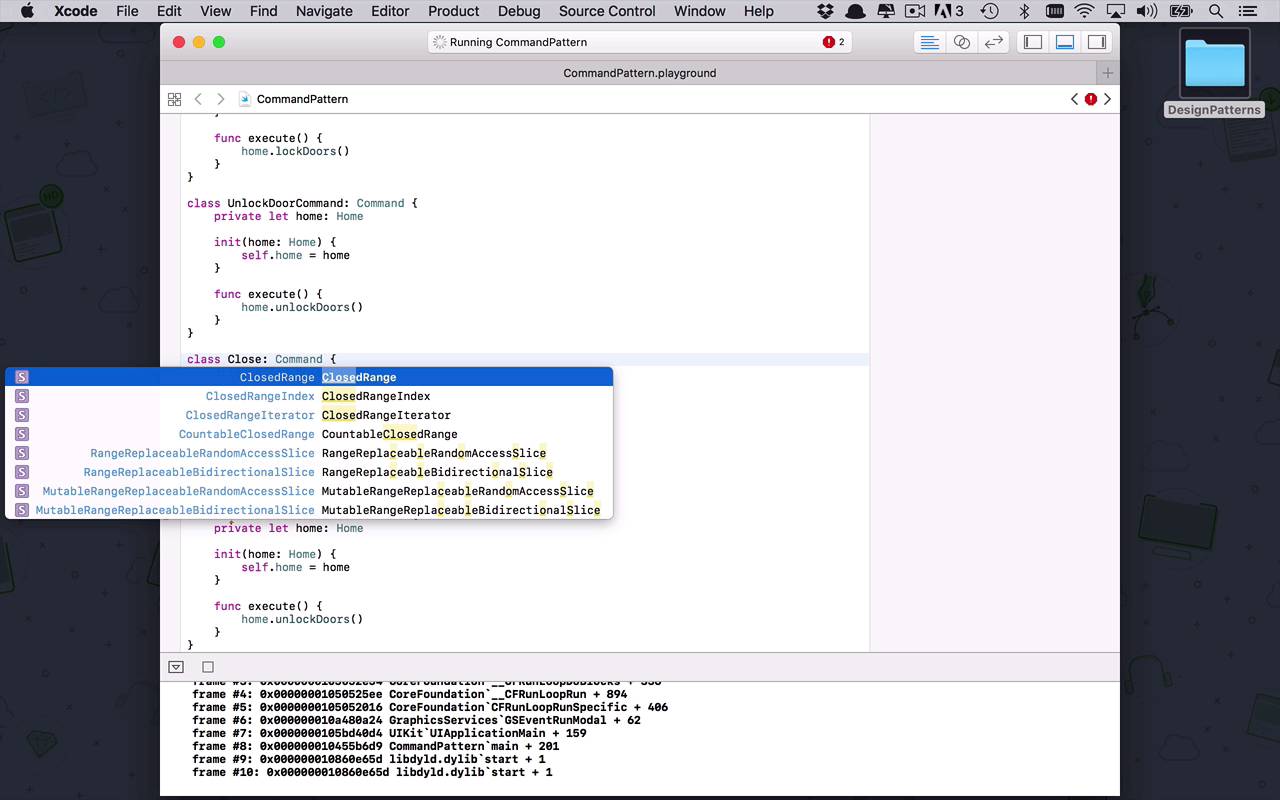
- Overview
- Transcript
4.2 Command
One of my all-time favorite patterns is the command pattern. The command pattern defines a way for you to extract the functionality from one class and use and restructure this functionality in any other class in your application.
1.Introduction
1.1Introduction01:39
1.2Prerequisites02:48
2.Creational Patterns
2.1Factory10:16
2.2Abstract Factory12:24
2.3Singleton09:09
2.4Prototype09:18
2.5Builder11:40
3.Structural Patterns
3.1Adapter10:07
3.2Flyweight10:33
3.3Proxy05:53
3.4Bridge10:35
3.5Decorator11:44
3.6Composite09:43
3.7Facade07:19
4.Behavioral Patterns
4.1Iterator09:32
4.2Command07:48
4.3Chain of Responsibility13:47
4.4Mediator08:16
4.5Memento08:53
4.6Interpreter14:31
4.7Observer08:58
4.8Strategy07:36
4.9State06:21
5.Conclusion
5.1Conclusion02:42
4.2 Command
Now I know earlier on in this course, I did mention that the factory pattern was probably one of my favorite all time patterns. But this next one is going to come in a close second, and this one is called the command pattern. And the command pattern is pretty interesting stuff because what it allows us to do, is kind of encapsulate a process, or a function, or some piece a functionality. Into its own class, in and of itself, and allow us to fire off that type of an event, or initiate that sort of operation later on in a much more structured way. So let's take a look at what this is going to look like, so we have the command pattern and in the command pattern, what we typically are gonna be dealing with is some sort of protocol like we have so many times called command. And the command, itself, is pretty generic, it usually has a single function called execute or something along those lines, and typically, it doesn't necessarily return a value, but it could. But a lot of times you're gonna see it be very kind of generic in it's processing, so that's what the command is gonna look like, so let's create a basic situation. Let's say we're dealing with some sort of home automation software and the first thing that we're typically dealing with is the concept of a home, or a house, or something like that. And let's say that this home has a couple of different operations, we can lock the doors, we can unlock the doors, maybe we could do a couple of other operations, we could maybe open the garage. And we could close the garage, something like that, so we have a bunch of different operations that we could do. And we'll just put in a couple of print statements here, we'll say, locking the doors, go ahead and copy this and drop this in here. In this case, we are going to be unlocking the doors, then in here we are going to open the garage. We're opening the garage, and then finally we are going to have the operation of closing the garage. So what's kind of nice here is that we've got this object, this class that we wanna perform these operations on. So part of the command pattern is not only having the concept of being able to execute some sort of operation. But we also need to know what we're executing that operation on and here we're gonna be executing it on the home. So typically what you're gonna see then, is you're gonna see a number of different classes that are gonna represent commands that are gonna sound like actions. So this is gonna be the LockDoorCommand, this is going to be a command and then within here of course it is going to have an execute function. And within here, we are going to perform an operation, we're gonna perform an operation on a home. So what we're gonna need, is we're going to need a private instance of a home which is going to be of type home and of course we're going to need to initialize that. So we're going to have a home which is going to be of type home and then we're just going to save that, so we can use it later on, and then we have this execute function and so it needs to do something. Well, all this lock door command is concerned about doing, is locking the doors, and it knows that it need to use that homage object and execute locked doors. And that's the basic gist of what these individual commands look like, so let's kind of copy these, and we'll drop these in here so we have the lock door command. And then we'll maybe have the unlock door command, this is gonna do the same thing except this time it's going to unlock doors. And then let's go ahead and copy both of these and let's handle the garage operations really quick. So we're gonna have the close garage command, and then we will have the OpenGarageCommand. And then all we have to do within these, is implement the correct functions, so in here we're going to close the garage and in here we are going to open the garage. So that's a pretty simplistic idea, so what we've in essence done here, is we've kind of separated the idea of an object and its actions. Into an object and classes that represent those actions that can be executed in other ways or based on other events or things like that. So now that we have these, how can we kind of start to use these in an interesting fashion? Well, let's go ahead and say I want to create some home automation software and we're going to create a new class here, and this can be called the home automator, how about that? And within here now, we're going to have all of these different options or all of these different commands, so we'll say let the lockDoorCommand be a command. So the reason that we use the protocol here instead of the actual class, is because that's going to allow us down the road, if we want to change the implementation anyway. Instead having to pass in a lock door command, we could create a different lock door command and pass it in and have that executed in it's place. So let's finish up with the final two, we have the closeGarageCommand, which will also be a command, and then finally we have the openGarageCommand. And then we are going to need an initializer here, because we want to initialize all of these commands, but we don't have to pass in what type of commands because we need to know the home that we're dealing with here. So all we're gonna need to pass in here is the home where the object that we're going to be doing these operations on, then we can just say the lockDoorCommand is going to be equal to a LockDoorCommand. And we're going to go ahead and pass in that home and then we'll go ahead and do the same thing for the other commands. So now that we have all of these initialized, now we can kind of create some different functions within our home automator that we can assign to different operations. So let's kind of keep it pretty simple for the time being, but you can obviously create any sort of combinations or functionalities around these different command that you want. So let's say the home automator we want to secure, maybe that's one of the functions we want to secure the house. And then that would obviously mean we want to take our lockedDoorCommand and we want to execute that one, and then we want to do the closeGarageCommand and execute that one as well. And then when we're home and we're having a good time with friends maybe we want to open it up, so let's open everything up. So in this case we'll issue the unlockDoorCommand and the openGarageCommand, so there you have it. So there you have it, so now we've been able to take functionality that's typically baked into a class all on it's own. And we've been able to separate the actions outside of that particular class so that we can reuse them and structure them and order them any way that we want into some other type. And then finally, all we have to do to use this, is simply create a couple instances so I can say let my house be equal to a home. And then we can say let automator be equal to a home automator, and we're gonna pass in MyHouse, just like that, and now I can initiate my actions. I can say automator.secure and I can say automator.open. And in both of those cases now, I'm going to call into my home automator and then initiate whatever actions or execute whatever commands that are necessary to complete those actions.


