
 Lessons: 24Length: 3.5 hours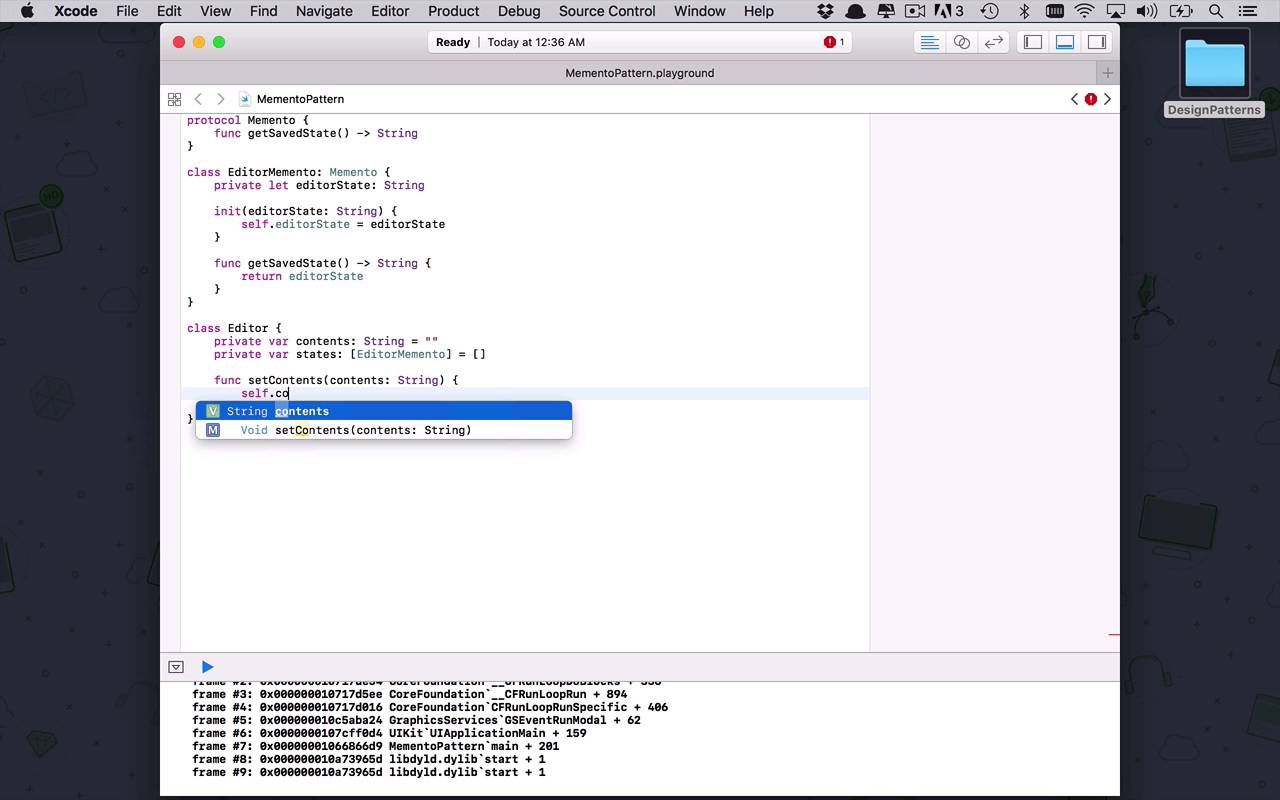
- Overview
- Transcript
4.5 Memento
Imagine you need to periodically save your app's state, so that later on it can revert to another point. An example is a word processor in which I can undo any of my edits back to a certain point in time. This is a case where the memento pattern really shines.
1.Introduction
1.1Introduction01:39
1.2Prerequisites02:48
2.Creational Patterns
2.1Factory10:16
2.2Abstract Factory12:24
2.3Singleton09:09
2.4Prototype09:18
2.5Builder11:40
3.Structural Patterns
3.1Adapter10:07
3.2Flyweight10:33
3.3Proxy05:53
3.4Bridge10:35
3.5Decorator11:44
3.6Composite09:43
3.7Facade07:19
4.Behavioral Patterns
4.1Iterator09:32
4.2Command07:48
4.3Chain of Responsibility13:47
4.4Mediator08:16
4.5Memento08:53
4.6Interpreter14:31
4.7Observer08:58
4.8Strategy07:36
4.9State06:21
5.Conclusion
5.1Conclusion02:42
4.5 Memento
In this lesson, we're gonna take some time to learn a little bit more about the memento pattern. And the memento pattern sounds like kind of fancy, I suppose. But the concept is actually fairly simple and there's other little bits of the basic concept behind this sprinkled in a couple different other patterns, but the basic idea here is that I want to be able to save the state of any particular object at some point throughout the application. But not only do I want to save it, but I wanna be able to kind of go back in time and apply the saved state or the snapshot to my current instance of my object or of my class and just kinda have it overwrite and take it back to that point in time. So when I think of a sample like this or when I think of a pattern like this, I kinda start to think of maybe like a text editor or that style of an application where I can start to put things into my editor. And then I can save it and then I can undo, and kind of unwind what I've done so far, and be able to display that on the screen. So, let's go ahead and see what that's gonna look like. So, we're going to create a MementoPattern playground and let's stick with that concept of I want to be able to create some sort of editor or something like that. So, that's kind of the loose ideal we're going for. So, let's create a protocol here and let's create this memento protocol. And the basic idea here is that at any point during the life of my object that is going to implement this protocol, I wanna be able to get a saved state. I wanna get whatever that information is that I've saved off. So, I'm gonna create a simple function here called getSavedState and this is simply going to return a string for this particular application. Because like I said, we're kind of building a basic text editor type of an application. So, the first thing I wanna do is I wanna create my memento implementation. So, this is gonna be an EditorMemento and it's going to implement or it's going to use that memento protocol. And so, let's do a couple of things in here. So really at this point, I wanna be able to save the current state of my editor. So at any point in time, I wanna be able to create a memento that's going to take a snapshot of what my editor looks like at that time. So obviously, I'm gonna need a way to store that. So I'm gonna say that I'm gonna save my editor state, which is going to be a strain since that's all I'm really concerned about at this particular time. And let's create an initialize and just say that's it's going to take it in the editor's current state, so I can initialize that. Good, so we have that initialization. But we also need to retrieve that saved state, so we can simply return the editor's state. So, that's the basic concept of this memento. This is gonna take that snapshot and be able to retrieve that snapshot from wherever I was at that point when I took this snapshot. So, let's go ahead and create our editor class. This is gonna be our fancy schmancy editor that we're going to be able to put text into. So when we're talking about that text, that's really the contents of the editor. So we're going to have a variable here called contents, that's going to be a string. And initially, it's going to be empty. So, I just startup my editor. There's nothing in there and then what I want this editor to be able to do is to periodically, when I choose or maybe when we have some fancy logic in there that every so often, every five seconds or something like that, it takes a snapshot. It takes a memento from my application, but we need a way to kinda store all of those. So, we're gonna create a private variable. This is going to be an array of states, which are really just going to be editor mementos. And just like the contents, it's gonna start out empty since there's really nothing to save or we haven't saved anything when we just started out our editor. So, let's set up a couple of help functions here. So were going to say, setContents. So imagine, this is the function that gets called when we start tying in there. So, the setContents is gonna continually update the contents of the screen. So, this is just our mechanism into that world. So we're gonna pass in contents and this is going to be a string. And then all we're gonna do is say, self.contents is gonna be equal to contents. So we're constantly being able to update the contents and what show up on the screen, then we need a couple of operations. So, any editor is going to allow you to do some sort of save function. Now, the thing that could be a little bit confusing here is it doesn't necessarily mean that I have to click the Save button for this to save in my application. Remember in a lot of applications, especially cloud-based word processing applications, there's usually something going on in the background that every so often it just starts to save the contents and maybe it could be something like that. You can use your imagination. But anyway, we're gonna go to our states. And at this point, we're going to append onto there. We need to create an new editor memento. So, we're going to create an edit memento and this is going to take the current contents of our editor. So at any point in time, when the save function is called, we're gonna take a snap shot of our editor and we're going to append it to the state. So, we can kinda see all the different states that we were in along the way. And then at any point in time, we could undo our current state and kind of take whatever that last saved state was and make it the current state. So we're going to create an undo function here, so we need to get the last state. So we'll say, let last state be equal to. So the equivalent of pop, if we were using a stack, the last state off and use that as the current state. So the way that we can do that with an array is simply go into states and say, I want to removeLast. RemoveLast will take the last thing that we added off of the array and give it back to us. So now I can simply say, contents is gonna be equal to the lastState.getSaveState from our memento protocol up here. So that's gonna be our do function and then let's just throw a little helper function on here at the end just say, getContent. And all this is going to do is return to me a string, which is going to actually be just the contents as they are currently. So nothing overly complicated, but this is the basic concept behind memento when I'm able to take snapshots of my application or of my objects. So, let's begin by creating an editor and this is going to be a new instance of our editor class. And then let's just say, at any point and time periodically, it's running the save or the set contents. And in here, let's say, I just had started typing things like my name is. And then at this point, it did a save and I kept typing. And so then the set contents would run again and then I had continued and I got as far as saying, my name is Derek and then maybe somebody came in and wanted to play around with it a little bit. It got another save wrong and then somebody started typing a little bit more, and maybe backspaced out a little bit, and started to type my name is again. Maybe they removed Derek and then the editor save function fired off again. and then finally, somebody thought they were gonna be funny and they wanted to change my name and say, my name is Juan or something like that. So at this point now, we have gone and made a couple saves. So, we started off with my name is and then it was saved. And then my name is Derek and then saved, and then my name is, and on, and on, and on. And you could kinda see how this flow was going. But as you can see, I look at this and well, my name isn't Juan. My name is Derek. And now I would like to go back in time to the point where it said, my name is Derek, because that's ultimately where I want it to be. Was you can see, I'm currently at this state and I need to go back one, two. So, I want to undo the last two things. So we can simply go into our editor and say, I want to undo and I want to undo. And if this all worked correctly, if I come in here and say, editor.getContents, you should now seeing it return. My name is Derek and it is. So now you can see with just a little bit of work, you can create a very simple instance of a memento that's able to take snapshots of your application regardless of what it is. And this is just a simplistic example of a text editor, but they could be as complex as you need them to be and be able to take snapshots periodically and implement some undo functionality in your own applications.


