
 Lessons: 24Length: 3.5 hours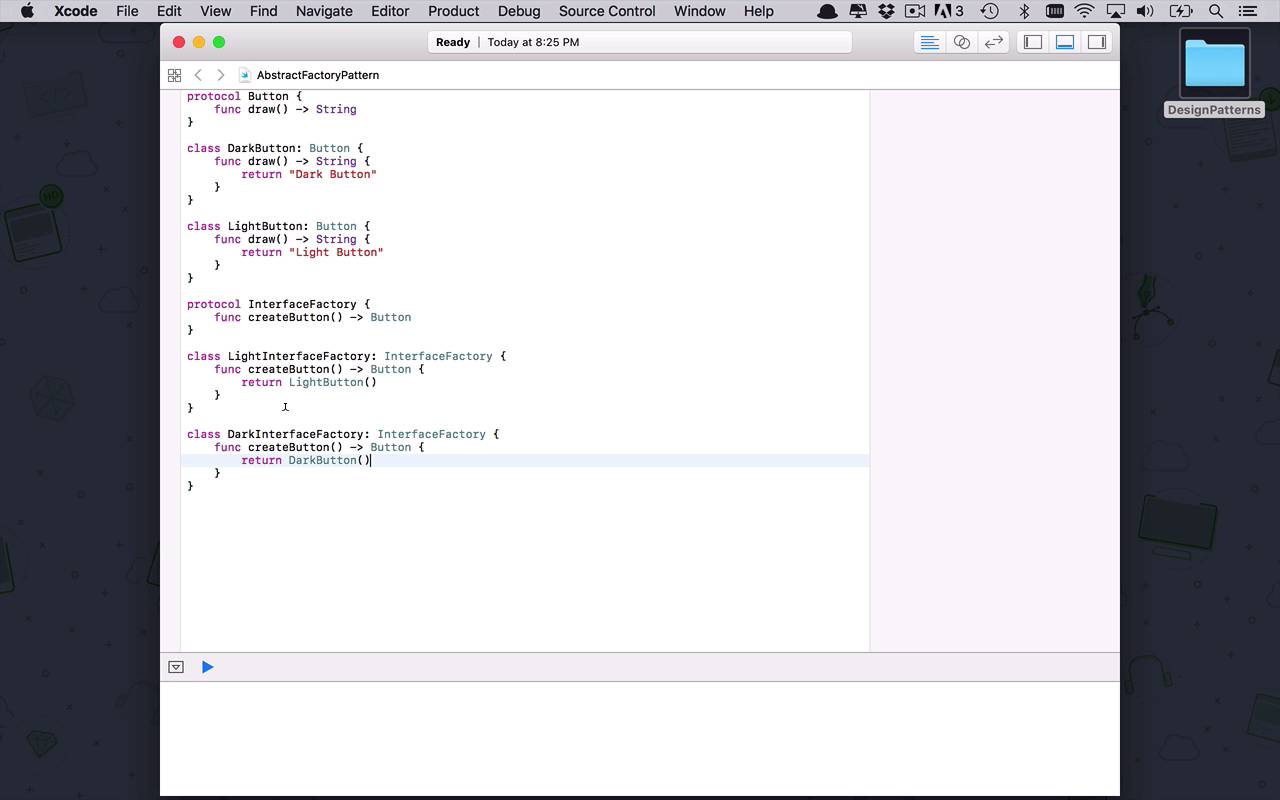
- Overview
- Transcript
2.2 Abstract Factory
The abstract factory pattern is a further layer of abstraction added on top of the factory pattern. The abstract factory pattern allows you to break up the creation of complex objects into smaller pieces and hide all of this complexity behind a simple-to-understand interface.
1.Introduction
1.1Introduction01:39
1.2Prerequisites02:48
2.Creational Patterns
2.1Factory10:16
2.2Abstract Factory12:24
2.3Singleton09:09
2.4Prototype09:18
2.5Builder11:40
3.Structural Patterns
3.1Adapter10:07
3.2Flyweight10:33
3.3Proxy05:53
3.4Bridge10:35
3.5Decorator11:44
3.6Composite09:43
3.7Facade07:19
4.Behavioral Patterns
4.1Iterator09:32
4.2Command07:48
4.3Chain of Responsibility13:47
4.4Mediator08:16
4.5Memento08:53
4.6Interpreter14:31
4.7Observer08:58
4.8Strategy07:36
4.9State06:21
5.Conclusion
5.1Conclusion02:42
2.2 Abstract Factory
The next design pattern that we're gonna take a look at is actually an extension of the concept of a factory pattern, and is known as an abstract factory pattern. Now, the idea behind an abstract factory is very similar to a factory. But typically it's where you start to increase the complexity of the objects that you're creating, and maybe it takes a little bit more. Maybe there's more to these objects and you need to start creating sub-factories and all these types of things. And typically what you're gonna wanna do is, you're gonna wanna take that complexity and abstract it away from your consumers or from your end users. So from the outside world I might be calling a single factory method, but within there it may be delegating the actual functionality and the actual process of creating certain things to some other factory or some other piece of code that's gonna handle it, depending on the situation. So the easiest way to take a look at this is through an example. So let's create an abstract factory pattern. So we're going to create an AbstractFactoryPattern playground, once again iOS, and we're gonna stick this in our Creational folder once again. Okay, so let's level set a little bit here. So let's say in this case I'm creating an application that maybe can be scanned. Maybe I can define different user interface components that are different based on some sort of configuration that the user is allowed to make. So in this case maybe let's say I have two different user interface styles or themes, one is light and one is dark. And as you can imagine, this is a very complex thing to do. Just because I say I want a light interface, that means there's a number of different things I have to be able to create. I have to be able to create light buttons, light text boxes. And if I want dark, it could be dark buttons, dark text boxes. So the thing that we're trying to create here is the user interface, but that user interface is made up of a number of different subcomponents that are going to be created in a certain way. So let's kind of start to create that type of a flow in a very simple example here. So the first thing I'm gonna do is I'm gonna once again create a protocol, and this time I'm gonna create a button. So let´s just say that this particular protocol is going to be for a button. And we´re gonna do another similar thing like we did in the previous lesson for factory, where it´s gonna have a single method or a single function, once again called draw with no inputs. And it´s simply going to return a string in a very similar fashion to what I did before. But imagine that we're not only dealing with buttons so you could be adding in here text boxes and shading and borders and all sorts of things like that, that would need to get built in such a way to support whatever sort of theme you're creating within your application. So in this case I have a button. So let's say now I wanted to create a class and I wanted to create a class called DarkButton which is going to implement Button, which is gonna have a draw function once again and this is going to return simply Dark Button, just like that. So now let's go ahead and create another instance of this and this time it's going to be a LightButton. So as you can see here, this is pretty similar to what we did before but, like I said, this could be now instead of creating a single button, what I'm more interested in is creating an interface of which these buttons are a part of. So let's take a look at what that might look like. So in this case, I'm gonna create another protocol. I'm gonna create another protocol, which is going to be what's going to actually be handling my interface creation. So I wanna be able to create an interface that's gonna have a button in it. So in this case, this is going to be my InterfaceFactory. So within here now, I want to be able to support a certain operation. And in this case, it's going to be another function and I want to create a button. Now once again, this is going to return a button. But really what I'm talking about here is creating the different pieces of the interface. So I want to allow the user to specify what type of theme they want. And then from that point, I would delegate the process of creating the different interface components, buttons, text boxes, etc., to some sort of interface factory. But in order for me to be able use this protocol, I need some concrete implementations. So we have a class. So in this case we're gonna have a LightInterfaceFactory, which is going to implement InterfaceFactory. And then within here, we're simply going to implement createButton, and this is going to return a LightButton, just like that. And then we're also going to have another instance of this called DarkInterfaceFactory, which is going to implement InterfaceFactory once again and this is simply going to return an instance of a DarkButton. So as you can see, this is a simplified concept here, but in actuality, what we're doing within this light interface, we could be creating all sorts of things. So creating a button is gonna return a light button, we could be creating text boxes or what have you. But, as you can see here, as I start to create these things, the complexity is kind of exploding exponentially. So every time I want to support a new user interface style or theme, I have to create more and more of these. I have to have more support in my interface factories. I have to have multiple interface factories for light, for dark, for CPF, or whatever. As you can see, things get very complicated very quickly. And typically as software developers, we wanna abstract or encapsulate as much of that complexity as possible so the end user only has to deal with maybe one or two entry points into that logic. But from the outside world, it's gonna seem fairly simplistic. Okay, so we're getting a little bit closer. So we have a couple different interface factories, but that's a lot for one consumer to have to use. How about if we start to abstract this out again and create an abstract factory that's going to encapsulate all of this so that we only have that one entry point that we're looking for. So we're gonna do that, we simply create another class and this is going to be the user InterfaceFactory. So this is what's going to drive everything. Now within this factory we're gonna have a couple private members here. We're gonna have a darkInterfaceFactory, which is going to be an instance of a DarkInterfaceFactory and it is going to be equal to a new instance of that, just like that. We'll do another private let, this is gonna be the lightInterfaceFactory. So you can see what I'm doing here, I'm actually kind of hiding those from the end user so that all they really need to use is the UserInterfaceFactory and they don't really care which one of those factories it's using under the covers, I just want to get something out of it. But before I can actually get something out of it, like I said before, we're talking about maybe some user configuration. So in order to handle this concept of the user being able to choose these things, we need to create a couple classes or an enumeration or something like that to support that if we're really going to kind of show the concept of what this might look like. So let's say within our application we have a enum of, say, UIStyle. And this is going to allow us to define the different types of styles that we support within our application. So we're gonna say in this case we're only gonna support light and dark because that's all I'm really handling right now. I can do light interfaces and dark interfaces and create the appropriate buttons. So that UIStyle is maybe gonna get used somewhere within my application as a UserConfig. So within this user configuration, the user can go in and change all sorts of things within the application, tailor it to their need. But in this case we're going to have a style within here that's gonna be of type UIStyle. And we're just gonna give it a default that say, by default, It's going to be the light style. And that's pretty common with most software that you install that has themes. They usually have one of their more basic themes, like a light theme, be a default. Okay, so now that we've come this far, we need this user interface to support these things that we're looking at. So we wanna be able to support creating light interfaces and dark interfaces. So we're going to expose that via a function. We're gonna simple say, in this case I want to get a button. Now, for this particular case, I'm gonna say I wanna get a button for an instance of a configuration which is going to be a UserConfig. And this is simply going to return a button. So this is gonna be that basic process that we're gonna use to build out the interface for a user based on that configuration. So all I'm gonna do, once again, as you saw before, I'm gonna build a switch block here. And I'm going to switch on my config.style. And then within here I can use that enumeration. I can say if I want a light, then I'm simply going to use the LightInterfaceFactory, and I'm gonna say create button and then I'm obviously gonna have to return that. And then I can create another case, and I can say in this case dark. And from here I'm going to return a darkInterfaceFactory.createButton. And then obviously that's all I really need to do. In this case, because I've defined an enumeration here and that is what I am switching over, I don't actually need this default so I can delete this and remove some of that complexity from my code. So now that I've done that, imagine somewhere within the application the user has updated the configuration or has started using the application and they wanna see what they've been able to create or what the theme is going to support based on their configuration. So let's go ahead and save. var config is gonna be an instance of user config. So by default as I said before, remember, that it's going to be light, as we saw up here. So now I have a configuration, I can create an instance of my factory, which is my UserInterfaceFactory. And because there's a lot of complexity here, all I have to do is deal with this one factory and it's going to kind of delegate all the other operations and complexity down to other factories or other methods within the class that as a user from the outside, I don't really care about. So I can say var button is going to be equal to factory and just say give me a button, and give me a button for my configuration. I don't care how you get it, but just give it to me. As you can see here now, I have a light button. And using my abstract factory which is then delegating the process of creating this user interface, I can now retrieve these user interface components, buttons, or what have you simply by calling one appropriate method. So now I can say button.draw and it's going to say, light button. And then I can go ahead and change my configuration. I can say config.style is now gonna be equal to dark. So they went in and changed their configuration, then all I would have to do is come back in and say, all right, great, give me a button for that configuration. And that button would now be a dark button and we would see dark button. So as you can see ow the abstract factory simply builds on the concept of factory where now we can create different levels of complexity. But the complexity is kind of hidden behind this single factory so there's a number of different layers within there that we're able to create interfaces or create shapes or what have you. But that's all being hidden from the end user and all we have to do is use a very simplistic interface like get button to be able to get whatever components out of that factory that we need.


