
 Lessons: 24Length: 3.5 hours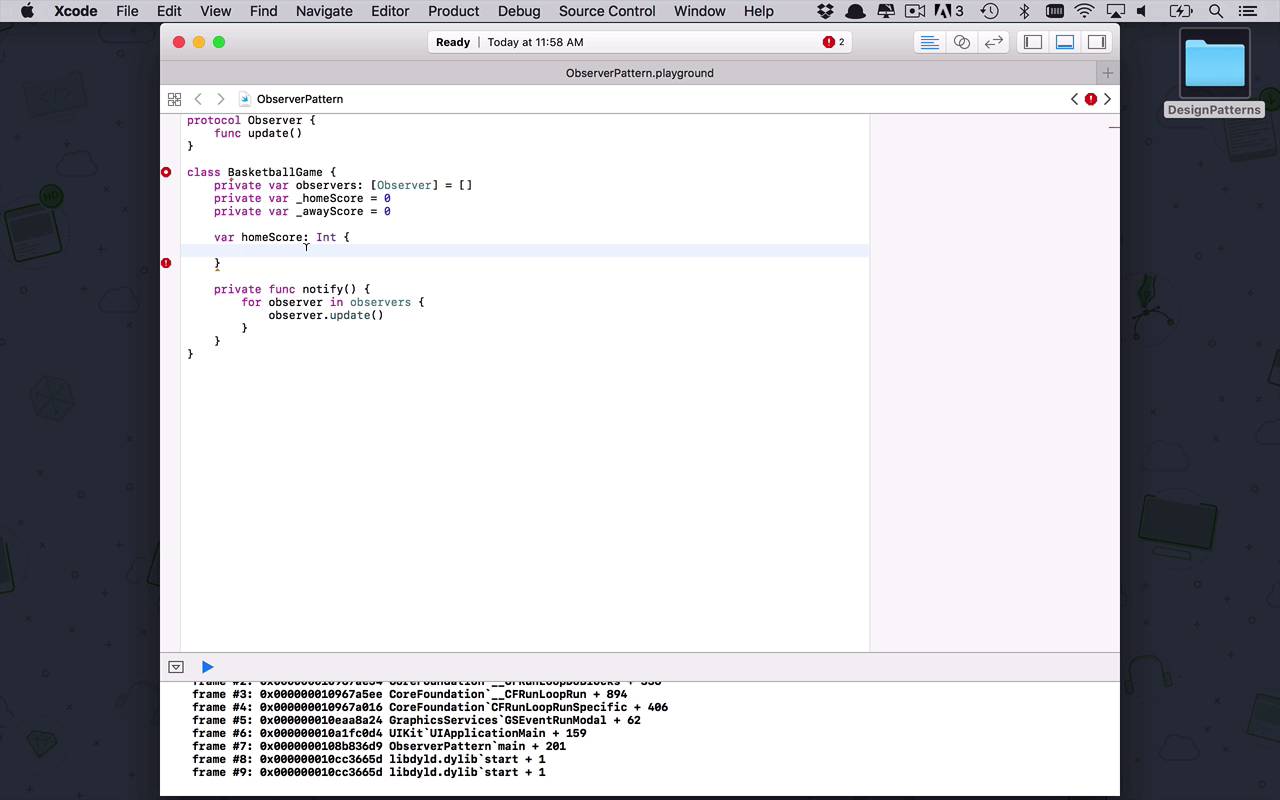
- Overview
- Transcript
4.7 Observer
There may be times in your application when certain types or objects respond to changes in another object. Wouldn't it be nice if your objects could watch, or observe, other objects and take an action when something happens? If so, let's take a look at the observer pattern.
1.Introduction
1.1Introduction01:39
1.2Prerequisites02:48
2.Creational Patterns
2.1Factory10:16
2.2Abstract Factory12:24
2.3Singleton09:09
2.4Prototype09:18
2.5Builder11:40
3.Structural Patterns
3.1Adapter10:07
3.2Flyweight10:33
3.3Proxy05:53
3.4Bridge10:35
3.5Decorator11:44
3.6Composite09:43
3.7Facade07:19
4.Behavioral Patterns
4.1Iterator09:32
4.2Command07:48
4.3Chain of Responsibility13:47
4.4Mediator08:16
4.5Memento08:53
4.6Interpreter14:31
4.7Observer08:58
4.8Strategy07:36
4.9State06:21
5.Conclusion
5.1Conclusion02:42
4.7 Observer
Oftentimes when we are designing software systems, it's necessary to communicate with other objects in the system. A lot of times we use a kind of pub-sub type architecture or things like that. But sometimes you don't really want to go that far. Sometimes you just want to be able to notify other objects in your system, or other types, or other classes, or whatever have you, when a certain operation happens. So this is kind of the idea that you have some observers or some watchers of your particular object, and when something in that object changes, you wanna notify that other object. And the way that we accomplish that via patterns is known as the observer pattern. So let's go ahead and create an ObserverPattern playground. And within here now we're going to break this down into some basic ideas. The ideas for the most part are going to be we're gonna have some sort of actor, some sort of thing that's important. And then we're going to have some other observers or watchers of that particular type or class. And then, when something happens or something changes, we wanna notify all of those observers. So let's kinda break it down into something fairly simple. Now what we can do is start by defining a protocol that's going to be observer. And we're gonna say that anything that implements the observer protocol can be updated when something happens. So we're gonna create a function called Update. And it's gonna be fairly generic and fairly straightforward, and it's gonna depend on the actual implementations of that observer to say what's gonna happen when that update fires. So let's say, to play on a previous example, let's say we have some sort of sporting event or some sort of game, and when something changes we want to notify all of the observers. Or in this case, maybe the fans that wanna know about when something happens with this game. So once again, let's create the class called BasketballGame. And within here, we want to handle a couple of different things. All we're really gonna be concerned about at this point is the home score and the away score. And when those things change, we want to send updates out to all of the observers. So in order to facilitate that, we're gonna create a private internal list here of observers, and this is going to be a list of observers and by default it's going to be empty. So when a basketball game is first created, there's really nobody watching it yet, it has to be created first. Then we have to add observers to it. Then internally we're going to maintain two different scores. We're gonna maintain a _homeScore which is gonna begin at zero, and then we're going to create an _awayScore which is also going to start at zero. Now, I am naming them with an underscore here because I want to create kind of a backing field scenario for some calculated properties that I'm going to create within my basketball class. And you're gonna see why and how we're gonna do that in just a second. Okay, so now, what we want to do is we want the people on the outside world of the basketball game to be able to query into it and get what the current homeScore is and the current awayScore. So we're going to create two properties, homeScore, which is going to return an integer. And it's going to have some information that we can return out of this. Now, we need to use getters and setters in this scenario because the way that we're gonna update the score is simply by passing in or updating the homeScore property. But when that happens, when we're setting that, we want to notify all of the observers. Okay, so that means we're going to need to do a couple of different things. We're going to be very explicit on the getter and the setter. And we also need some sort of function or something to notify everybody that's watching. So let's go ahead and create that first. Let's say function notify. And this is going to be something that we only want to handle internally. So this is gonna be private, so we're going to have a function called notify. And what this is going to do is it's simply going to loop through all the observers and say, hey, notify that the observers of this basketball game that something has changed. So we'll simply loop through the observers. So we'll say for each observer in observers we simply want to use the observer.update function. So we wanna update them and say, hey, something's changed, you should come back and check out to see what it is. Okay, so the first thing that we wanna do is we're gonna specify a set here. Now, when we set the homeScore, we wanna set our backing field, which is _homeScore to be equal to whatever the new value is here. And then once it changes, we're gonna call that notify function to notify anybody that's watching. And then, obviously, if anybody wants to get the value of the homeScore, we're simply going to return homeScore just like that. All right, so it's pretty basic. Now, we're gonna do the same exact thing for the awayScore. So let's just copy this. And we'll paste it down here, and we'll change this to away. And we'll just kind of update these backing fields a little bit. This is going to be awayScore, and this is also going to be awayScore. So now we have two publicly facing properties with backing fields that now when the score actually changes, we're gonna notify anybody that's watching. All right, but now we need somebody that's gonna be watching. So we're gonna create another class and we're just gonna call this a Fan. So a fan of a particular team or of basketball in general can now watch each of these individual games themselves. So this is going to be an observer, and the person or the fan is going to need to know about the particular game that they want to watch or pay attention to. So we're going to create a private variable called game which is going to be a basketballGame. And from this point, we are going to initialize it so we can say that game is going to be a basketballGame. And then we'll just initialize our internal game here like that, okay. So now we have this game all set up and ready to go. Now what we need to do is we actually need to actually implement our update on the observer protocol. So we're going to come in here, we're going to update. And whenever this is updated, I simply want to print out something, I want to know when something has updated on the game. And when it has, I'm gonna go back and get the information that I care about, which in this case is gonna be the homeScore and the awayScore. So now I can say New score is Home Team, and we'll simply print out that homeScore. So I can say game.homeScore, and Away Team, and then I will print out the game.awayScore. Just like that. Okay, so now I'm able to print those things out when I want to see what exactly the current state of the game is. Now one other thing that we have to do is we have to be able to observe the game and attach observers to the game. So the way that we're gonna do that is we're gonna come into our basketball game and we're gonna add one more function. And this function is going to be attachObserver. So at any point in time during the process of this game, I wanna be able to add observers to this game. And so we're simply gonna add a function to do that. And then we're going to say observers.append, and we're going to append a new element, which is going to be our observer. Okay, so that's definitely one piece of the puzzle. But at some point, I have to actually attach somebody to this game so I can watch it. Now obviously, you can remove people that are watching as well. So I can remove observers, I can add observers, and you can absolutely add that functionality in so that when I'm done watching the game I can just remove myself. So the easiest way for us to do that at this point is, now that I've initialized within my fan class the game that I'm watching, I'm going to register myself as an observer. So I can say self.game.attachObserver, and I'm just going to attach myself. Okay, so now we've got all of this going and we're looking pretty good. So let's go ahead and create a simple example. Let's begin by creating a game. So let's say let game equal to a BasketballGame. Then we're gonna say let fan be equal to a new instance of a Fan. And that fan is going to watch that particular basketball game. And then we can come in here and simply do game., let's set the homeScore equal to 3. So now you can see that once I have gone into my game and updated my homeScore, I have tripped the set functionality within homeScore, and I have set the backing field. And now I have notified all of my observers, and as you can see the new score is Home Team 3 and the Away Team 0. So now,using this very simple pattern, you're able to take in observers and watchers of whatever your object is. And then those people and observers can be notified when important changes have occurred or when changes that they care about have happened.


