
 Lessons: 14Length: 1.1 hours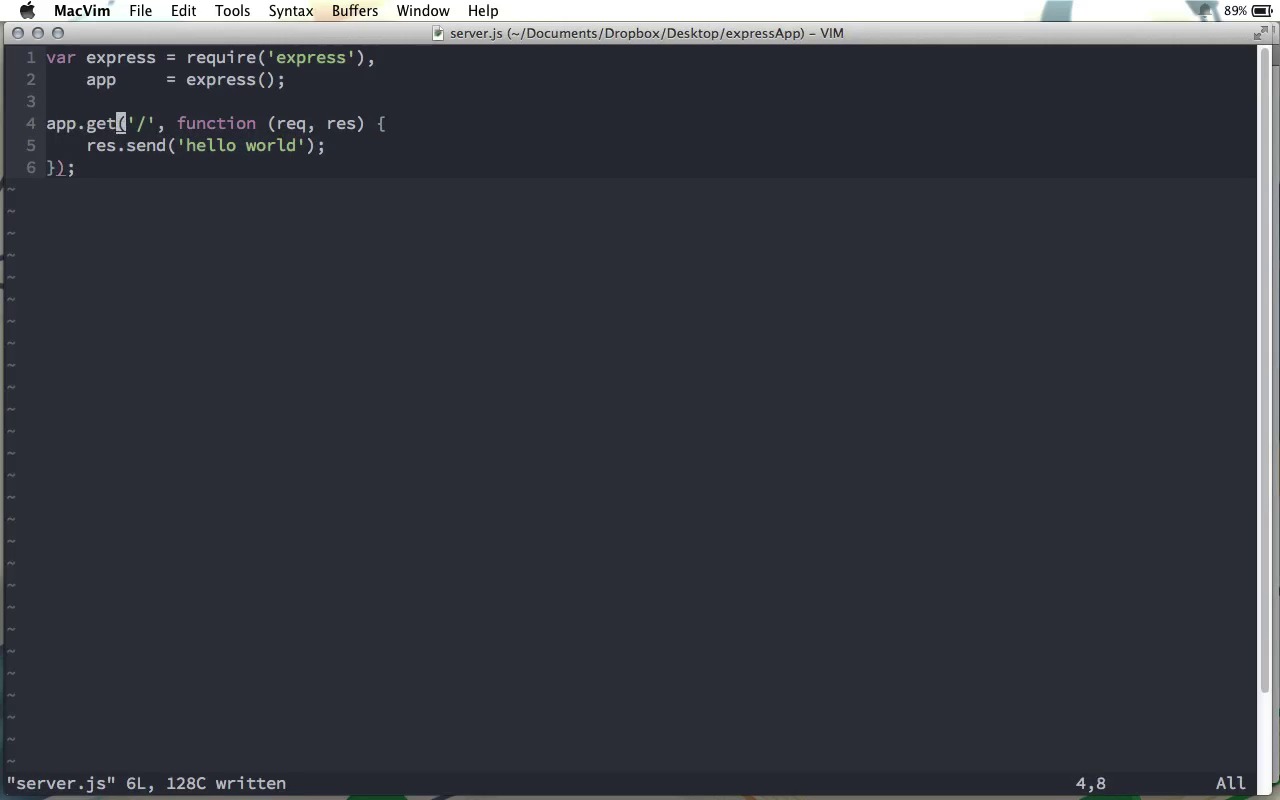
- Overview
- Transcript
1.3 Your First Express Application
Now that we have Express installed, we're ready to start learning all about it. In this lesson, we'll build a super-basic application, just to get an idea of how Express works.
1.Learning the Basics of Express
1.1Introduction01:09
1.2How to Install Express 401:11
1.3Your First Express Application04:09
1.4Views and Templates07:37
1.5The Verb Methods09:10
1.6Application Settings09:47
2.Understanding Request Flow in Express
2.1Middleware and Request Flow06:25
2.2Custom Middleware Based on Route Parameters04:59
2.3Grouping Routes with app.route02:46
2.4Router Objects05:59
3.Request and Response Objects
3.1Request Object04:13
3.2Response Object04:15
3.3Formatting Requests02:43
4.Conclusion
4.1Conclusion01:35
1.3 Your First Express Application
At the end of our previous screen cast, we created this Express app directory here on the desktop, and we installed the Express package in this folder. So now we're ready to go ahead and use that Express package. Here we are in terminal, inside of that express app directory. And so to create our first application, we need to create a JavaScript file, and this file will run as our actual web server. So I'm gonna go ahead and call it server.js, although really you can call it whatever you want. It's kind of conventional to call it server, or main, or index, something like that. So in here, the first thing to do, of course, is to get that Express library. We can do that by just requiring Express. And now, we need to create our application. So I'm gonna call the application object app, and this, again, is another kind of convention in Express, and we create an Express application simply by calling the express function. It's that simple. So now we can use all of the many methods that this app object has to create our application. In this screencast, we're gonna start with something very, very simple. We're gonna do app.get. Now get is one of a series of methods that allow us to create a specific route that users can go to in their browser within our application. We'll talk more about this method and its related methods in a future screencast. But for now, know that the first parameter is the actual root. So in our case, that'll just be a forward slash, meaning this is the root route, or root route, however you pronounce it, for this application. The second parameter that this get function receives is a function. And this function is where we will decide what the user will see, when they go to the route that we chose in the first parameter. Now this function receives two parameters of its own. The first one is the request object that was sent from the browser to the server. And this is often abbreviated to req for request. The second object is the response object, and this is the object that has many methods that we will use to send values back to the browser. For now, we're gonna do something very simple. We're gonna do response.send, and we're just gonna send the message hello world. So there we go. This is a very, very simple application. We're telling our application, if the user makes a request to the root route, use this function to decide what to do. And in our case, we're just going to send a response of hello world. We're not quite finished yet. The last step is to tell the application to listen for requests on a given port. So we can do that by saying app.listen, and let's just choose port 3000. Often what you'll see is we can take a call back function here, so that once we know the app is listening, then we can just print a message out to the console. For example, something like listening on port 3000. Now this is one way to do it, however, our application object here actually allows us to chain methods. So we could put that listen request right up here, so I could put listen right in the end of this get method. And this will work exactly the same way. And so it's up to you, really, to choose which way you want. Really, any where where you see we use an app.some method name, probably means you can go ahead and chain those methods. However, if it is your personal preference, you could instead do something like this, where you call the app object many different times. It's really entirely up to you. I'm gonna go ahead and remove this. And I'm gonna uncomment this and let's go ahead and run this application. So we'll head back to the terminal here and I'm gonna do node server.js. And notice you can see we get the message here, listening on port 3000. So in the browser, I'll head over to localhost port 3000. And you can see we get the message here, hello world. Just to show you that this is working, let's come back here and change this, and let's say hello express instead. We will have to come over here and restart the server. Once we do that we can refresh the page of the browser here, and you can see that now it says hello express. So that is our very first Express application. It's quite easy as you can see, and actually very intuitive. And if you haven't used Express before, I'm sure you can see why its a very popular node.js web application framework. It's very intuitive and easy to read, really. We have a get request going to the root route, and this is what we do. That is our very first Express application, but there's a lot more to learn, so keep watching.


