
 Lessons: 14Length: 1.1 hours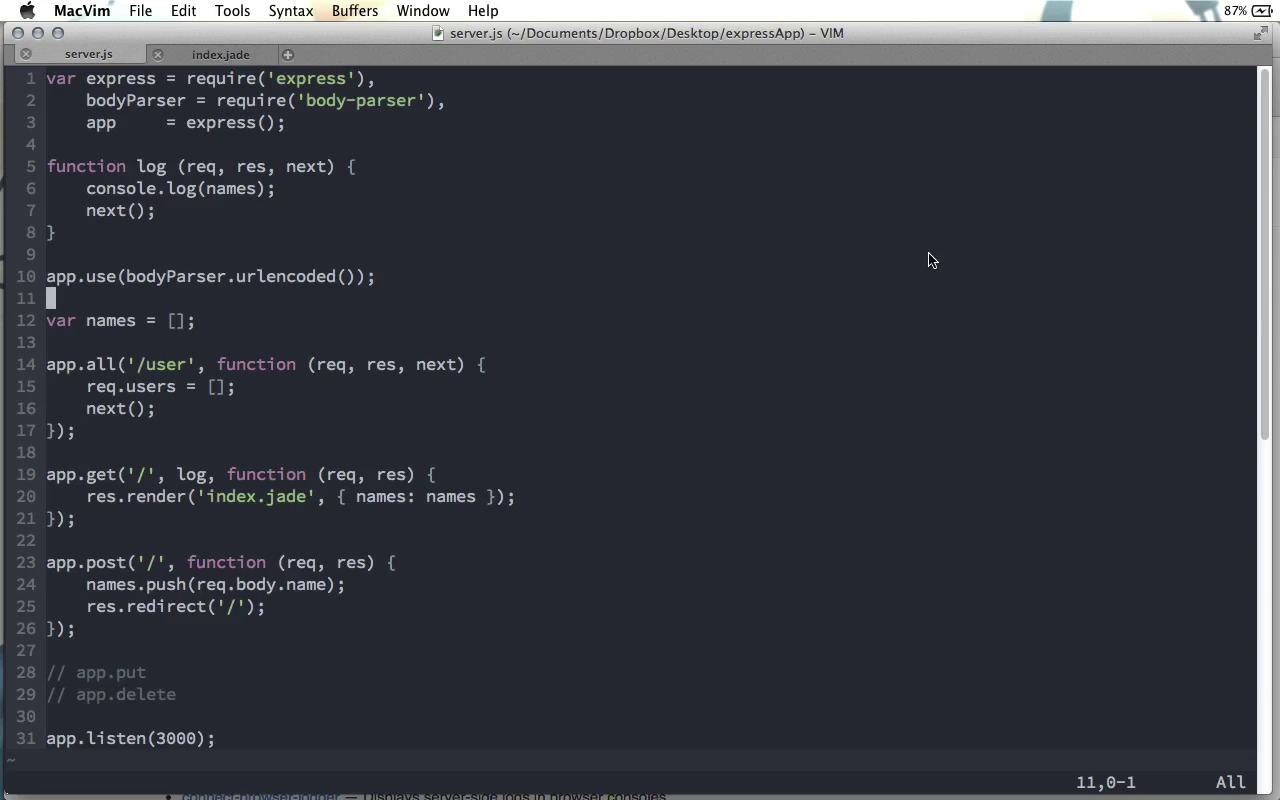
- Overview
- Transcript
2.1 Middleware and Request Flow
A big part of every Express application is middleware: layers that log or change the request object as it goes through our application. In this lesson, we’ll learn about how those HTTP requests come through our apps, and how we can use middleware to work with them.
Related Links1.Learning the Basics of Express
1.1Introduction01:09
1.2How to Install Express 401:11
1.3Your First Express Application04:09
1.4Views and Templates07:37
1.5The Verb Methods09:10
1.6Application Settings09:47
2.Understanding Request Flow in Express
2.1Middleware and Request Flow06:25
2.2Custom Middleware Based on Route Parameters04:59
2.3Grouping Routes with app.route02:46
2.4Router Objects05:59
3.Request and Response Objects
3.1Request Object04:13
3.2Response Object04:15
3.3Formatting Requests02:43
4.Conclusion
4.1Conclusion01:35
2.1 Middleware and Request Flow
In this screencast, we're going to talk about Middleware and Request Flow in Express 4. We looked a little bit at this in the previous screencasts, but there's more to say. The flow of requests in Express 4 happens a little bit differently than it did in previous versions of Express. The first difference that I want to talk about is app.router. Now if you used Express in previous versions, you might recall app.router as the way to choose where exactly in the flow of middleware the routes that you define are run. You might recall from the previous screencast that a request flows down through the different layers that we create from top to bottom through our file. And previously, you would have your list of middleware near the top and wherever in middle where you wanted your Express routes to be run you would call app.router. But this is no longer necessary in Express 4. Instead the request will flow through the whole application, the whole file, from top to bottom. And you can intersperse middleware and actual routes and the request will be processed by each layer in the order that they're given. By the way, if you're not familiar with the term middleware or what it actually is, you can see a good example of middleware in the code from our previous screencast. Right here we have the app.use line and app.use is the function to call when you wanna register a piece of middleware. And here we're using the body parser middleware. You can think of middleware as a route function that doesn't actually return anything. So it's just like these functions that we have here, where in this function we are rendering index.jade, or in this function we're doing some data work and then redirecting back to the home page. These functions actually show the user something. However, middleware goes between the browser and what we do with the data that we get from the browser. It goes in the middle and usually provides some kind of transformation or maybe some kind of logging. In the code that we're using here, the body parser middleware parses the bodies from HTTP post, put, and also I think delete requests. Now, you might recall me saying in the previous screencast that this type of body parsing was previously built into Express but is not built into Express anymore. And this is the other big change with Express version 4. There's no longer a whole collection of middleware built into Express. This makes Express much leaner out of the box, however it does mean that it does not come with a bunch of functionality that it use to. Previously, Express depended on the Connect library for much of its middleware. However Connect is no longer a dependency, and you can choose exactly which pieces of middleware you want to use, and install them via npm. Now Connect is a great source of middleware, and I would recommend that be one of the first places you look. In fact, if you go to the senchalabs/connect page on Github you can find a whole list of different middleware that make up the Connect library. And they've been all separated into individual npm packages so that you can install just the ones you need. For example right at the top here, you can see is the body-parser one that we were just using. And there's plenty of others that you can look at through here. There's another page also, I'll have a link to both of these underneath this screencast, but as you can see here's a list of a whole lot of different middleware. And you can even build your own middleware and put that up on npm as a package and I'm sure there are other developers who have done that. So really you can find middleware for pretty much anything that you need. So the important thing to take away from this video is that requests now flow from top to bottom through your file. And we'll go through each of the appropriate pieces of middleware, or routes, as they go down. Let me clarify what exactly these different layers can be. I'm gonna delete that, and at the top right here, you can see what we will call a third party middleware. This is a little piece of functionality that you choose to install, and you'll use in this way to perform some action on the request. You can also have custom middleware. Custom middleware just means that you use the app.use function yourself and you pass it a function that takes those very same three parameters. So in here I can just console.log line and say this will log on every request. You can kind of think of using app.use and custom middleware in this way as kind of like using apt.all, except this is not limited to a specific route. This will be run on every single request. After custom middleware, you have route functions. And these route functions include all, get, post, as well as the put and delete functions. Basically everything that we looked at last time can fall under the category of route functions. There's one more category which actually only includes a single piece and that is built-in middleware. Now, as I mentioned, there used to be a lot of middleware built into Express but they removed all that to slim down the library and allow you to choose exactly what you want. However, there is one piece of built-in middleware and that is the express.static middleware. Express.static is what you would use for stylesheets and images and any other static files that you want to send from the server to the browser. To show how this works, let me clean this up just a little bit here. We'll have a route here that we'll just call /route, and for this we will just send and say this is a route. But then, if I come back to the terminal here, let me go ahead and make a directory called public. And I'll echo this is a file into a public/file.txt file. And so now if I go ahead and startup the server and we come back to the browser, if I go to localhost 3000/route it looks like our request is kind of hanging here. If I come back, oh yeah, here in our custom middleware I forgot, we do have to say next in our middleware, just like we do in our route functions. So I'll restart the server, and then come back here. And you can see we get this is a route. However, if I go to file.txt, you can see we got this is a file. Because that text file that we created is being served statically with our static middleware here. The last thing I want you to notice, is that the functions you pass as middleware and the functions you pass as route functions really do act exactly the same. They get the request, the response, and the next function as parameters. And to move past them you have to call next. The only difference really is when they are called. Any middleware function will be called for every single request type on every single route. Whereas route functions will only be called for specific routes on specific request types, get, post, put, or delete. Or there's app.all, which is kind of like hybrid middleware and route. So that is a look at how requests flow through your Express application, and how exactly you can decide what will be run when.


