
 Lessons: 14Length: 1.1 hours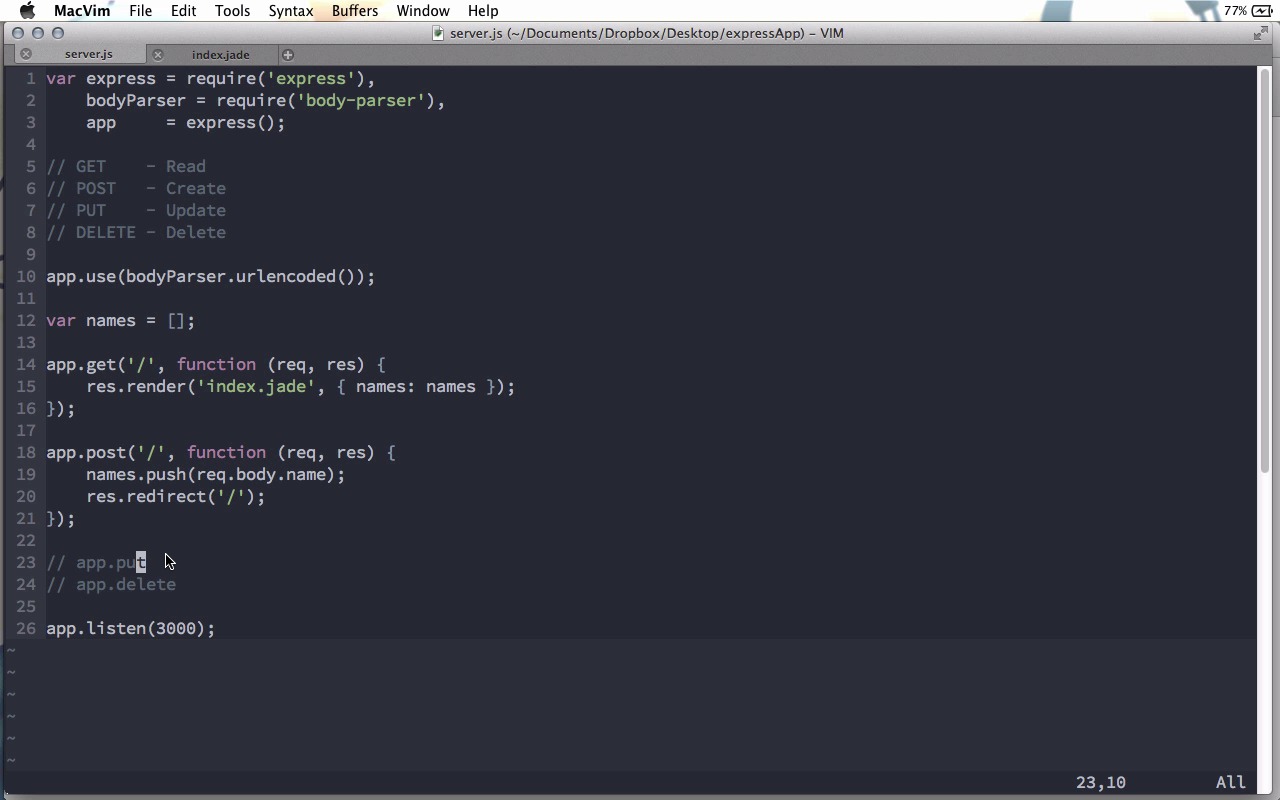
- Overview
- Transcript
1.5 The Verb Methods
The core methods for responding to requests in Express are through what
the documentation calls the verb methods. These are the methods get,
post, put, and delete, for the different HTTP request types. We’ll
look at those in this lesson.
Notes
body-parser now requires that the extended option be explicitly specified, otherwise a deprecation warning will be thrown. The correct syntax in this case is
app.use(bodyParser.urlencoded({extended:true}));
1.Learning the Basics of Express
1.1Introduction01:09
1.2How to Install Express 401:11
1.3Your First Express Application04:09
1.4Views and Templates07:37
1.5The Verb Methods09:10
1.6Application Settings09:47
2.Understanding Request Flow in Express
2.1Middleware and Request Flow06:25
2.2Custom Middleware Based on Route Parameters04:59
2.3Grouping Routes with app.route02:46
2.4Router Objects05:59
3.Request and Response Objects
3.1Request Object04:13
3.2Response Object04:15
3.3Formatting Requests02:43
4.Conclusion
4.1Conclusion01:35
1.5 The Verb Methods
In this screencast we're going to look at what you might consider a core feature of Express. And that is creating routes for different HTTP methods. Now the express documentation calls these the verb methods, and if you're familiar with HTTP requests you know that there are four of them. There is the get request, the post request, the put request and the delete request. And these map to the four operations that you can perform in a database. You can perform a read. You can perform a create. You can perform an update, or you can perform a delete. Normally these are known as crud, C-R-U-D. And with Express we can easily make roots for all of these different methods. Now we've already seen the get request, all we have to do is app.get and let's get the root route. And we have a function as our call back that takes the request and the response. And in this let's go ahead and do response.render and we're gonna go ahead and render index.jade. And so we can get a little bit of an idea of how these routes can work together, we're gonna pass it an array of names. So just above that here, I'm gonna create a list of names and it's just gonna be an empty array. So now, let me go ahead and open views/index.jade, and let's start with an H1, we'll just say add name. And underneath this we want to add a list of names, so let's do an unordered list, and then we'll say for name in names list item equals name. And this is an easy way to iterate over the list of names that we're passing in right here and display them all inside of a list item. Then, lets do a horizontal rule and then we'll have H1 and we can say add name. Oh, I accidentally said add name up here. Instead, we want this just to say names. To be the list of names. So we have names for the first H1 and down here we have another H1 which says add name. Now let's go ahead and create a form and we'll give it a method of post. We wont put an action and that means it will post this to the same URL. In here we'll have an input that's of type text, so we don't need to put that but we'll say the name is equal to name and then we can also have a button that says submit. Excellent. So that is all we need to do for get request, but let's also write app.post and we wanna post to the same URL, just the root route there. And now we can do names.push. And we want to push in the new name that was submitted. But now comes the question, how do we actually get that name? Now, I'm gonna assume you've worked with forms before, and you know that when we post with a form, any of the inputs that earn the form become fields in the body of the HTTP request. And this means that we need to actually get the request body. So we could do this by doing request.body and then we just need the name of the field, which in our case is name. However, by default, Express does not parse the body of a request. And we're going to discuss more about middleware in the next screencast, but suffice it to say for now that Express no longer comes with the functionality to parse that body. So, we need to install a piece of middleware. So, I'm gonna go back to my terminal here and I'm going to do npm install body-parser. This is another npm package that we can use with Express and this will parse the bodies of our HTTP request. That was quick and easy to install and so now we can come back up here. Let's get that by saying body parser equals require body-parser. And then here we just need to tell express that we want to use that so we can say app.use body parser.urlencoded. And this here will make sure that all the bodies of the forms are parsed before we get to our routes here. And we'll talk a little bit more about how exactly this line is working in the next screen cast. So now that we've pushed that name in, we can just do a response.redirect. And we'll redirect back to the home route. And when we do a redirect like this it does a get request. And so it will do the post, and then it will render the page through the get. Finally, at the bottom here, we'll go ahead and do an app.listen on port 3000. And now we can come back to the terminal. I'll do no daemon runningserver.js, and now if we come back to the browser, and I refresh the page. You can see we have our list of names empty at the top, and then add name. I'll go ahead and add my name, Andrew. Which I click submit, notice the name appears above. If we do this again, and I add another name, say Joseph, I submit it and it appears above. And so now you can see that we're managing two different types of HTTP requests, get and post. Now, I won't give examples of them here, but app.put and app.delete work in exactly the same way. And these are not used as often in simple web pages like we're building here, but these are used, for example, if you're using a front-end JavaScript library like backbone. When you do an update on a model instance in backbone, a put request is sent to the server. And that way you can update your database instead of creating a new record. Or, if you're trying to delete a model instance, a delete request is sent to the server and in those cases app.delete will be run. However there is another method that we can use, and let's put this right at the top above our other roots. And this is app.all. As you might guess, app.all is run on all of the verb methods. So no matter whether the request coming in is a get post, put, or delete, app.all will run it if the route matches. So here, as you can see we have an app.all with a matching, with the root route there. And in here, I could just do response.send, and we could do testing all. And if we do this and come back to the browser, if I refresh this page, you can see that now it just says testing all. And our get request down here, even though the request came through and matched both of these, only one of them was run. And the reason for this is that the request goes from top to bottom through our file. And since it matched this all route up here, it ran this function here. Now if we want it to continue on down the stack, what we need to do is call next. Next is the third parameter that is passed to all of our call back functions here. So after we do response.send, we could do next here. And it would go ahead and render this. Now, we don't want to actually send this and then render that. So instead of doing a response.send, we can just do a console.log, and I can say, from ALL. And then next, and the request will continue down the stack and it will render the index page. The beauty of this is that this all will work for both gets and posts. So, the first time we render the page, we will log that line, and then render the page. Then, when they click the submit button, we will log this line again, and then the post request will be run. So you can see, if we come back to the server here. Let me go ahead and clear the screen, and now if we refresh the page here, you can see we have this. Currently, we have from all once. If I go ahead and add a name and then I click submit, we've just run our post root and then we actually ran our get root, right? Because of the redirect, so we should find, yep, from all shows up three times now. So this can be an easy way to break things out into multiple functions. And, in fact, there's one other way that we can break things out into multiple functions. And that is that each one of these all get post, and of course, put and delete as well, can take multiple call back functions that will be called in order. So let's say that we wanted to do some other logging. Here in the get let's do function and we can just take another function here, of course, this function will get the request, the response, and the next methods as well. And even though we do have multiple callbacks here, it is important that we call next to move on to the next callback. So in here we could do console.log, and let's just log the list of names, and then we'll call next. And if we do this, every time we do a get request, we'll log the list of names. So now you can see it started by logging an empty array, and then it logged the array with Andrew. Let me go ahead and add another name, Jeffrey. And now you can see it logged Andrew and Jeffrey. Now of course, this function does not have to be in line here. For example, we could create a function here, we'll just call it log, this will take the request, the response, and the next and up here we can just do the consult.log of names and then we call them next. And now down here I'll just remove this function and I will replace it with just log and this would work exactly the same way. This type of behavior is really nice because it allows you to break your more complex applications down into smaller manageable bits. So, for example, if you needed to do this kind of logging maybe not to the console but maybe to a log file for different requests throughout your application, you can put all those logging methods in their own functions. Maybe even in their own module. Require the module up here and then just reference the functions in the roots, like this. And that would work just fine. This reasoning also stands for the app.all method there might be some functionality that you want to perform on all of your different routes. For example, let's say you have a specific route that goes to a user page maybe no matter what the route is that goes to this user page. You wanna first get a list of users from the database. And you can assign request.users equals some list that you get from a database, before going on to your get, post, put, or delete routes. Where you could then use this request.users list. And all of this is possible because Express allows these multiple callbacks and things like that which allow you to really express your code any way you'd like.


