
 Lessons: 14Length: 1.1 hours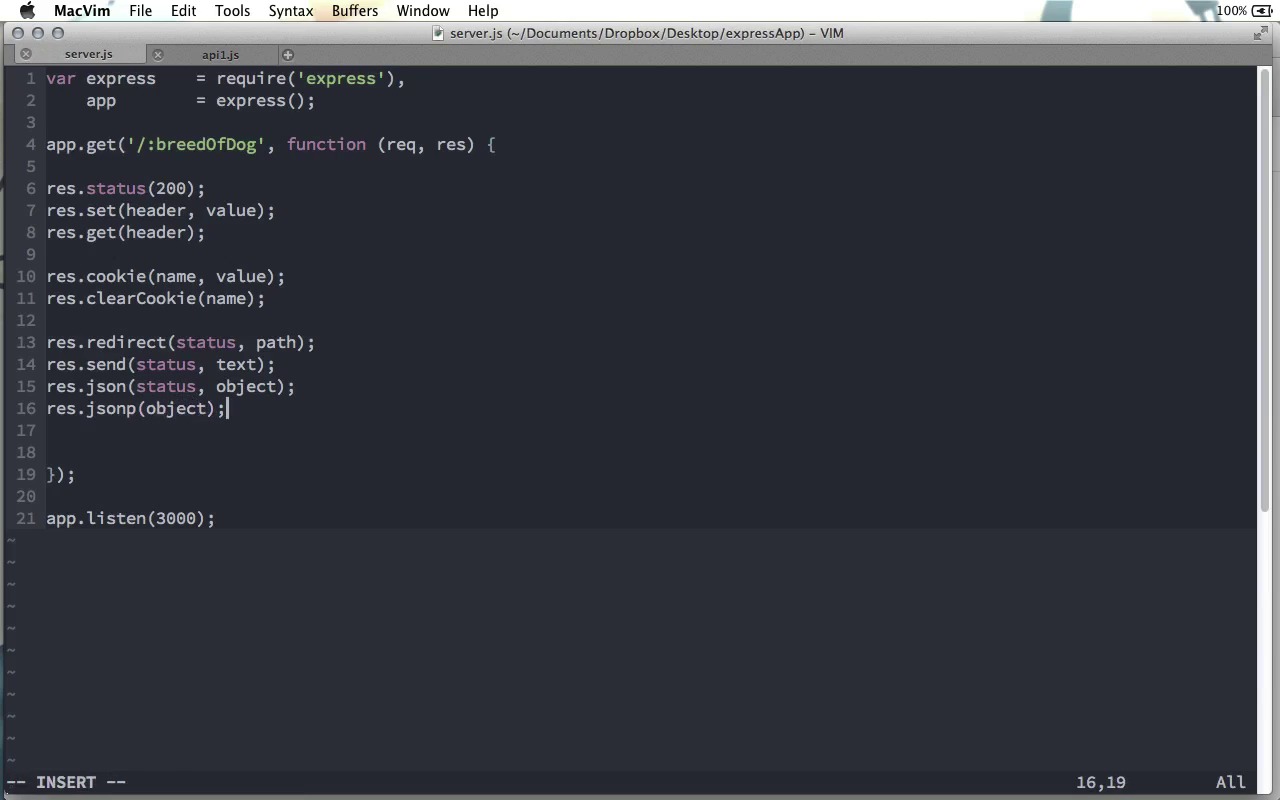
- Overview
- Transcript
3.2 Response Object
We've seen a few of the response object's properties, but it has some other properties that you'll want to use when building an application. We'll look at these in this lesson.
1.Learning the Basics of Express
1.1Introduction01:09
1.2How to Install Express 401:11
1.3Your First Express Application04:09
1.4Views and Templates07:37
1.5The Verb Methods09:10
1.6Application Settings09:47
2.Understanding Request Flow in Express
2.1Middleware and Request Flow06:25
2.2Custom Middleware Based on Route Parameters04:59
2.3Grouping Routes with app.route02:46
2.4Router Objects05:59
3.Request and Response Objects
3.1Request Object04:13
3.2Response Object04:15
3.3Formatting Requests02:43
4.Conclusion
4.1Conclusion01:35
3.2 Response Object
In the previous screencast, we looked at the request object that we get with Express. In this screencast, we're going to look at the response object, which we can use to set values on the response that we will ultimately send back to the browser. The first one is response.statusmethod. Of course, this is the status code, so you can set whatever status code you'd like on your response object before sending it back. You can set a 200 status or a 404, 500, whatever is necessary for the response you're trying to make. Now, the status method only sets one header, the status code, but you can use the response.set method to set any header that you'd like. Just call set, pass it the header name, pass it the header value, and that will set that header on the response object that you are making. If you wanna check the value of any header, you can use response.get to get the value of that header. If you are working with cookies, you can use res.cookie to set the name and the value of a given cookie. You can also use res.clearcookie to remove a given cookie, just passing the cookie name as the only parameter there. We've seen in a previous screencast how you can use the redirect method to redirect to a given path. But there's an optional first parameter, which is the status code. In fact, as you are about to see, a lot of methods have a status code as an optional first parameter, which means this status method up here Isn't always required. So, with redirect, you can pass an optional status. And, in the path that you want to redirect to, of course that will be a get request for that path. We've seen res.send, which can send just any text value or a buffer object, or anything like that back to the browser. This, too, can take a status code as its first parameter. Another method that I use quite a bit when building front end applications is the JSON method, and this is great for sending any JavaScript object back to the browser. Of course, you'll pass it in as an actual object, and this method will go ahead and convert it to a JSON string, and then send that along. This can't have a status code as its first parameter as well. There's also res.jsonp. If you're not familiar with jsonp, that stands for JSON with padding. We would pass this a JavaScript object, and it not only sends a JavaScript object as a string back, but it wraps that JavaScript object in a call back method, and this is a technique that allows for cross domain requests. And as you might guess, this method can take a status as its first parameter as well. Also, there's res.download, which you pass a file path to and it will make this file available as a download on the browser. I'm sure you've gone to a website where you click on a link to download a sample version of an application or something like that, and the link does not open a new tab, or reload the page. Instead it downloads a file. Well, by using res.download, you can do the same thing and trigger a download in most browsers, instead of loading the page. And this would work with maybe as a .pdf file download or anything like that. Finally, there's res.render, which we have already looked at and when you just pass it the file name and an object of properties perhaps, it will go ahead and render that template file and send it back. However, you don't have to send it back right away. If instead you pass a function as a third parameter, this function takes an error and the rendered HTML as a string. And then in here you can maybe do something with that HTML. And this is really handy if you want to render a template, but you don't want to send that rendered template back right away. You want to get that HTML string and perhaps do something else with it. I could do just res.send(html), and this would just be the same as not doing a call back at all. So these are the main methods that you're going to use when crafting a response to send back to the browser. If you go over to the Express API documentation, you can see a complete list of all of the different response subjects. I think I've named pretty much all of them here, but there are 1 or 2 such as res.attachment, which allows you to set the Content-Disposition header field to attachment, and you pass it a file name. This is kind of similar to the res.download method. And there are a few other methods here that you can look at if you have some more advance needs. But for 90% of your Express applications, I think you're gonna find that these methods right here will do exactly what you need in creating a response to send back to the browser.


