
 Lessons: 14Length: 1.1 hours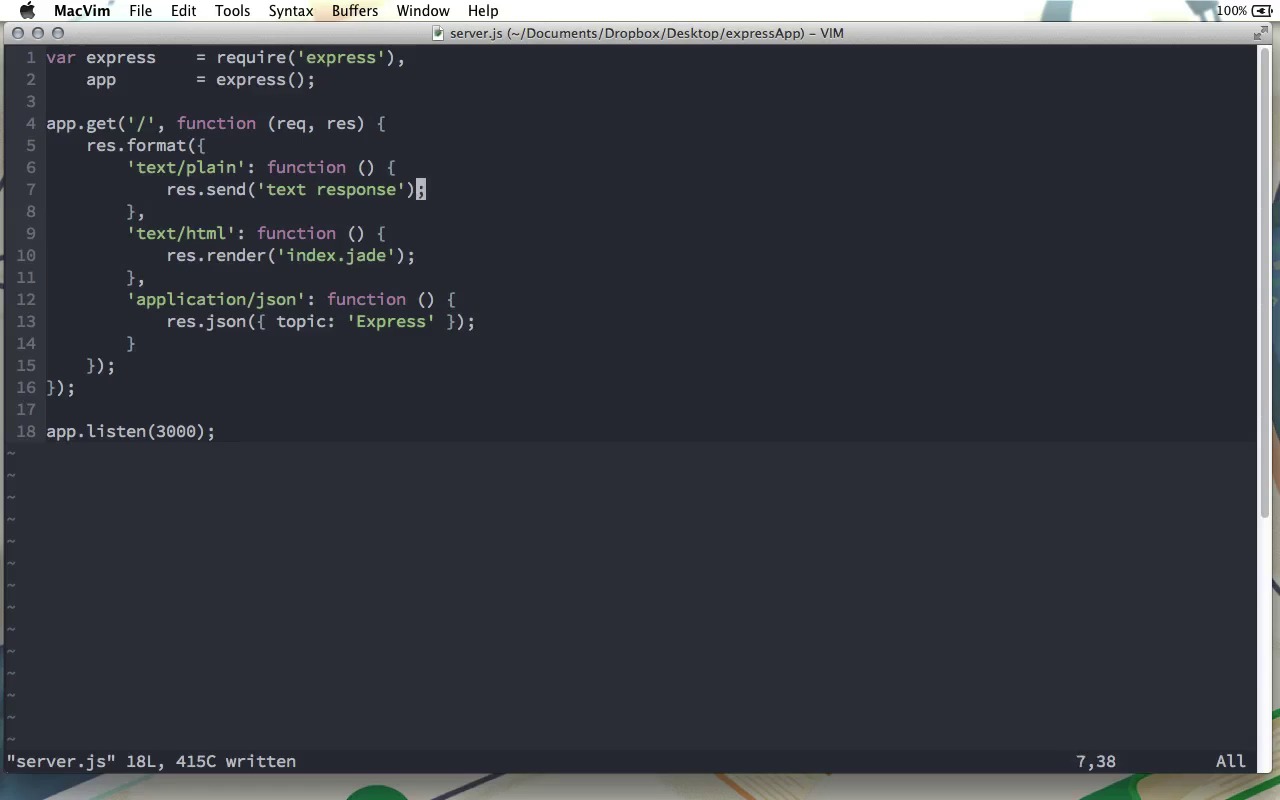
- Overview
- Transcript
3.3 Formatting Requests
A new feature of the response object in Express 4 is the format method. It allows you to send a different response based on what type of response the request is expecting. We’ll look at this feature in this lesson.
1.Learning the Basics of Express
1.1Introduction01:09
1.2How to Install Express 401:11
1.3Your First Express Application04:09
1.4Views and Templates07:37
1.5The Verb Methods09:10
1.6Application Settings09:47
2.Understanding Request Flow in Express
2.1Middleware and Request Flow06:25
2.2Custom Middleware Based on Route Parameters04:59
2.3Grouping Routes with app.route02:46
2.4Router Objects05:59
3.Request and Response Objects
3.1Request Object04:13
3.2Response Object04:15
3.3Formatting Requests02:43
4.Conclusion
4.1Conclusion01:35
3.3 Formatting Requests
There's one function on the response object that we did not look at in the previous screen cast, and that's because it's new in Express 4 and I wanted to give it its own video. Because, it's actually pretty cool. And, this is the response.format method. Response.format takes an object as its single parameter. Each of the properties of this object are a given response type. So for example we can have text/plain. We could have text/html. And let's do one more. Let's do application/json. And each one of these takes a function as its value, and in here, we can choose what to do if the response is expected to be one of these different mime types. So if the response is expected to be plain text, this function will be run. If the response is expected to be html, this one will run, and if it's supposed to be JSON we'll get this one. So, for example, here, we can do a response.send, and just say a text response, as this one, here, for text.html, let's do response.render and we will render index.jade. Let me go ahead and open up index.jade and we'll just say HTML response in h1 there and then down here we can have response.json and we'll send an object where we'll just say topic equals Express. And so we'll have three different responses here depending on the type of response that is expected. So, with the server started if we go to localhost port 3000 you can see we get the HTML response. If we do a curl on localhost port 3000. You can see we get a text response. And finally if I open up Postman, which is a rest client. Localhost 3000 here and will send this request. You can see right here that we have topic Express and we got adjacent response when we use a application that expects a JSON response. And this can be a great way to build a little bit of a more complex API for a frontend application. For example, you can have a route that is /users/:ID and if it get request to this route expects an HTML response well, then you could render a page displaying this user's profile. However if it expects a JSON response then you can return the JSON data for that user and so this route could be used as actually being part of the application that an end-user could view in a browser. But it can also be used as an API, to get the raw user value that can then be used in a third-party application. And that's one way that this response.format method could be used. So that's a look at this response.format method which I think is a really cool, and very handy addition in Express Version 4.


