
 Lessons: 14Length: 1.1 hours
- Overview
- Transcript
2.4 Router Objects
Another new feature in Express 4 is router objects. These objects have many of the same methods that an Express application object does, but a router object gives us a little more control and flexibility over how our application works.
1.Learning the Basics of Express
1.1Introduction01:09
1.2How to Install Express 401:11
1.3Your First Express Application04:09
1.4Views and Templates07:37
1.5The Verb Methods09:10
1.6Application Settings09:47
2.Understanding Request Flow in Express
2.1Middleware and Request Flow06:25
2.2Custom Middleware Based on Route Parameters04:59
2.3Grouping Routes with app.route02:46
2.4Router Objects05:59
3.Request and Response Objects
3.1Request Object04:13
3.2Response Object04:15
3.3Formatting Requests02:43
4.Conclusion
4.1Conclusion01:35
2.4 Router Objects
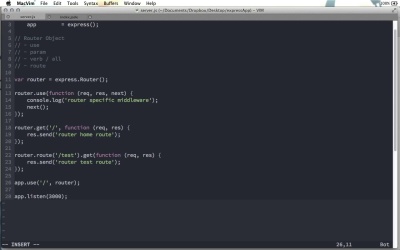
Another great feature in expression version four is the rotor object. Basically, a rotor object is a mini express application that runs inside of our master express application. So far on our actual app object, our Express application object that we've looked at, there we've seen several different methods that we can use to apply either middleware or a route function to our application. There's the use method for middleware, there's the param method for route specific middleware, then of course there's what Express calls the verb method, the get, post, put and delete methods, and of course, the all method. And then in the previous screen cast, we saw the route method. Router objects allow us to use all of these methods in a kind of like a contained environment. Let me show you how this works. So, first thing you wanna do is create a router object. We say var router = express.router. And this is a function. This function can actually take an object of options. There are two options that it can take, and these options are application options as well. There's the case sensitive option, which is false by default. And there's the strict option, which is true by default. You might recall these two options from our video on express application settings. These are the default options, so I'm just going to remove that right now. So, once we have this router object, we can then go ahead and use these different methods that we've been discussing throughout this whole course. So, for example, I can do router.use, and this is a piece of router specific middleware, so I'll go ahead and I'll just say router specific middleware for now. We could of course do a router.get, so I can say if we get the /, the home root, like that, why don't we just do response.send and say router home root. And I'll show also that we can do a router dot route, and say if we get the slash test route, if we have a get request on that route, then we can just do response dot send, say router test route. And so, as I've said, all of the different methods that we've used on the application object can also be used on an express dot router object. However, making a router like this does not automatically put it into use. To actually use this router, we have to apply it to the application object through the app.use method. So it's almost as if this router object becomes a piece of middleware. But we don't just pass the router object like that. That's actually the second parameter. As a first parameter, we pass a route, and this is the route from which the router object will be used. And this is part of the thing that makes a rotor object like this so powerful. So right now, I'm just gonna use a forward slash as our route. And let's go ahead and use Nodemon to start up our server. And so now, if we head over to local host port 3000. Notice we have rotor home route. And if we go to /test, we get router test route, just like you would expect from our code here. But the neat thing is we can now actually use our middleware down here, we can use the app.use function here to prepend a portion of the URL or the path to all the routes in this router object. So we could do for example /API/ and we actually don't even need that trailing slash, if I just say /API, now when I come here, if I go to the home route you'll notice that we cannot get slash because there's nothing there. But if I go to /API then we get the router home route, we can go to /api/test to get the router test route. So the beauty of this is that it allows you to really modularize your code even further. For example, let me remove this code here, and let's say we want to create API version one say, and then we also have an API version two, and we have two express routers just like this. Now I can do an API version one.get for example and if we get slash names, that might do one thing. For example, let's just say this currently responds with names from API 1, we'll just say. But now I'll copy that, paste it down here. We have /names, and names for API 2. If I change this here to API version two. And so now we have two separate rotor objects here with the same route and they have different responses because they are different versions of the api. Better yet, let's actually divide this up a bit. So I'm going to go ahead and create a new file here. I'll call it api1.js. And let me copy this code here and we can just say require express just like that to create new router object. And then here we can do a module.exports=API version 1. Right? And now let me go ahead and change this to version two. I'll change this to version two here, version two here, and version two here. And now, I will do a save as, and this will be api2.js. So now, I can remove all of this from here. And up in here, we can do api, we'll say version one. And we can go ahead and require API one, and I'll duplicate this line for API version two. So now that we have our APIs, we can go ahead and do an app.use on slash API slash version one we can use API version one and let me duplicate this line and have API version two running on version two. And so now we just abstracted our two separate versions of our API into two different files and then we can use our router objects to put these on completely different routes on our web application. And so now we come back to the browser and go to API/V1/names you can see we get from API1, and if I go ahead and change that to API2 you can see we get from API2. So there's a quick but really neat, I think, example on how you can use the new express router objects. I think part of the beauty of this is that to create a router as we're doing here, we don't even need a specific application object. We can create the router almost as a standalone thing or as a singleton application, and then we can just inject that into our application using the standard malware function, app.use. And this gives you a really neat interface, I think, for dividing up your code into the necessary components.


