
 Lessons: 14Length: 1.1 hours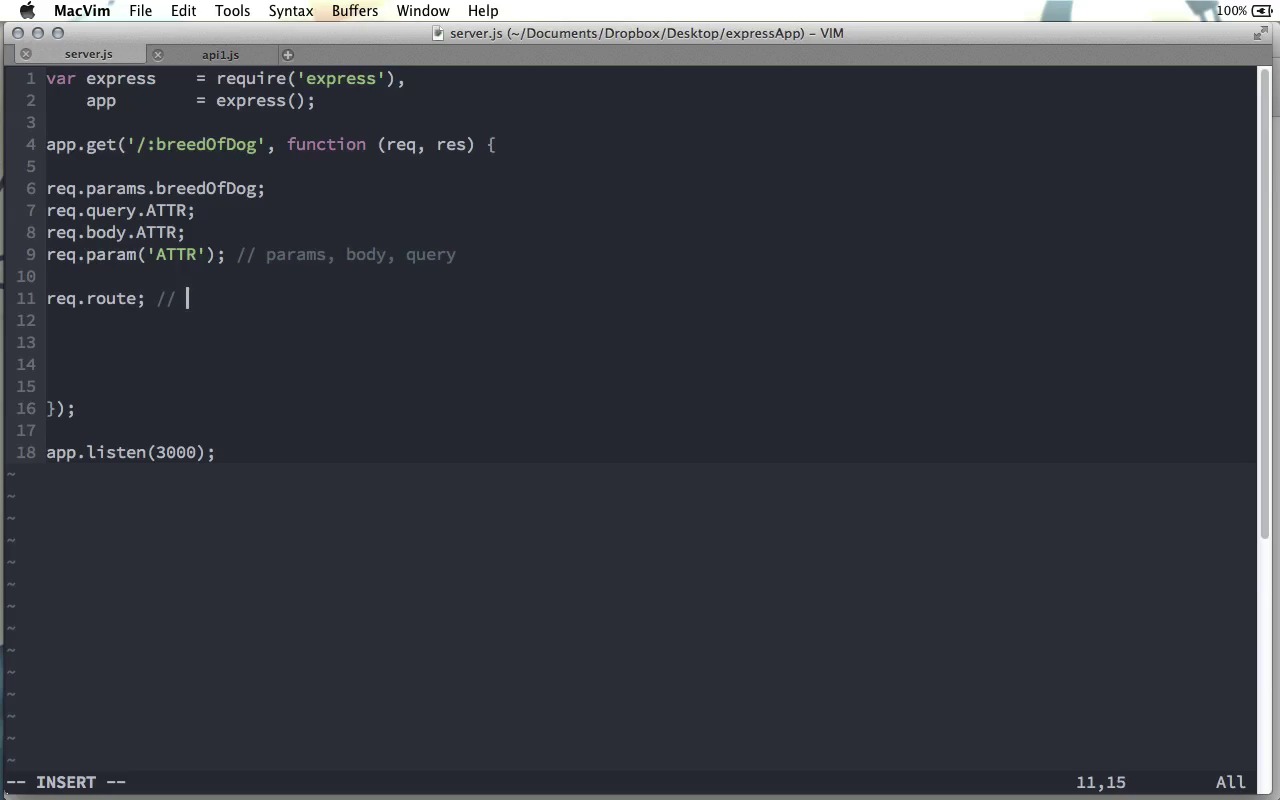

- Overview
- Transcript
3.1 Request Object
We've seen a few of the request object's properties, but the request object has many other properties you'll find useful when building an application. We'll look at some of those in this lesson.
1.Learning the Basics of Express
1.1Introduction01:09
1.2How to Install Express 401:11
1.3Your First Express Application04:09
1.4Views and Templates07:37
1.5The Verb Methods09:10
1.6Application Settings09:47
2.Understanding Request Flow in Express
2.1Middleware and Request Flow06:25
2.2Custom Middleware Based on Route Parameters04:59
2.3Grouping Routes with app.route02:46
2.4Router Objects05:59
3.Request and Response Objects
3.1Request Object04:13
3.2Response Object04:15
3.3Formatting Requests02:43
4.Conclusion
4.1Conclusion01:35
3.1 Request Object
Throughout this screencast, we've pretty much taken the request and response objects for granted. But there's a lot that they can do that we haven't looked at yet. So in this screencast, I'm gonna go over some of the highlights of those objects, some of the things that you're most likely to use. Now we're not gonna cover everything from the request or the response objects, but we'll look at some of the things that you're most likely to use in your applications. First, there is the params object, request.params.attribute name. As we already saw, any tokens that we create in our actual route will be available as parameter names. So, for example, if I have :breed of dog in the route, then request.params.breedOfDog will be available on the request.params object. There's also the request.query object. Now if you're not familiar with a query string, this usually comes in the form of a question mark, followed by an attribute name, equals sign, and an attribute value, for example, name equals Andrew. And this, of course, would not actually be part of the route that you define here, but that might be sent back from the browser to the server. And if there is a query string, like that, after the actual route name, you can use the request.query object to get those attributes out of the URL. We also saw request.body, which of course to access, you'll need some body parsing middleware, but you can use that with put or post requests to get attributes from the body of an HTTP request. These three things kind of work together with the request.param method. You pass the attribute name as a property to the request.params method, and it will look first in request.params, then in request.body, and finally, in request.query to see if we find anything that matches that attribute name. So if you're not sure which one of these three ways that value is gonna be sent to this route function, well then you can use the params object and it will check all three of them. As I said, it will check in the order of params, body, and then query. If you need to find out more information about the route that was used to call whatever function you're currently inside, request.route is an object that has several useful properties. As you might guess, these routes are parsed with Express using regular expressions. So it will have the regular expressions that were used, as well as a list of the parameters, other keys, along with the full path name. But if all you want is the actual route string that was used, you can use request.originalUrl, only the U being capitalized there. And that will just be a string that gives you that route that was called. So instead of saying /:breedOfDog it would say /Great Dane or /Chihuahua. If you have cookie parsing middleware involved, you can use the request.cookies object to get any cookies that you might be using in your current session. Also useful is the request.get function. You can pass this function any header name, and it will turn the value that header was in this HTTP request's object. The request object also has methods that are for specific request headers. The one I'll mention here is the request.accepts method. As you know, an HTTP request usually states certain types of content that it is able to accept as a response. And you can use this to return a boolean to find out what type of request is acceptable. So, for example, you can say does this accept text/html, and if it does accept that, this will return true. Other mime types are available, of course, so you could do application/JSON or text/plain, something like that. So these are a few of the most common methods that you're gonna use when you're building your application. However, you can find a complete list if you go over to expressjs.com and look at the API. As you can see over on the side here, you can click Request and here's a whole list of them. A few of the ones I didn't mention is req.ip, which turns the remote address of the request that was used. You can also use req.protocol to find out what protocol was used. Req.secure will return true if HTTPS was used. And there are a few others that you probably won't use very often that you can find on this page. So there's a quick look at some of the Express request objects that you can use to make developing your application a little bit easier.


