
 Lessons: 14Length: 1.1 hours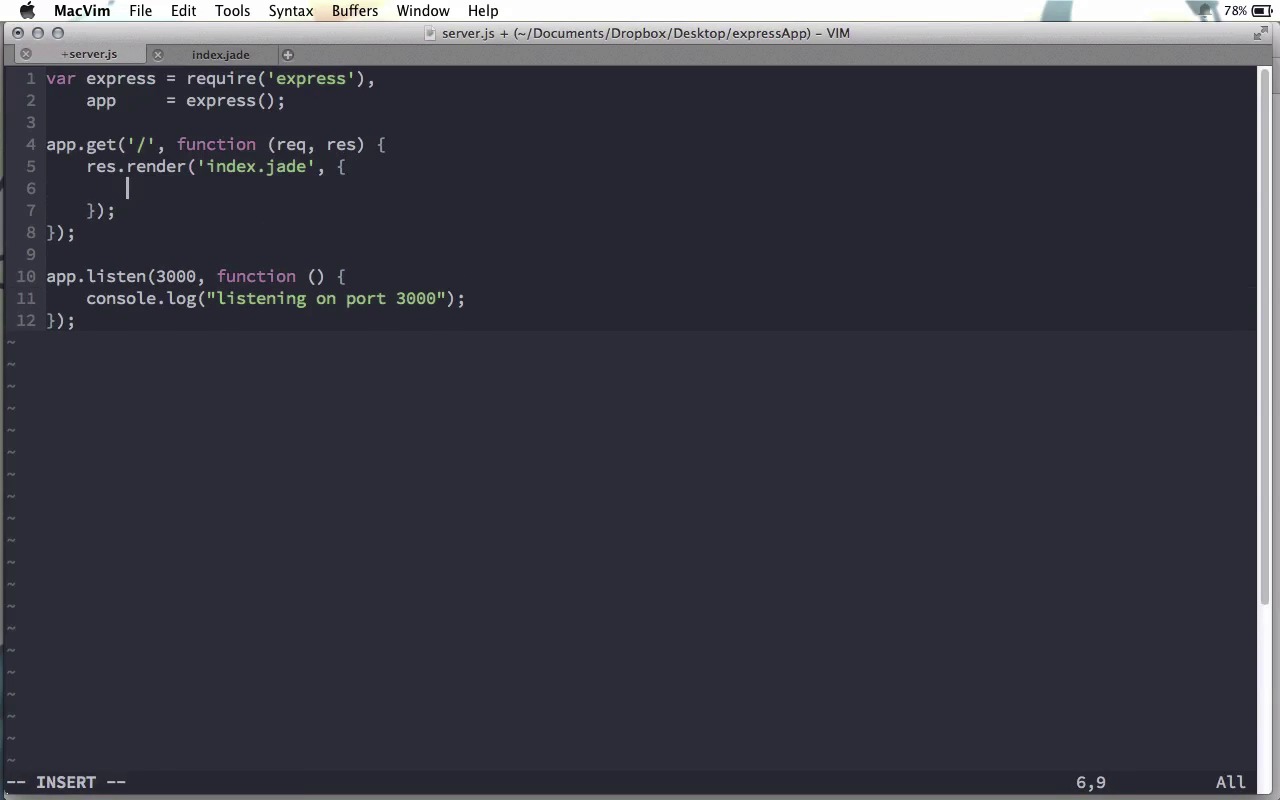
- Overview
- Transcript
1.4 Views and Templates
In the basic application we created previously, we simply sent some text from the server to the browser. However, in real web applications, you’ll want to send HTML files from the server to the browser as well as loading data.
Related Links1.Learning the Basics of Express
1.1Introduction01:09
1.2How to Install Express 401:11
1.3Your First Express Application04:09
1.4Views and Templates07:37
1.5The Verb Methods09:10
1.6Application Settings09:47
2.Understanding Request Flow in Express
2.1Middleware and Request Flow06:25
2.2Custom Middleware Based on Route Parameters04:59
2.3Grouping Routes with app.route02:46
2.4Router Objects05:59
3.Request and Response Objects
3.1Request Object04:13
3.2Response Object04:15
3.3Formatting Requests02:43
4.Conclusion
4.1Conclusion01:35
1.4 Views and Templates
The very basic application that we made in our previous screencast just sent a little bit of text from the server to the browser. Now, that's good for a basic learning example. But often, you're gonna wanna send full HTML files from the server to the browser, right? And, what's more than that, the reason you're not just using a static HTML website is because you need some dynamic content on those pages. Right? You need to be able to pull data from a database or some other source, and stick it into those HTML pages. So, what you need is the ability to create views and templates. And, that's what we are going to look at in this screencast. Here's the application that we created in the last screencast, and right here is where we're just sending that text along. So, what we want to do, instead, is actually render a template. Now, before we can actually render a template, we need a templating engine to use, right? So, let's come back to the terminal here, and install a templating engine. Now, there are several different ones that we could use, however, one that is often used with Express is Jade. So, let's go ahead and do an npn install jade. And, while Jade is installing, I'll show you the Jade website. You can go over to jade-lang.com, and this is a templating engine made specifically for node. Now, we're not going to completely learn Jade in this screencast course, because this course is primarily about Express. But, you can see a good example of pretty much all the main parts of Jade over on the left-hand side of this page. As you can see, tags are nested, based on indentation here. And, you just really have to write the name of the tag. For example, HTML, head, and then title, script, etc. Notice this H1 tag here. We just have H1, and the text that follows it over here, turns into H1 with that text inside of it. And, we'll look at some simple examples of Jade here in our screencast. But, if you want to learn more about it, head over to jade-lang.com, and go through this references page. And, I'll have a link to this page underneath this screencast. Okay, so back in the terminal here, you can see that Jade has finished installing. And while we're still here in the terminal, I want to make another directory inside our expressApp directory. And, we're gonna call this views. By default, Express expects all of our views to be inside of a views directory. So back here, what we can do is let's remove this res.send line, and we're going to replace it with a res.render line. And, we're going to tell it to render the index.jade template. This template doesn't currently exist. So, let's go ahead and create it. I'm going to open a new file called views /index.jade. And in here, let's make this really simple, let's just say, H1 Hello World. So now, if we come back here. And, let's go ahead and start the server. Instead of just saying node this time, I'm gonna use nodemon. And, this is basically a process that will restart our node server anytime it senses a change in the files that make up the server. If you don't have this installed, you can go ahead and do npm install -g nodemon. And, I'll go ahead and do that, just to make sure I have the latest version. If you're not familiar with that -g flag, this installs nodemon globally. And, it makes it a global process, so that we can use this one installation in all of our different JavaScript applications. It's not something specific to Express. You could use this to rerun any different JavaScript web server. All right, so if you have nodemon, go ahead and use it. I'll do nodemon server.js, and now I'll go ahead and open local host port 3000. And you can see we have, Hello World showing up here as an H1 element. So, that was really, really simple, right? So right now, we're using Jade to render our views, but we're not actually using its templating features. So, let's go ahead and pass this render function an object. And, this is where things get interesting, we can pass render a second parameter, an object. And, any value we add in here will be available from within the template that we're trying to render. So, let's set the title here to Hello Express & Jade. There you go. So now, this title variable will be available from within index here. But, we can't just go ahead and replace title like that, cuz if we do that and come back and refresh the page, you can see we just get title. So instead, what we have to do is say equals. And, when we put an equal sign here, after the tag name, but before the actual content of the tag, Jade will print everything that comes after this equal sign as if it was a JavaScript expression. So, when we say title there, we can now refresh the page and we have Hello Express & Jade. And like I said, it will treat everything as a JavaScript expression. So, we could say title.toUpperCase(), for example. And now, when we reverse this page, you can see that we get everything completely in upper case here. So, putting that equals sign there will make sure that everything there is treated As JavaScript. Let me show you one or two more things about Jade while we're here. For example, let's say we wanna have paragraph, but it's gonna be a rather long paragraph. Right now, this is a single line. But, let's say you probably have your code editor on No Wrap, just like that. Well, if we do that, you can see it works just fine, but its not really that great to work with here in the template. So, what you do is you put a period after the tag name, then what we can do is put multiple lines here underneath this tag. So, every line after this of course will have to be Indented, but then you can see we can just have it nicely like this. And, this will all go inside the tag that has the period there. So, if I save this and refresh the page, you can see it looks just fine. Also it's very easy to do nested tags. So, for example, if we have an H2 here with the text, Hello There, you can see we have this H2. But, if we want to nest an emphasis tag inside of this, we can just do em, like that, H2 with em inside of it, notice, Hello There is in italics. So, we have nested tags just like that. One more thing I can show you with Jade is that we can do attribute, as well. So, if we just have a regular input element there, you can see that this is just a text input by default. However, if I want to add an attribute to it, you put parenthesis after the tag name, and inside of this you put attributes just like you would in HTML. So, I could say type=password. And, we just have the attribute name, equal sign, and then the attribute value in quotes, like that. And now, if we refresh this, you can see that we have a password input element. Of course, if you would rather not use Jade, but might rather use something, for example, like embedded JS, or EJS, we can do that too. Lets go ahead and do npm install ejs. Once we have our other templating engine installed, all we have to do is make sure that our view file has the right final extension. So right now, in the res.render method, we're passing the index.jade, so it knows to use the Jade templating engine. If we change this to index.ejs, I'll have to go ahead and create views/index.ejs. And, in here, I can go ahead and create H1, and then we'll just use the tags here, and put in the title, and close our H1 tag. And now, we'll actually have to go ahead and restart the server, because I closed it to install EJS. But now, if we come back and refresh the page, you can see that we have Hello Express & Jade, and this, of course, is coming from our index here. And, if you're not sure about that, let me just go ahead and save EJS as a prefix there, and now you can see that this is coming from EJS. So whatever templating language you want to use, you can use. And, Express is really smart. You can find the package as long as you have it installed, and you're good to go. So, having one of these templating engines installed, and using the res.render method, allows us to create complex HTML views, which is exactly what we will need for a full fledged web application.


