
 Lessons: 14Length: 2.4 hours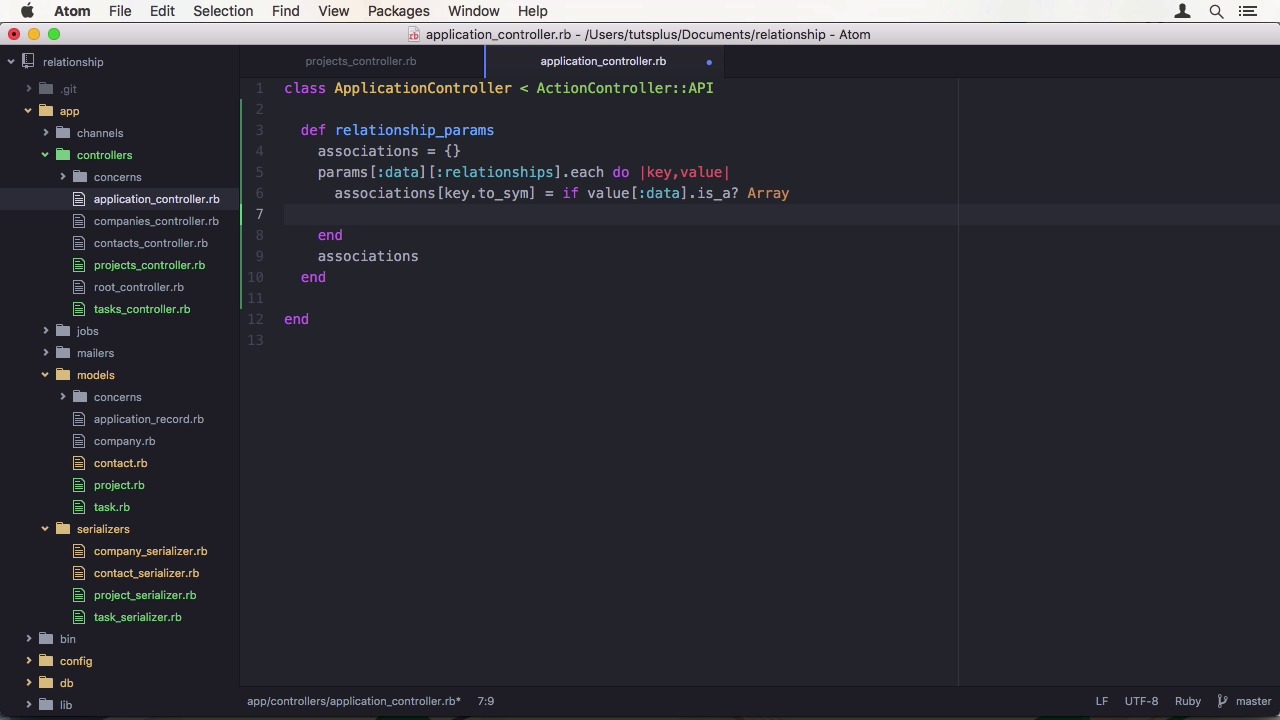
- Overview
- Transcript
2.3 Add Projects, Tasks, and Offers
We're not just building an address book! To go further, we're going to add projects, tasks, offers, and the associations between them. This will let us properly organize customer interaction.
1.Introduction
1.1Introduction01:05
1.2Project Overview03:23
2.Rails Back-End
2.1Generate and Prepare the Application09:19
2.2Create Companies and Contacts10:35
2.3Add Projects, Tasks, and Offers14:47
2.4Track Customer Interaction12:01
2.5Secure API Access07:46
3.Ember Front-End
3.1Generate and Prepare the Ember-CLI Application08:34
3.2Application Layout and Authentication15:36
3.3Manage Companies and Contacts15:54
3.4Manage Projects, Tasks, and Offers19:18
3.5Add Customer Interaction14:11
4.Deployment
4.1Deploy to Heroku and Amazon S308:28
5.Conclusion
5.1Conclusion03:02
2.3 Add Projects, Tasks, and Offers
Hi, and welcome back to Create a Full-Stack Rails and Ember App. In the last lesson, we created our first resources, contacts, and companies. In this lesson, we will extend our data model, also include projects, tasks, and offers. Let's start with a project. This one is very easy, it only has a name and a status. To show if the project is active or archived, we can model the status as an enum in rails, which means you have to use the data type integer in the generator. We also have to add a default to the migration. In the model, we have to define the enum for a status field to have active, which is the default, because we define the default of zero, and it is in the first position, as well as archived. While we're at it, let's also add a presence validation for the name field. As for relationships, we want to assign one or many contacts to a project, which means this has to be a has_and_belongs_to_many relation. Let's also add this to a contact model. To reflect this in the database, we have to create a new table without a model. Therefore, let's create a migration called Create Contacts Projects. I am going to manually add the references to the migration in the editor. First for contact, and then for project. It is also a good idea to create an index and a foreign key for both. Let's migrate the database to a new schema. Next up is tasks. There, we have a description that describes the task, and again, the status. A project might also have tasks that are explicitly assigned to it. So we can add a reference to it in the task model. Finally, I want to have a duet field that gives me the possibility to add a deadline. Again, we have to add a default value in the migration, and then we have to migrate the database. We also should change the project model, and add a has_many relation to task. Now let's have a first look at the serialized classes, since we don't have to transform data, they look very simple. Having only an attributes call to specify which attributes we want to have in the JSON response. For projects, I also want to send the created_at field, so I have a way to sort it in the front end, or determine the age of a project as well. In the TaskSerializer, there's also a has_one project call, which tells the serializer to add the project as a relationship to the output. Let's change the project serializer to include all contacts and tasks, and then go to the contact serializer and add the reference to project as well. To test a new API endpoint, let's open up or your request tool of choice, and query an endpoint, this time the project resource. Since there are no projects in the system yet, I made it a post request and added some data. In the last lesson, we used a simple Rails version of sending data to the server. Now, we are going to use the JSON API one. Right away, you can see the difference. It isn't just plain field names and values. The structure is much more complicated. In fact, it is the same you get back when requesting data. Let's start the Rails server if it isn't running already, then make the API request, and it fails. The parameter variable is missing project, and permitting the parameters, this is to be expected. We adapted our data input, but we didn't change anything within the Rails controllers. In the project controller on the bottom, we find the method that fails. As you can see, it requires the project key, which then contains the fields. This looks like so, in JSON. Well, you first need the data key, and then require the attributes key, where we permit our fields. Let's try this out with and it works partially. The data is there, but our relationships aren't. Of course, we didn't adapt the controller to use them. Back in the controller, in the create method, I want to do something like this. Project.contacts will have the results of a method call to relationship params for contacts, or an empty array if it doesn't exist. The same goes for tasks. This relationship_params method can easily be so generalized that I will put it in ApplicationController. We also have access to the params parameter here, so it's easy to extract the data. The return should be a hash with a key for each relationship that points to an array of all the related items. What we need is to get each key and data relationships, and set the value for it on our associations variable. Now for setting the variable, I have two possibilities. Either it is an array, then we have a has many relationship, which means I have to loop through all the records, or we have a belongs to relationship, where it is a bit easier. I just want to find the related object that is specified in the data object of the value. To find_related_object ethod, is responsible for first getting the type attribute, which is conveniently provided to us in the JSON payload, titlecase it, and then constantize it. This is now a reference to the model in class. We need to find the records within our database. And actually, the has-many relationship isn't that difficult either. We just need to map the data array, and call find related objects on each entry. Back in the projects_controller, we also need to set those values in the update method. Since I'm overwriting all the relations, I am additionally going to safeguard the call by making sure the relationship is present in the request. So let's update the record by sending a patch request to the server. I'm going to add an ID key to the data object, and also append the ID in the path. As you can see, when I comment out the contact in the payload, it gets removed on the server. When I undo that and remove the whole context relationship, the association stays. For testing our create method, I changed the request back to its original form and perform it again. Now all the data and relationships are present, but the project has a new ID. Signaling me, that is indeed a new record. Before we move on, I have noticed a small mistake I made in our JSON payload. I used singularized types while the specification calls for the pluralized form. Luckily, this can easily be fixed by adding singularize to the find related object method. Before we add more models to our application, let's quickly change all the other controllers who use a new JSON API compliant way of data processing. First, I'm going to change the company's controller, which just has a contact relationship. And then, our contacts controller, which has relationships and companies and projects. Finally, the task's controller needs to change as well. First the task's params method, and then create an update. On to our final resource, offers. Each offer has a name, a price, a status that can be pending one or last, and a validity date. Let's also change the migration to add a default for status, as well as precision and scale for a price. After running the migrations, we need to define our associations. Like a project, an offer has and belongs to many contacts. It also belongs to a project, and has many tasks. Let's also do the reverses. A project can have many offers, and the tasks can belong to an offer. Now the serializers. First the ProjectSerializer, then the TaskSerializer, and the OfferSerializer. This is a bit tedious to do, but with so money interconnections, there is no way around it. Something we also didn't set yet is the status enum in the offer model. And therefore, you need to be active, one, rejected or expired. Or to keep the naming in sync, let's call one accepted. I also want to have a name present for the offer. In the contact model, we also have to set the reverse where that has and belongs to many association. And finally, we need to create a database table for it. Let's jump into the console and generate a migration called create contacts offers, with the reference to contact and offer. Then, run the migrations. Our last step in the process is to adapt the controllers. First, the contacts controller, where we can add offers and tasks from the relationship params array in the create and update methods. Then, the offers controller, where we also have to change the offer params method to comply to JSON API, and add projects, contacts, and tasks to the create and update methods. Next is the project's controller. Where reference to the offer relationship has to go into create and update as well. And finally, we do the same changes one last time in the tasks controller. In this lesson, we expanded our data model, to have projects, offers, and tasks, and updated the input format to comply to JSON API. In the next lesson, we are going to finish the data structure by adding notes that use inheritance and polymorphism, two distinct different types from one another. See you there.


