
 Lessons: 12Length: 1.9 hours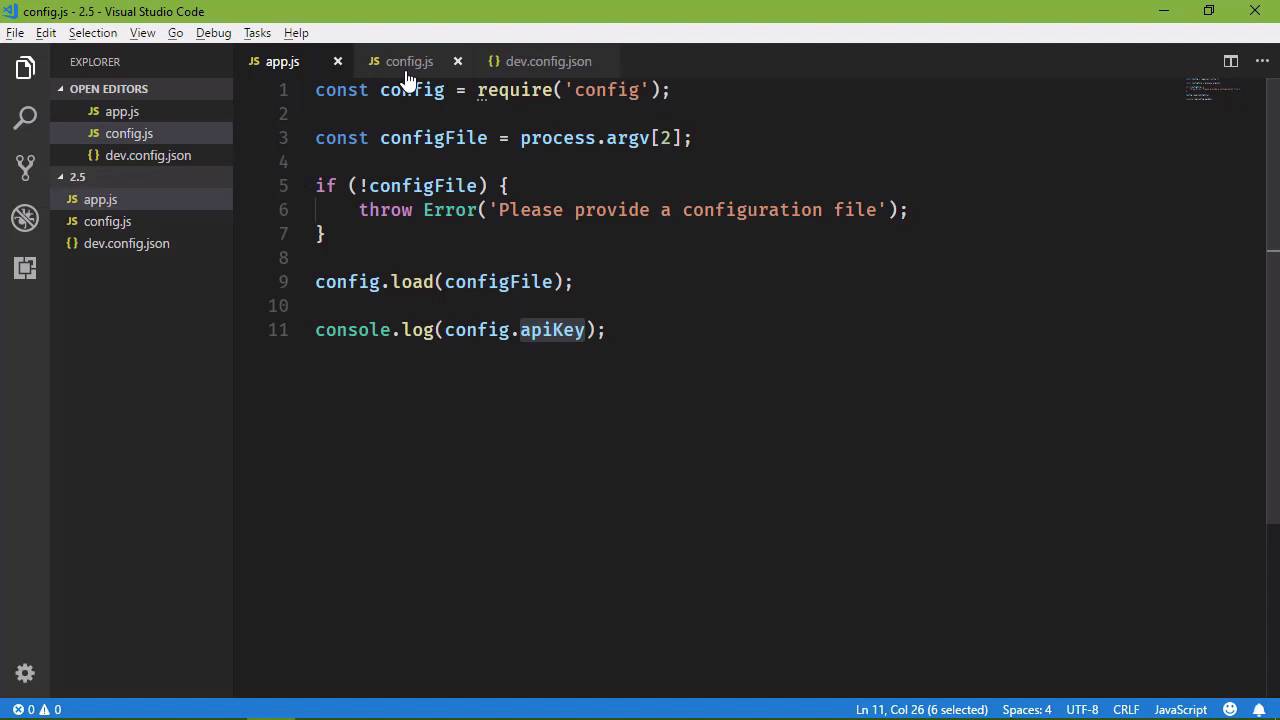
- Overview
- Transcript
2.5 Writing Modules (and Other Stuff)
Node.js introduced the idea of modularized code to the JavaScript ecosystem, and it's how we organize large applications. In this lesson, I'll show you how to write your own module, run synchronous code, and work with paths.
1.Introduction
1.1Introduction01:50
1.2Getting Set Up07:33
2.Node.js Concepts
2.1The Event Loop and Async Programming10:29
2.2The Asynchronous Pattern12:06
2.3Using Readable Streams11:18
2.4Writing Is Just as Important09:57
2.5Writing Modules (and Other Stuff)14:57
2.6Writing an HTTP Server16:21
3.Tools for Node.js Developers
3.1The `util` Module11:18
3.2NPM11:23
3.3Creating a package.json File06:54
4.Conclusion
4.1Conclusion01:13
2.5 Writing Modules (and Other Stuff)
As you are writing your applications, you're going to get to the point to where you have just a ton of code. And you want to break it up into separate modules, because that is what Node has essentially done for JavaScript development. We have gotten to the point to where we want to modularize our code. And it just makes sense to do it, because it makes your application easier to work with, because everything would then be organized into smaller pieces of code that are designed to do just one thing. So, in this lesson, we are going to write our own module. We're going to take the idea from a couple of lessons ago, where we read a config file. In this case, we are going to write a module for managing all the config stuff. So loading the config, and providing the necessary information to the rest of our application. So, let's go ahead, let's make our 2.5 folder. And we are going to create two files off the bat. The first is going to be our application file. In this lesson, I'm going to call it app.js. I know that in prior lessons it's been named something relative to the topic of the lesson. But when it comes to looking at other people's applications, the starting point of the application, or the main application file, is typically called app.js. It might be called main.js, but usually app.js. So, we're going to get into that convention here. And then, the second is going to be the file for our module. Because when it comes to writing modules, at least, modules for our applications, it's nothing more than a JavaScript file. Now, you can write a module and publish it to the Node package manager library. But that's a whole other beast. We're not going to get into that. Instead, this is a module for us, for our application. So it's nothing more than just a normal JavaScript file. So, let's think about how we would want to use this. So, we would say that's, we would create a variable called config, we would use require to require our config module. And then, we would want to load the config files, so we would say configfilename, we would get that from the command line. But let's just call it config file. And then, that would load the file so that then we could use whatever properties that we needed. So, a couple lessons ago we had a property called apiKey, so we would provide that property through our config object. And that would be available for the rest of our application. So let's do this. Let's go ahead and finish the code that we would have here. And then, we need the code for getting the name of our config file. So let's first of all create that config file variable. We'll use process.argv with an index of 2. If we don't have a configFile, then we want to throw an error that says, Please provide a configuration file, otherwise we will load that configFile, okay. So this is our usage of our config module, now we just have to make that work. So, if you're coming from client-side development, you are probably used to doing something like this. Having an immediately invoked function so that you can protect all of your private variables and functions. We don't have to do that. Everything is private by default. So, that's the first thing. If you want to make something publicly available, what you have to do, then, is export those things. So, we have module .exports. And then, this is how we export anything. Now, if we wanted to just export a function, we can just export a function. If we wanted to export an object, we could do that. If we wanted to just export a value, we could do that as well. In our case, we are going to export an object, because we have this load method. We also have this API key property, so it makes sense that we return or export an object that has a load method. Let's call that filename, and it has an apiKey property. Now, I'm going to say that our apiKey property needs to be read-only. We don't want to be able to set the apiKey from outside of our module. So we're going to make this a getter to where we simply return a private variable. I'm going to call it underscore apiKey, and so let's create that up here. And, we will give it a default value of default value. We'll change that later, but I want to have a value here so that you can see how this is going to behave. So, if we are going to load a file, then, of course, we need the fs modules. So, let's go ahead and require that. And then we will use the read file method to read our file. So, we'll say fs read file, we'll pass in the filename, then we will have our call back function, and we'll have the error and the data. Let's check to see if we have an error, that's always a good practice to be in. If not, then we will throw that error, otherwise we want to read our file, which by this time we already have done. So what we will have is our data in chunk. And this is going to be a JSON file, so we will want to parse that into an object. So we will say let obj and JSON dot parse. And here, we need to use that two-string method. And then, we will have that object, so that we can set our apiKey equal to the apiKey from our config file. It's a little bit of code, but the idea is pretty sound, I think. So, the only other thing that we need to do is create our config file. I'm gonna call it dev.config.json, the idea being that we can have production.config.json. And we will have our apiKey. And let's give this a value of dev api key. All right, so now we need to make sure that our files are saved, because otherwise I will forget. [LAUGH] And that will be an issue. So now we will just run our application. I'm going to tell you that this is not going to work. We are first going to get an error that says cannot find module config. Okay, so, whenever we use the FS module, we just say FS. There are many other built-in modules, and all we have to do is just provide the name there. If we install a module from NPM, all we have to do is specify the name as well. And if we write our own module, we have to tell our application where that module is. So, whenever we require our own module, we have to supply the path. And in this case, it is dot slash ./, and then config. Now, that's going to work. Now, it's still not going to work, actually, but we won't get an error in this case. So, let's run it. But now our issue is that we see default value. So, here's the thing, we are asynchronously reading our config file. That means that, by the time that our application gets to line 11, it hasn't read the file, parsed the JSON, and then assigned our private apiKey variable its new value. So we have a couple of different options, then. We can turn the load method into an asynchronous method, which we could obviously do, and it would look something like this. So that we have our error object. We have the config object. Let's call that settings. And then, inside of this callback function, we would have the rest of our code for the application. I don't necessarily like that approach, because it gives us a layer of nesting. It's more code that we have to write. And if there's one thing that I don't like doing, it's writing a lot of extra code. So the other option is reading our configFile synchronously. Now, I know what's probably going through your head. This is Node, we don't do things synchronously. Well, yes, we can. If we think of our application as having two phases, we have an initialization phase, and then we have the operational phase. So the initialization phase is the short phase where our application gets set up. So it's basically the code that we see here, where we are getting the config and all of that stuff. And whenever we write our first real application, which is going to be a web server, we're going to see the same type of thing. We're going to have all of our initialization code inside of app.js. And the rest of our code is going to be inside of modules. So, when it comes to the initialization, it needs to be fast, don't get me wrong. But if we're going to do any type of synchronous coding, it should be in the initialization phase. Because, definitely, when we get into the operational, we want asynchronous as much as possible. So I'm okay with using synchronous code in the initialization phase. It's just going to be once, whenever the application starts up, and then from there, we can do things the, quote unquote, correct way. So, we haven't talked about reading of files synchronously. That's very simple. fs.readFileSync. There we go, there's no callback function, all we have to do is provide the filename, and that is going to give us the data. So we can say let chunk = readFileSync. We don't need any of this code, but we still do need the parsing into an object. And then setting our private variable a value. So, let's go to the command line, and let's run our application. Now we see our correct dev api key. And we're not done with this particular implementation, because what I want to do, then, is move all of our config files. Because right now we just have one. But if we're going to name them dev.config.json, that implies that we're going to have staging.config.json and production.config.json, and whatever config file that we need. So then it makes sense that we organize our applications so that we put all of our config files inside of a folder, so let's do that. Let's call this config, and we will put our config file inside of there. But, we have changed the path of where that config file exists. So, if we try to run this again, we're going to see that, uh-oh, no such file or directory. So then, what we need to do is specify the path. We need to work with a path. And yeah, we could pass the path in the command, don't wanna do that. We can say that our application can assume that all of our config files are going to be inside of this config folder. And then just give us the name of the file and we'll load it from there. So what we want to do, then, is pull in another package or another module, rather. It's called the path module. And this gives us lot of utilities for working with paths. If we say path dot, we're going to see a lot of methods here. Now the one that I want to use is this join method. The join method takes different segments of a path, and it builds a path based upon the segments that we pass in. So, that means that we could do something like this. We have a segment called config, and then we have a segment with the filename that was provided. So, let's put this inside of our load method. So that then, we can say let filePath equals, and then we are going to combine these pieces into a full path. And then we will pass that to our read file sync. So, let's give this a run. It's still not going to work, because now notice what we have. No such file or directory open, c: config dev config Json. It's not taking into account the current folder, or the current directory that our application is in. But we have a special variable that is given to us, not through the path module, but it's just one of those things that we have available to us. And it's called underscore underscore directory name, or __dirname. This is the name of the directory of where our application is running from. So, we are going to take that value, combine it with config, combine it with our filename. So that then, whenever we run this, we're going to get the correct file, parse it, and get the value that we need.





