
 Lessons: 12Length: 1.9 hours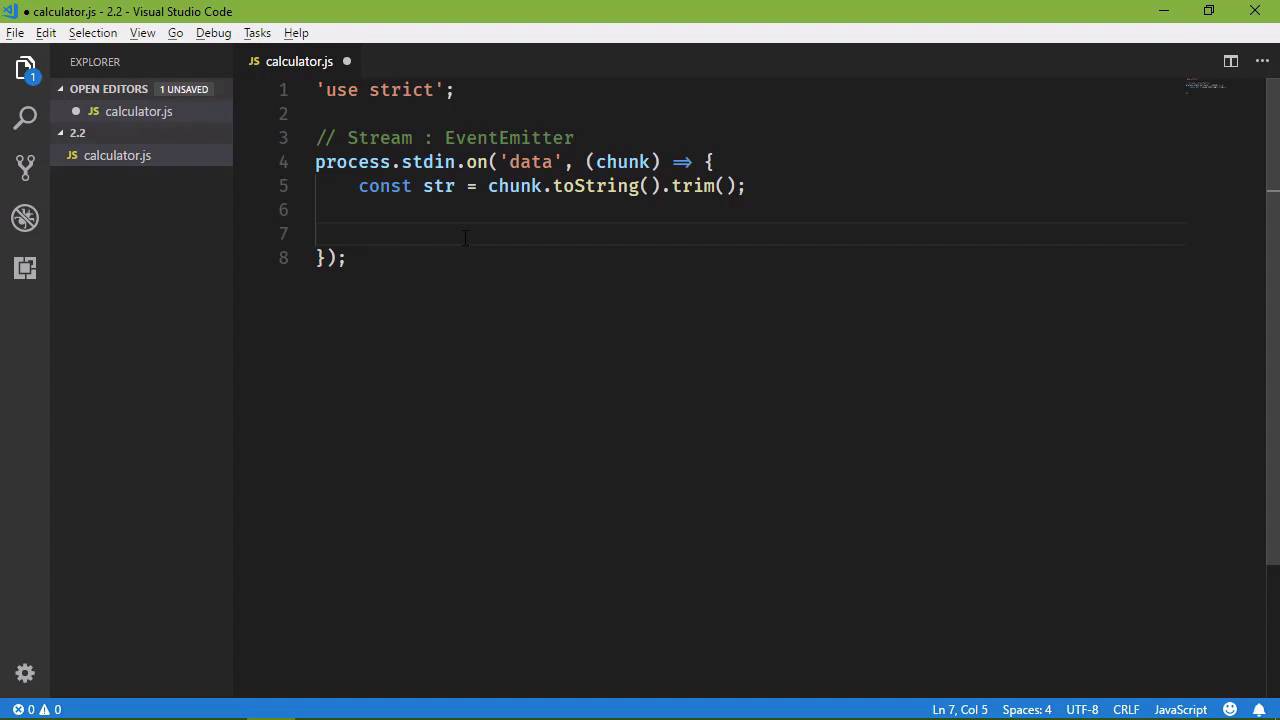
- Overview
- Transcript
2.2 The Asynchronous Pattern
As a Node.js developer, you'll write a ton of callbacks and event handlers. In this lesson, I'll show you some patterns you'll use to write callbacks and event handlers, as well as to capture errors.
1.Introduction
1.1Introduction01:50
1.2Getting Set Up07:33
2.Node.js Concepts
2.1The Event Loop and Async Programming10:29
2.2The Asynchronous Pattern12:06
2.3Using Readable Streams11:18
2.4Writing Is Just as Important09:57
2.5Writing Modules (and Other Stuff)14:57
2.6Writing an HTTP Server16:21
3.Tools for Node.js Developers
3.1The `util` Module11:18
3.2NPM11:23
3.3Creating a package.json File06:54
4.Conclusion
4.1Conclusion01:13
2.2 The Asynchronous Pattern
In the previous lesson we run an application that watches for changes to a file, and then writes a message to the console whenever changes are made. And it demonstrates, well, primarily two things, the first is the event loop and how Node achieves a synchronous execution. The second thing was kind of events, now I say kind of because we used the watch method on the file system object. And we passed in the name of the file that we wanted to watch, and then we passed in a function to execute wherever changes were made. So this function that we wrote is definitely an event handler, there's no doubt about it. However, there are certain patterns that you're going to see when it comes to event handlers. And while there are exceptions, and in this case the watch method is an exception, the two arguments that are passed to the event, and there are the event type and the file name which is useful for watching. But when it comes to just regular, everyday event handlers that's nothing like what you would normally see, so. What I want to do in this lesson is expose you to several different things, the first is going to be just standard event handlers. And this is important because it's a pattern that you're going to see just everywhere, both throughout the Node API as well a third party APIs as well. And the second thing are streams because we are going to use streams a lot in all of our applications, a stream is just a representation of data. So it could be data coming from the user, from the command line, or it could be data coming from an HTTP request, or an HTTP response, or it could be from reading a file on the file system, just any type of input or output can be a stream. So what we are going to do is write an application so that the user can type in an arithmetic operation in the command line, and then we will evaluate that and give them the value. I was not expecting that, we get that functionality by default, I bet that's PowerShell. If you'll indulge me for just a moment, I want to test, yeah, it's just PowerShell, okay, I did not know that, I learned something new. Okay, so let's make our directory this is 2.2, so let's do that, let's fire up code, and we will create our file, I'm just going to call it calculator.js. Let's use strict, and then we need to access what's called the standard input stream, stdin. If you've done any C or C++ programming then you've seen stdio, standard input output, in this case we just want standard in. So we can get the standard input in a variety of different ways. I am going to use what I think is the easiest and that is through an object called process. This is the process Well of our application whenever we run it that is the process that is running. So you can think of process kind of like if you've done any client side development like Window or document or things like that that are just automatically available to us, process is one of those things. It has a property called STDI in standard input, so this is a string, standard input, so let's do this. First if all we have a stream, and stream inherits from event emitter. Now if you remember from the previous as now very briefly mentioned event emitter. Event emitter is what is going to give us a method called ON. So that's, we can listen for a particular event, so, ON, whatever event we want to listen to, we will execute our function. It's the same idea behind special events if you used jQuery before. Now in the case of stdin, what we want to listen for Is an event called data. Whenever the user types something into the command line, that is going to fire the data event. So whenever the data event occurs, we want to get whenever data that they entered into the command line. So, that is going to be passed as an argument to our function. I'm going to call it chunk, because that is, primarily, what is used in the node documentation. Any time that you're working with data like this, especially from the STDI in stream, then it's simply chunk. Now chunk, in this case, is an object, so what we want to do is convert it to a string, but it contains every thing that the user typed in. So it's whatever alpha numeric characters as well as the carriage return. So basically we want to trim all of the pre and post white space, so let's do this, we'll see const str = chunk we'll convert it to a string then we will call the trim method. So that's going to give us just what the user typed, or at least what we want. Now, as we experienced in the previous lesson, our application is going to run, and it's going to run until we tell it to stop. Because it's going to have something to do in this case, it's not just outputting something and then finishing. It's going to be waiting for the data event to occur, before it does anything. So, we could add in a check to see if the user typed in exit, then we want to exit our process and we do that by saying process.exit, and then we can pass in the exit code which in most cases is just going to be 0. If we had some kind of error or if there was some other state that we were exiting in. Then we could specify whatever code that we wanted to signify whatever state that it is, but since this is a clean exit typically that is represented as a 0, so that's what we're going to go with here. So the next thing we need to do, is then evaluate whatever the user types, so let's create another variable, we'll just call it value, and we will eval that user input. Now of course, this is not something that we want to do, I'm doing this strictly for demonstrative purposes, so please do not do this in any production code. So we are going to evaluate what the user typed in, and then we are simply going to log that result to the console. So, we can say result and then we will have in the value. That way, especially in my case, we can make sure that we are seeing the result from Node as opposed to the PowerShell. So that will give us the result, and then that will work, so we could write an initial message that says, I'm listening. Let's use double quotes here, "I'm listening," and that will be fine. So let's go to the command line, let's run our application, that was calculator and it's listening great. So if we say 1 + 1, we see that the result is 2, and if we say 4 + 2 we see the result is 6. Of course, we can do any arithmetic operation that we wanted to do, and we're going to get the result. However, let's type something that's definitely not an arithmetic function, let's just say, hello. And we see, uh-oh, there is an error, so this is one of the things that I wanted to touch upon, handling errors within our application. So what we see here, we typed in something that was not JavaScript, and we attempted to evaluate it, which of course, is going to result in a thrown exception. So whenever an exception or an error is thrown, then our application stops, it's done, it's not going to do anything else. So in that particular case, what we want to do is wrap that with a try, so anything that can throw, we want to try, and then catch any thrown errors there. So we're going to wrap that with a try, if we catch anything, then we can have our own message. We could say that we don't know how to do that, so that sounds good. We are only going to do arithmetic stuff, anything else I don't know how to do that so that's going to be fine. So if we go back and we run this, then if we test our arithmetic that of course works. If we type in something else, I don't know how to do that, we have fixed that particular problem, and so if we type exit then we exit out of the application, so that's great. Now, one of the things I mentioned just a few moments ago was the pattern that's used within our event handlers. So every event, I'm not gonna say every event, but most events are going to pass some data to the event handler, something that's going to be useful for that event. So, in this case, it's the data that was passed or rather the data that was entered into the command line, but this is typically the second thing that is passed to these functions. The first thing is an error object, if there is some error that occurs with whatever object that we're working with. So in this case, the standard input stream, if there is some error with the standard input stream itself, then we are not going to get that error object and then we can do something with that. Now there is a very distinct difference between the error that is passed to our even handler and then, the exception that occurs right here. So if an exception occurs here, this is our code, this has nothing to do with a standard input, this has everything to do with just bad programming practices. But if there is an error with the standard input, which unfortunately I can't think of anything to cause that to fail so that we could see that it would fail. But if something did go wrong with the standard input stream, then that information would be passed as this first argument. So, in most cases you're going to see code that looks like this, if (error), then it's going to handle that error. So in this case we can throw whatever, let's just throw message: err. Or rather, what we could do is, 'there is something wrong with stdin' and then we can have a second property of error. So when you are looking at other people's code, you are going to see this a lot because in most cases an event handler is going to have the error object as the first argument. And then the second argument is going to be whatever data that is needed to work with that event that occurred. So just burn that in your mind, get used to it, because that is going to be very, very common.





